
Graphing with ggplot2


Grayson White

Math 241
Week 2 | Spring 2026

Announcements

  • Office Hours Schedule is now posted on the course website.
    • We will try to stick to this schedule, but if one of us has to reschedule, we will send a Slack message and update the schedule.
  • P-Set 0 due at 9am on WEDNESDAY (all other p-sets will be due on Thursdays).

Week 2 Goals

Mon Lecture

  • Basics of ggplot2

  • Explore several geoms.

  • And a little data wrangling with dplyr as needed!

Wed Lecture

  • GitHub workflow overview
  • Graphing context!
    • Labels
    • Highlighting
    • Useful text
  • Look at more geoms.
  • Explore further customizations.
    • Color
    • Themes
  • Learn how to ask coding questions well.

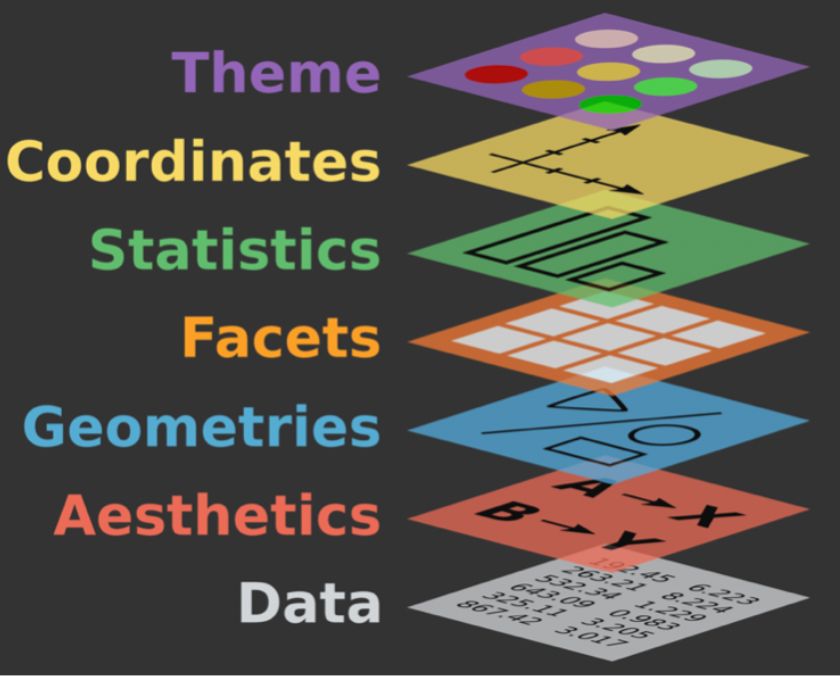
Recall: The Grammar of Graphics

  • data: dataset that contains the data

  • geom: geometric shape that the data are mapped to

    • point, line, bar, text, …
  • aesthetic: visual properties of the geom

    • x position, y position, color, fill, shape
  • coord: coordinate system

    • Cartesian, polar, geographic
  • scale: controls how data are mapped to the visual values of the aesthetic

    • EX: particular colors, linear
  • guide: legend to help user convert visual display back to the data

ggplot2 example code

ggplot(data = ---, mapping = aes(---)) +
  geom_---(---) + 
  coord_---() + 
  scale_---_---() +
  ---

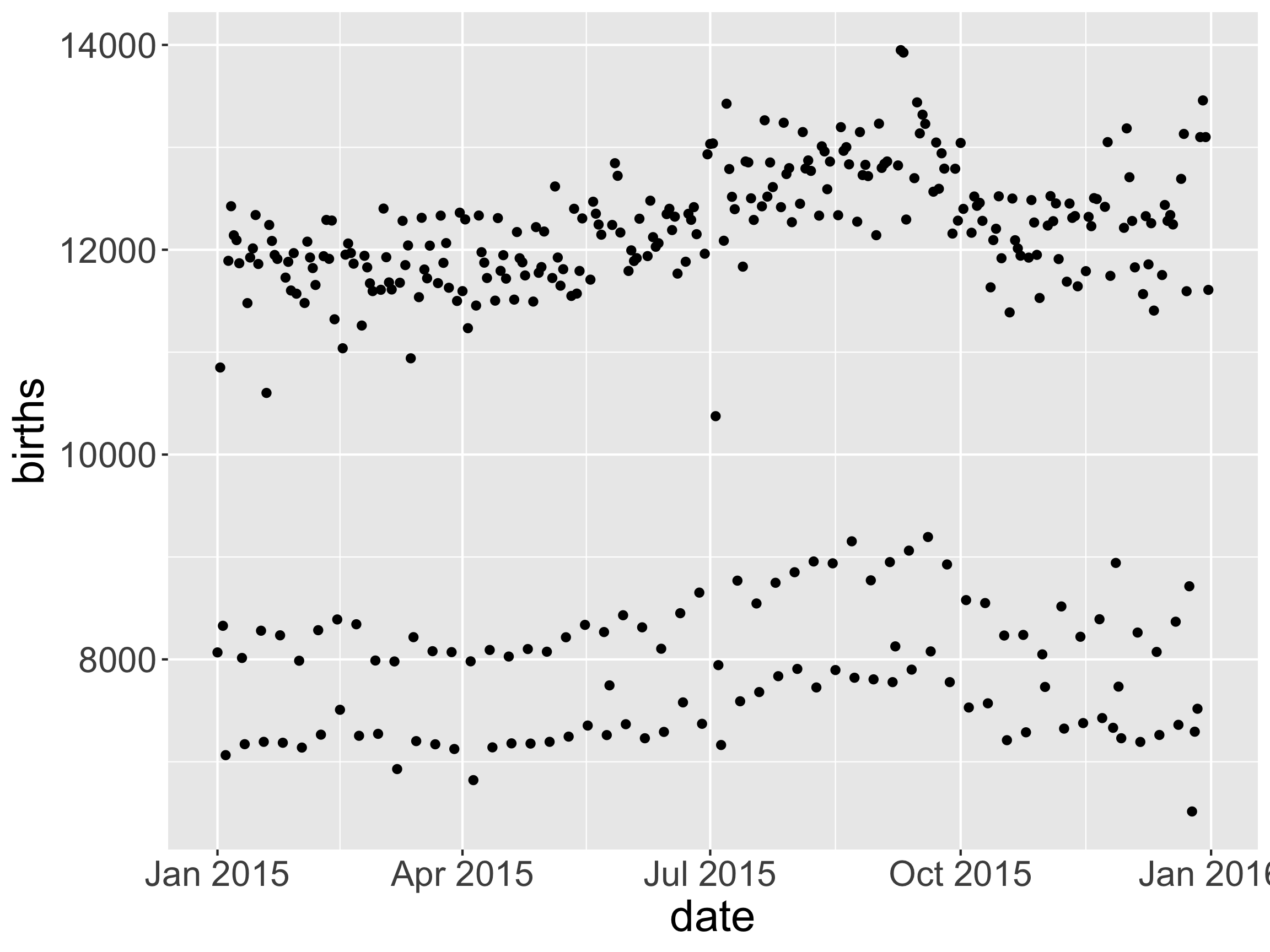
Example: Over the course of a year, how does the daily number of births vary?
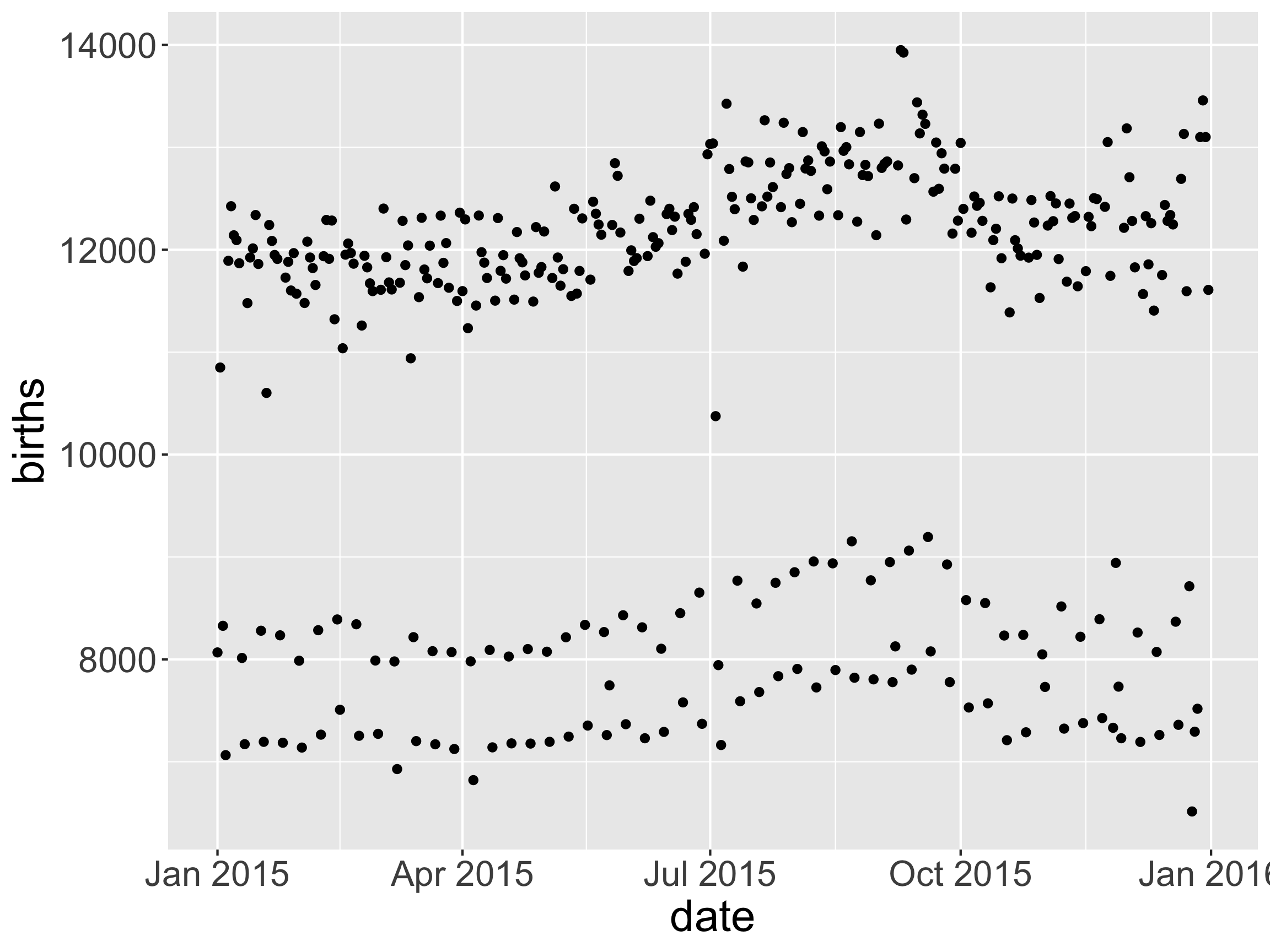
  • What patterns do you see?

Example

# Load library that has dataset of interest
library(mosaicData)

# Grab data
data(Births2015)

# Load tidyverse (which contains ggplot2)
library(tidyverse)

Example

# Example code
ggplot(data = ---, mapping = aes(---)) +
  geom_---(---) + 
  coord_---() + 
  scale_---_---() +
  ---
# Create plot
ggplot(data = Births2015, 
       mapping = aes(x = date, y = births)) + 
  geom_point()

Example

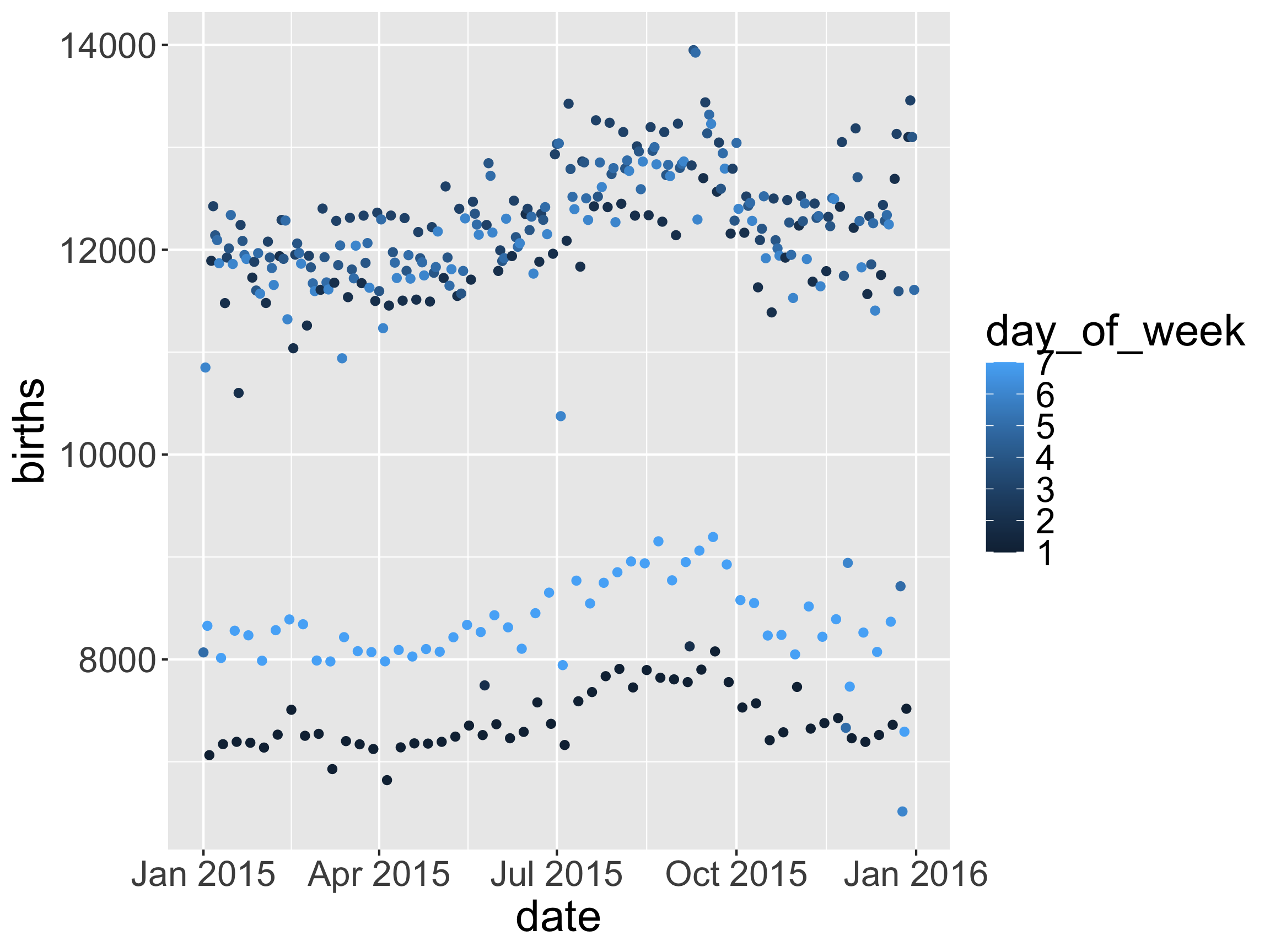
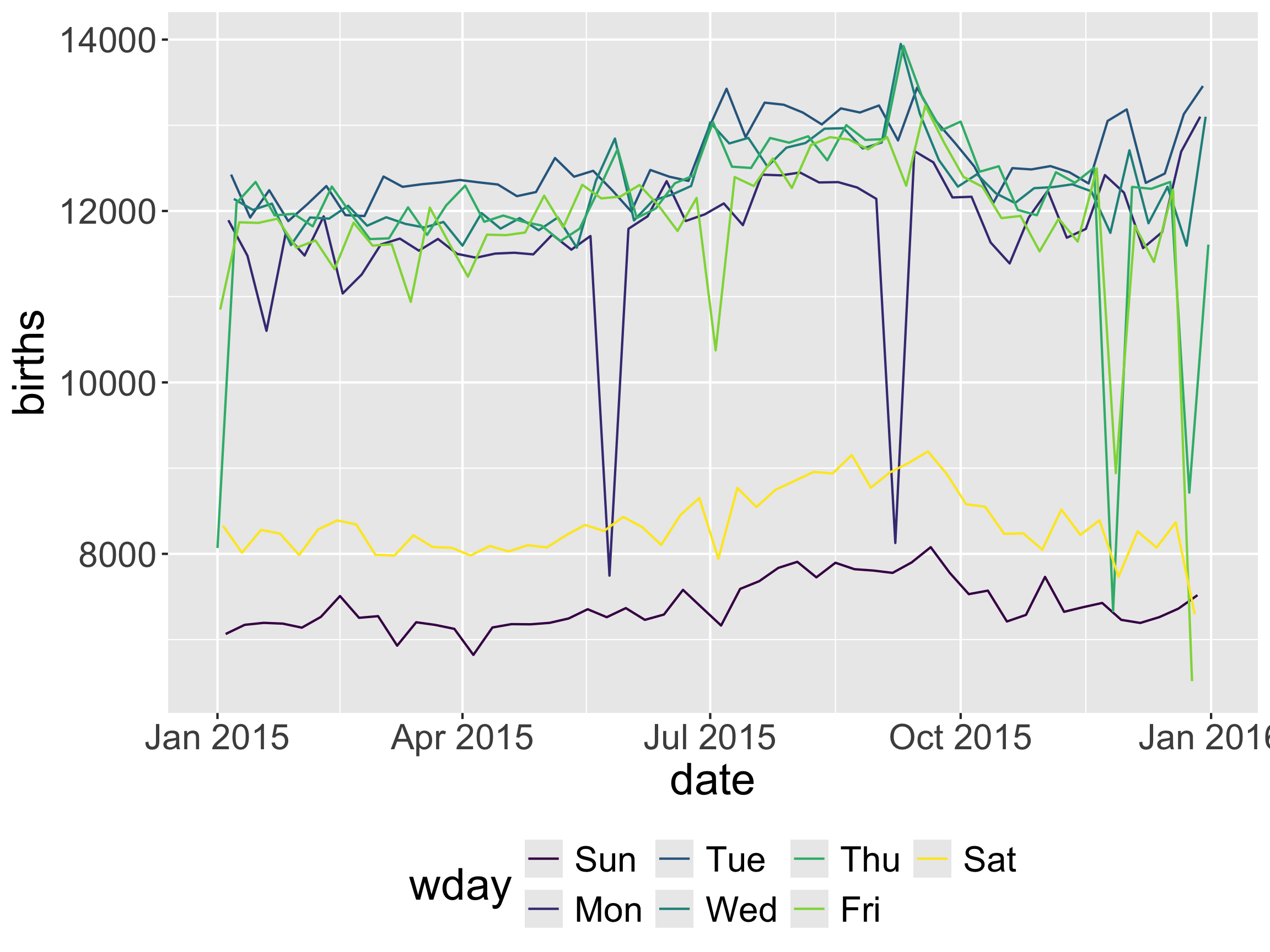
# Create plot
ggplot(data = Births2015, 
       mapping = aes(x = date, y = births, 
                     color = wday)) + 
  geom_line() + 
  theme(legend.position = "bottom")

  • What if we want visual cues for both position and direction?

Example
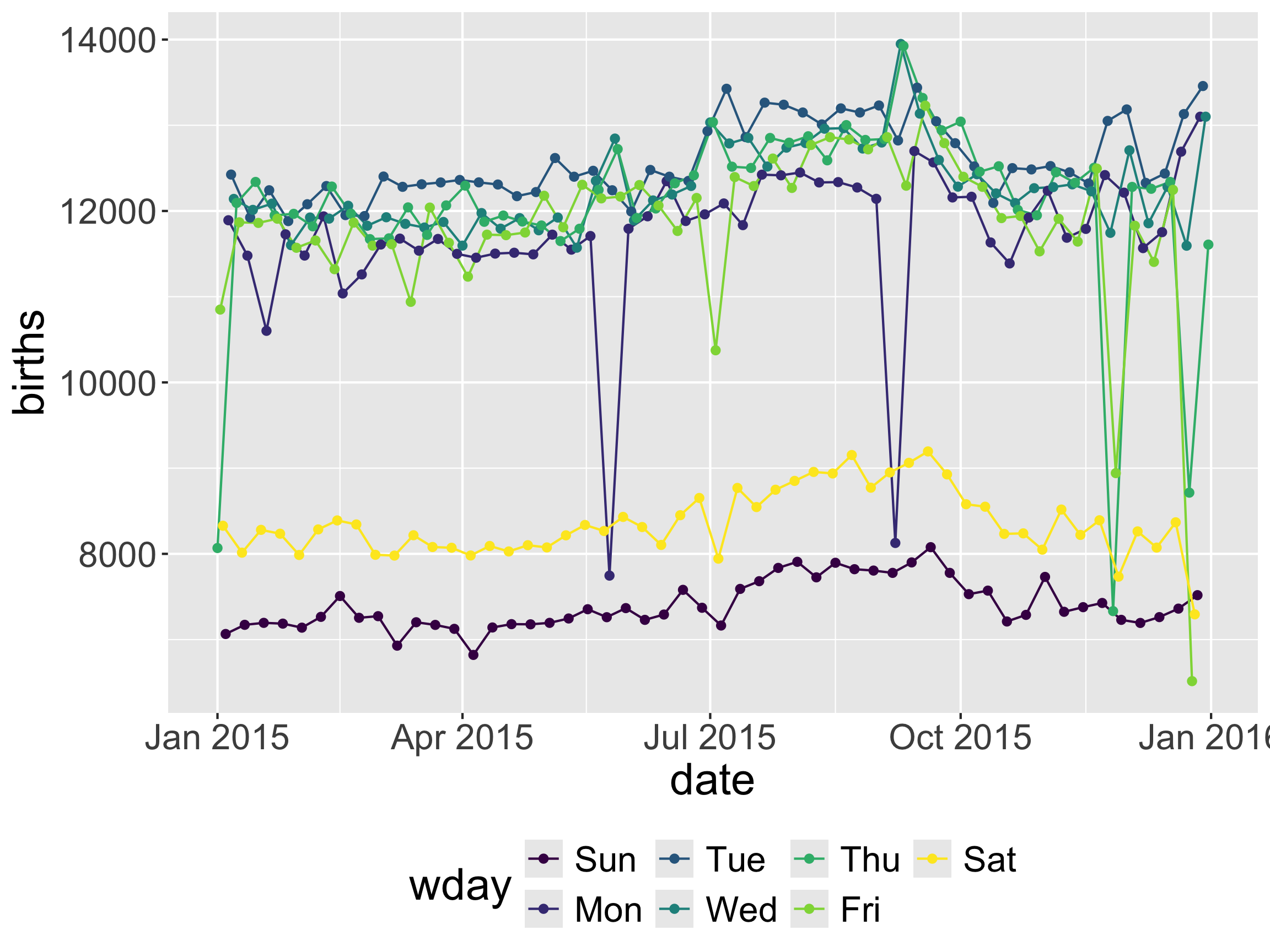
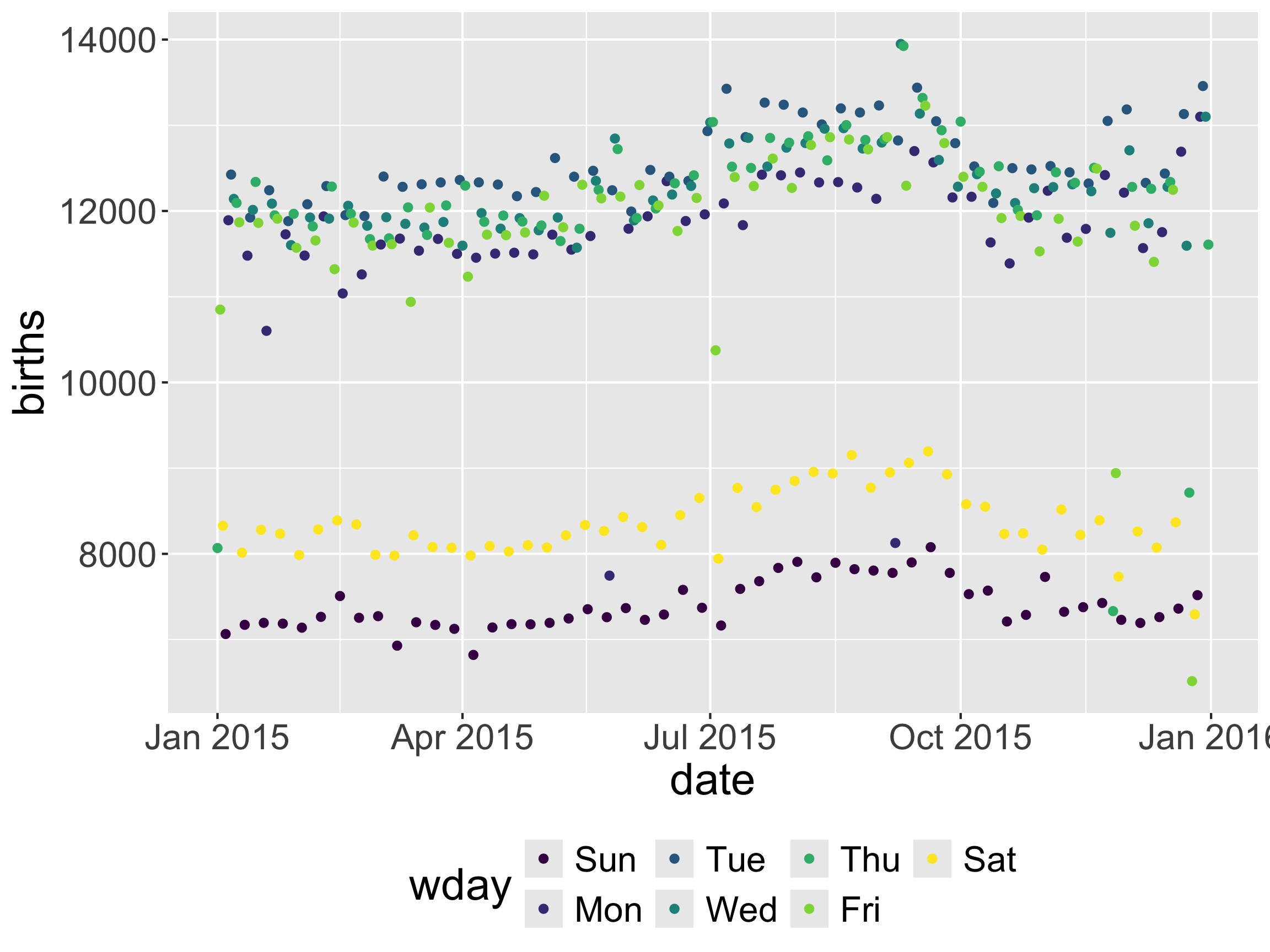
# Create plot
ggplot(data = Births2015, 
       mapping = aes(x = date, y = births, 
                     color = wday)) + 
  geom_line() +
  geom_point() +
  theme(legend.position = "bottom")

Coordinate System Layer

library(lubridate)

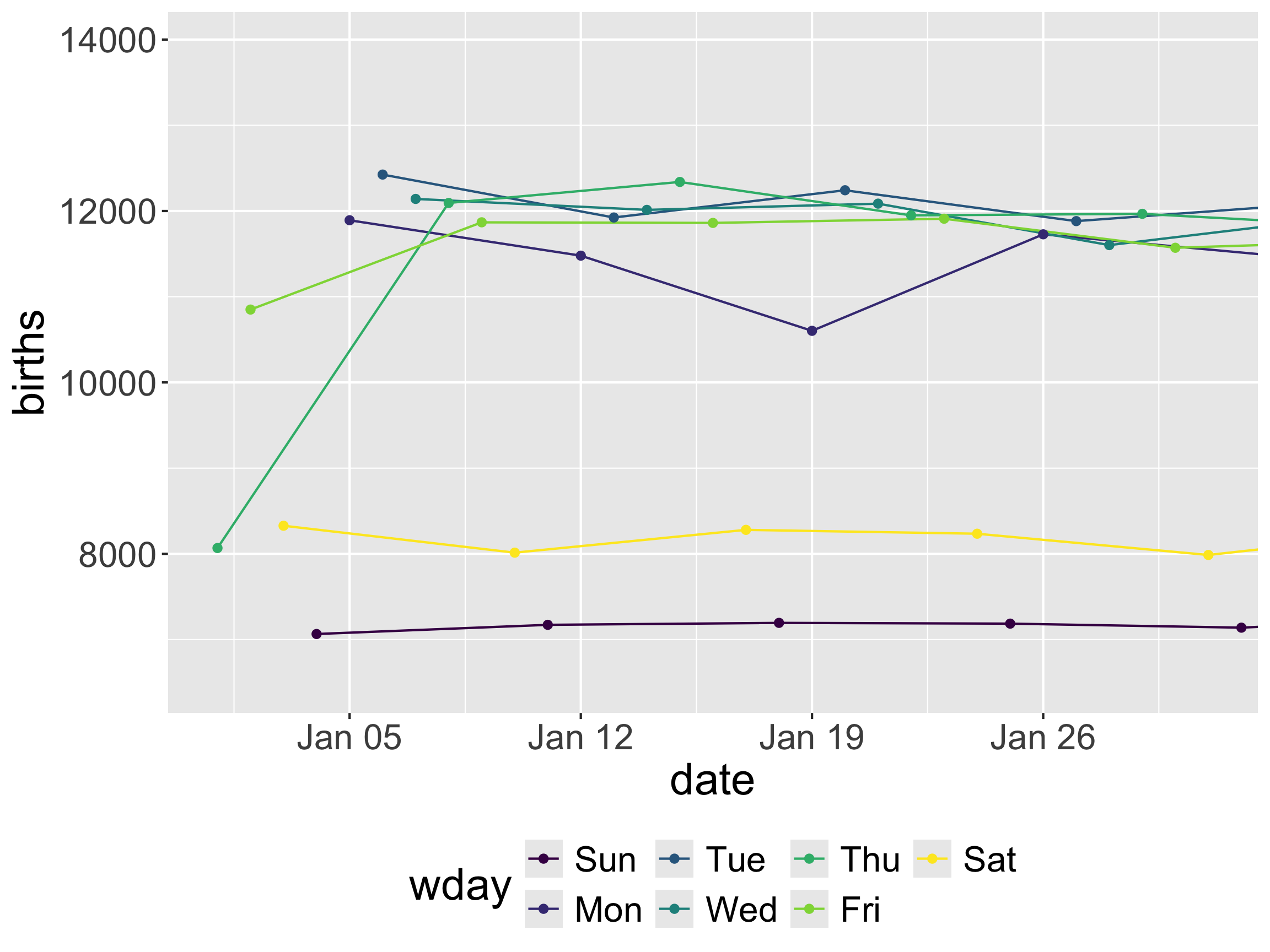
ggplot(data = Births2015, 
       mapping = aes(x = date, y = births, 
                     color = wday)) + 
  geom_line() + 
  geom_point() +
  theme(legend.position = "bottom") +
  coord_cartesian(xlim = 
                    as_date(c("2015-01-01",
                              "2015-01-31")))

  • How did this new layer change our plot?

  • What if we want all the points to be colored “midnightblue”?

Setting instead of Mapping
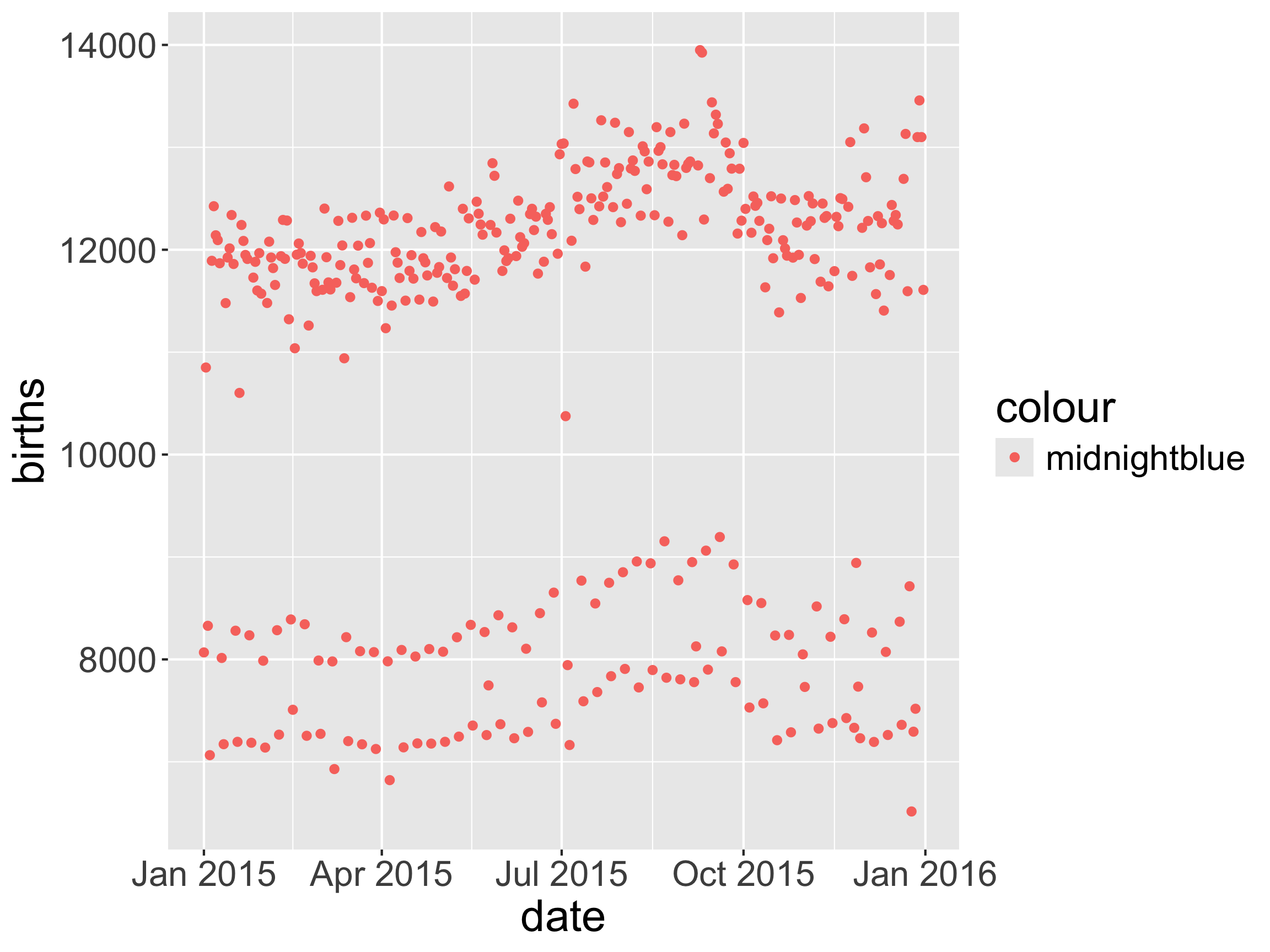
ggplot(data = Births2015, 
       mapping = aes(x = date, y = births, 
                     color = "midnightblue")) + 
  geom_point() 

Setting instead of Mapping

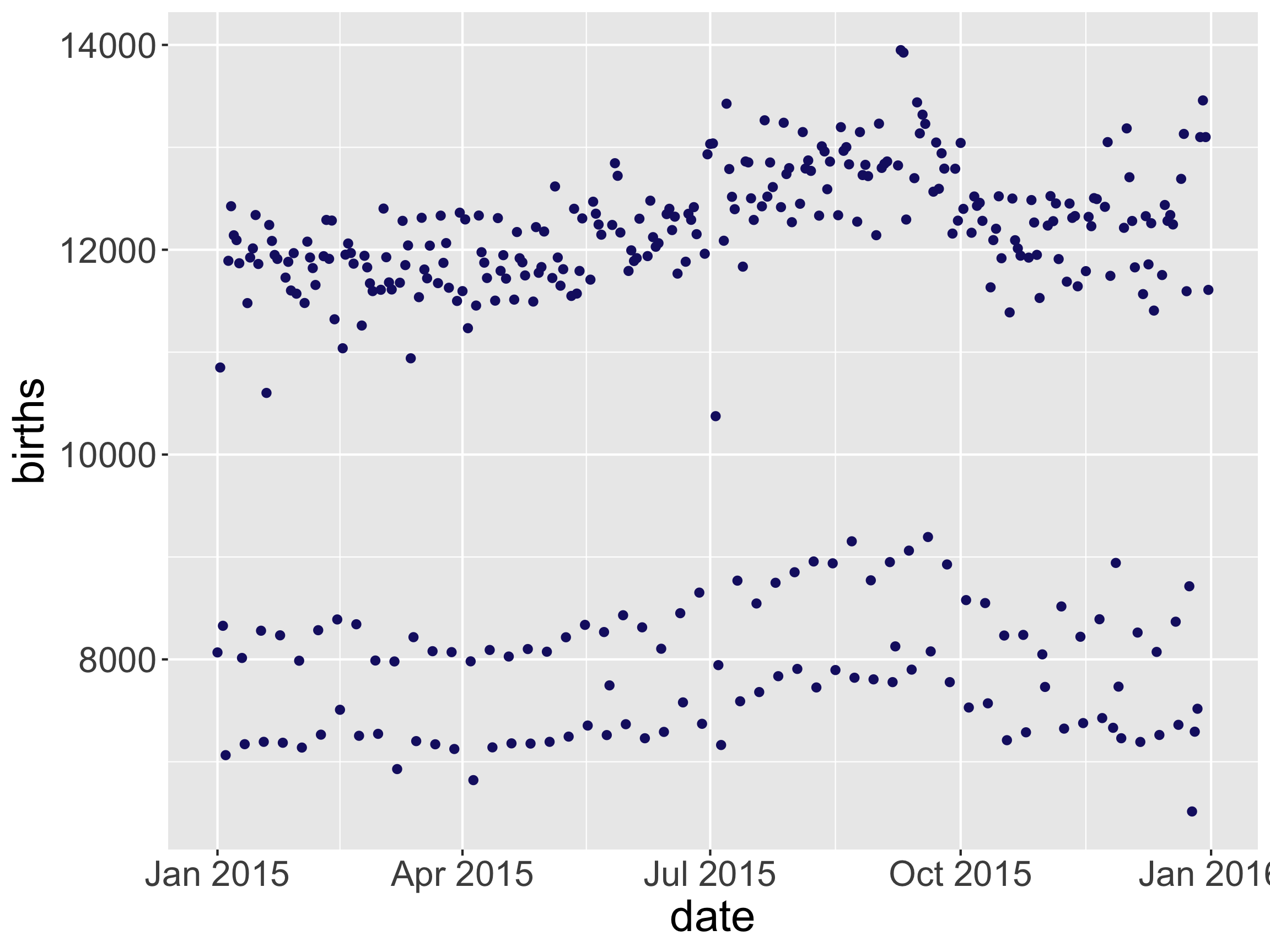
ggplot(data = Births2015, 
       mapping = aes(x = date, y = births)) + 
  geom_point(color = "midnightblue") 

  • If you want to set an aesthetic to a specific value (instead of mapping the aesthetic to a variable), do so in the geom_--() function.

Layer order (sometimes) matters
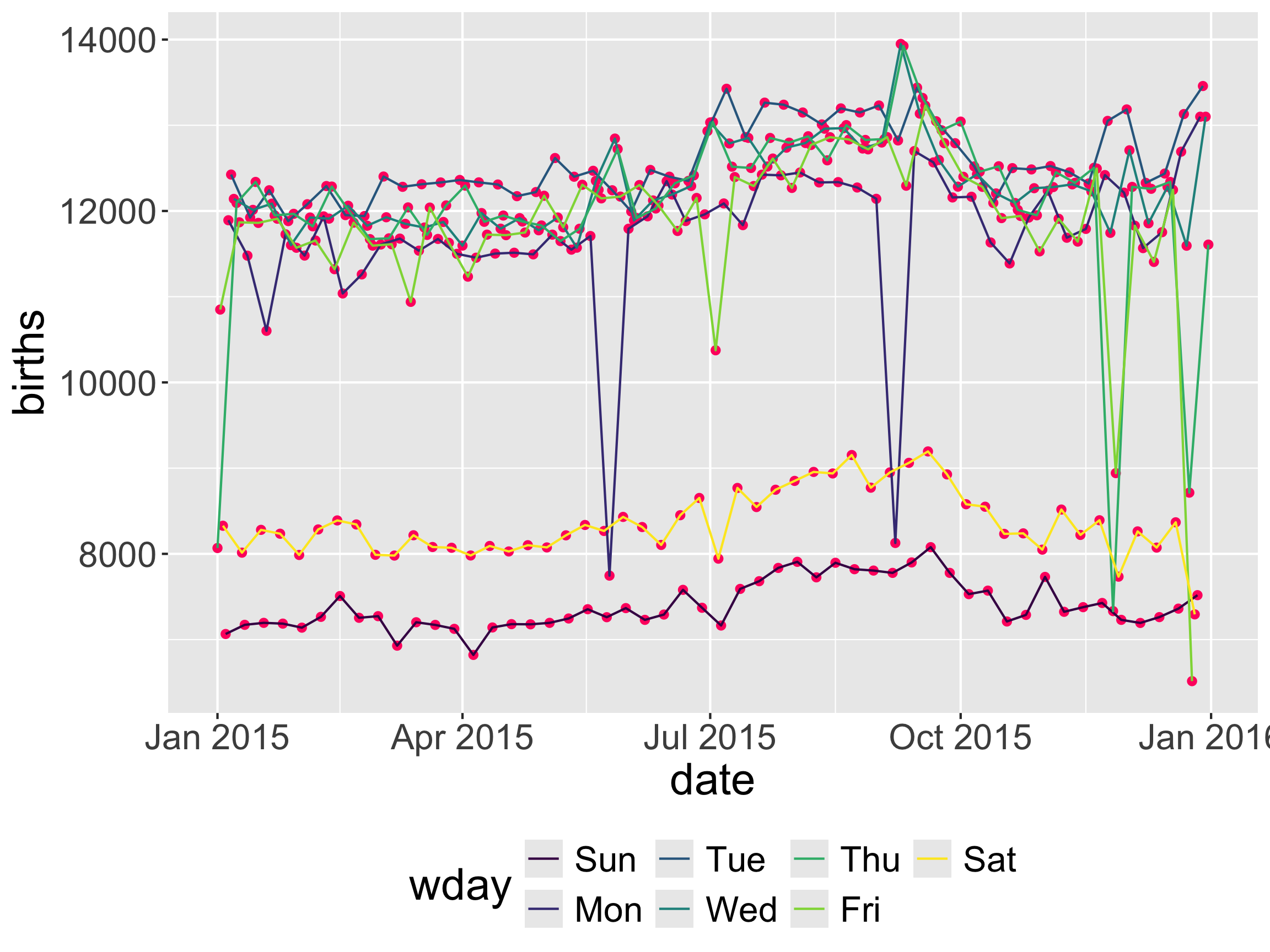
ggplot(data = Births2015, 
       mapping = aes(x = date, y = births,
                     color = wday)) + 
  geom_point(color = "#ff006e") +
  geom_line() + 
  theme(legend.position = "bottom")

Layer order (sometimes) matters

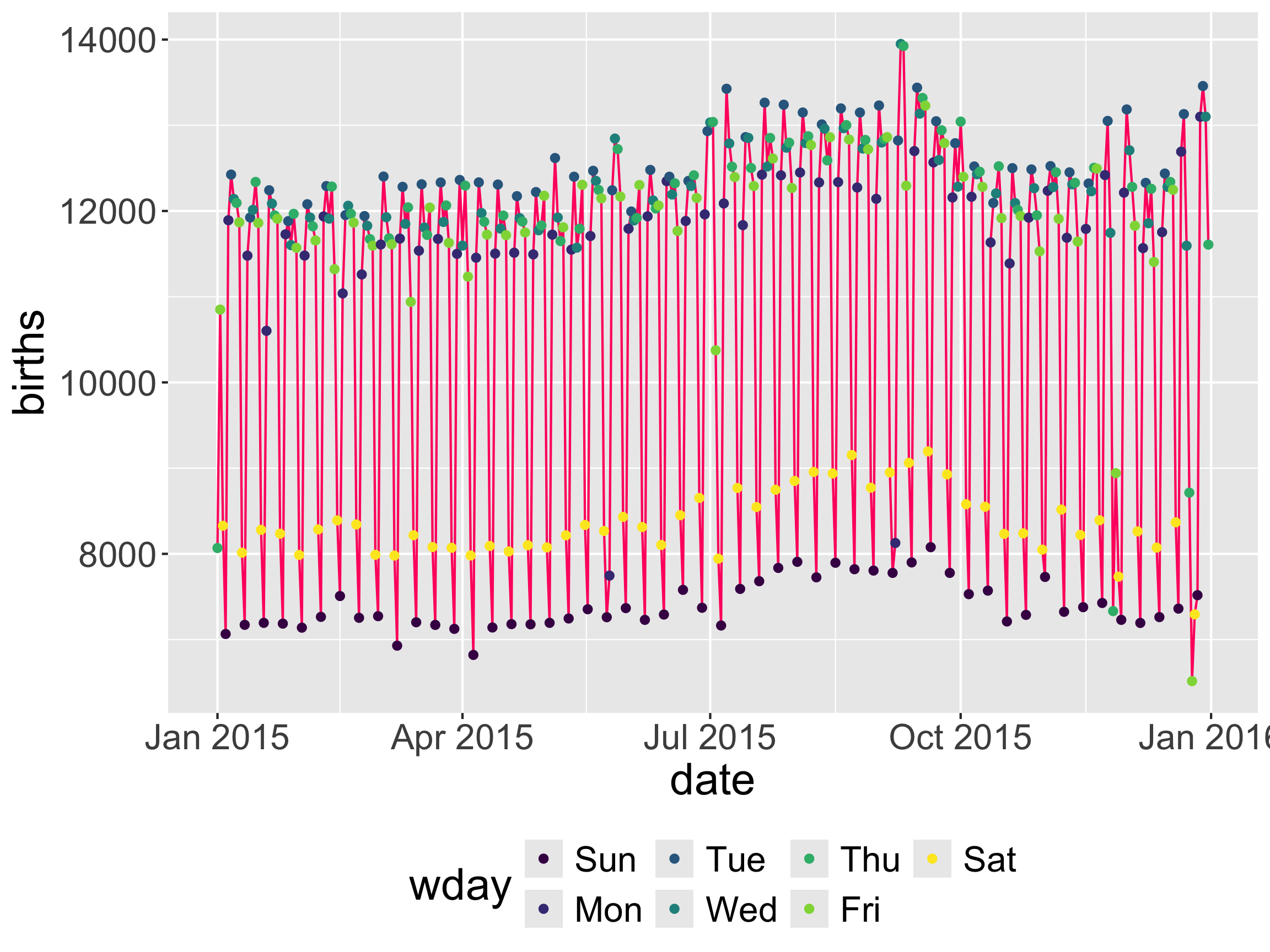
ggplot(data = Births2015, 
       mapping = aes(x = date, y = births,
                     color = wday)) + 
  geom_line(color = "#ff006e") + 
  geom_point() + 
  theme(legend.position = "bottom")

Layer order (sometimes) matters

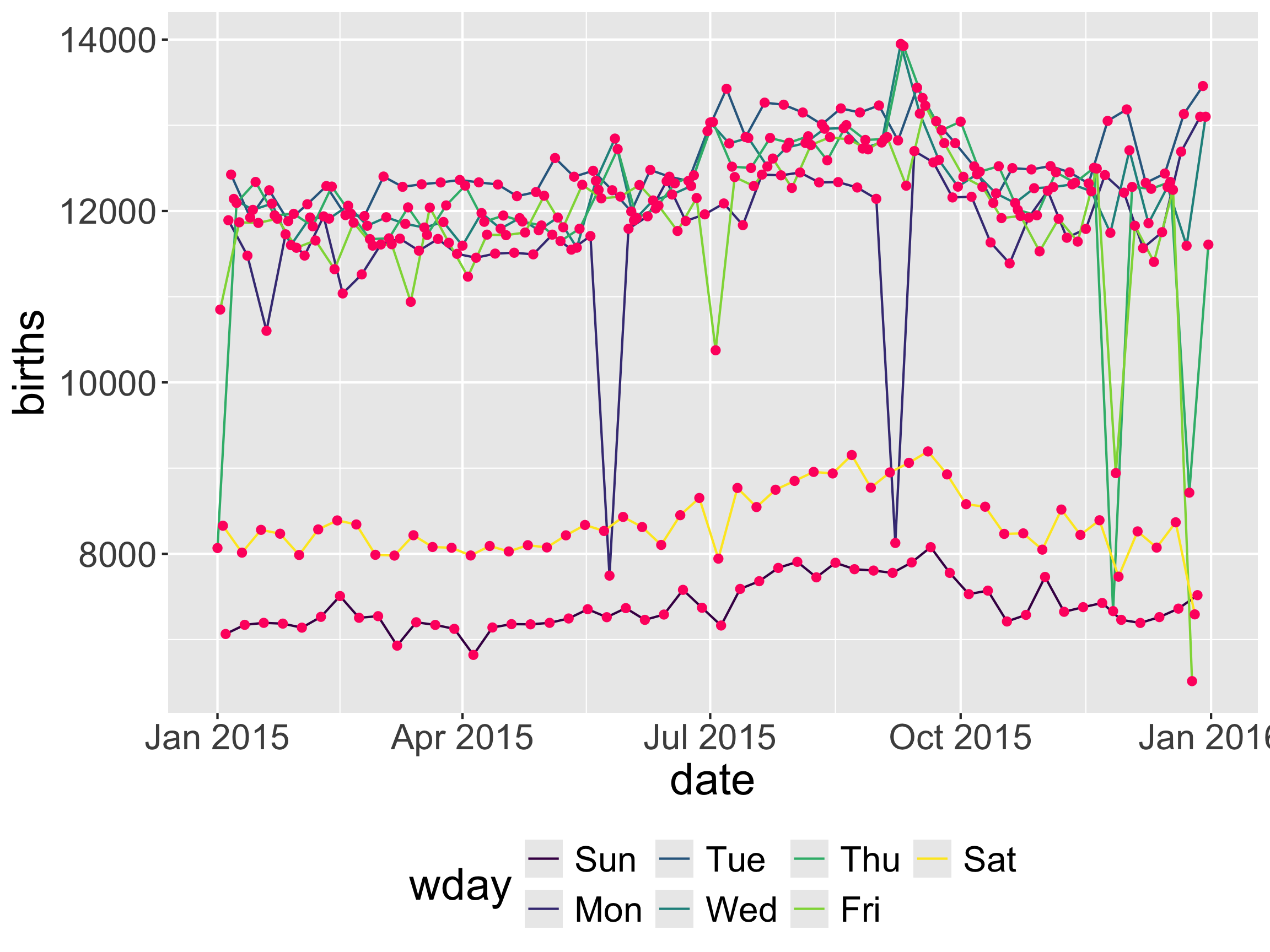
ggplot(data = Births2015, 
       mapping = aes(x = date, y = births,
                     color = wday)) + 
  geom_line() + 
  geom_point(color = "#ff006e") + 
  theme(legend.position = "bottom")

  • Inheriting aesthetics discussion.

Let’s explore other geoms

  • Can also ask R:
apropos("geom_")
 [1] "geom_abline"            "geom_area"              "geom_bar"              
 [4] "geom_bin_2d"            "geom_bin2d"             "geom_blank"            
 [7] "geom_boxplot"           "geom_col"               "geom_contour"          
[10] "geom_contour_filled"    "geom_count"             "geom_crossbar"         
[13] "geom_curve"             "geom_density"           "geom_density_2d"       
[16] "geom_density_2d_filled" "geom_density2d"         "geom_density2d_filled" 
[19] "geom_dotplot"           "geom_errorbar"          "geom_errorbarh"        
[22] "geom_freqpoly"          "geom_function"          "geom_hex"              
[25] "geom_histogram"         "geom_hline"             "geom_jitter"           
[28] "geom_label"             "geom_line"              "geom_linerange"        
[31] "geom_map"               "geom_path"              "geom_point"            
[34] "geom_pointrange"        "geom_polygon"           "geom_qq"               
[37] "geom_qq_line"           "geom_quantile"          "geom_raster"           
[40] "geom_rect"              "geom_ribbon"            "geom_rug"              
[43] "geom_segment"           "geom_sf"                "geom_sf_label"         
[46] "geom_sf_text"           "geom_smooth"            "geom_spoke"            
[49] "geom_step"              "geom_text"              "geom_tile"             
[52] "geom_violin"            "geom_vline"             "get_geom_defaults"     
[55] "reset_geom_defaults"    "update_geom_defaults"  

Adding Curve(s)

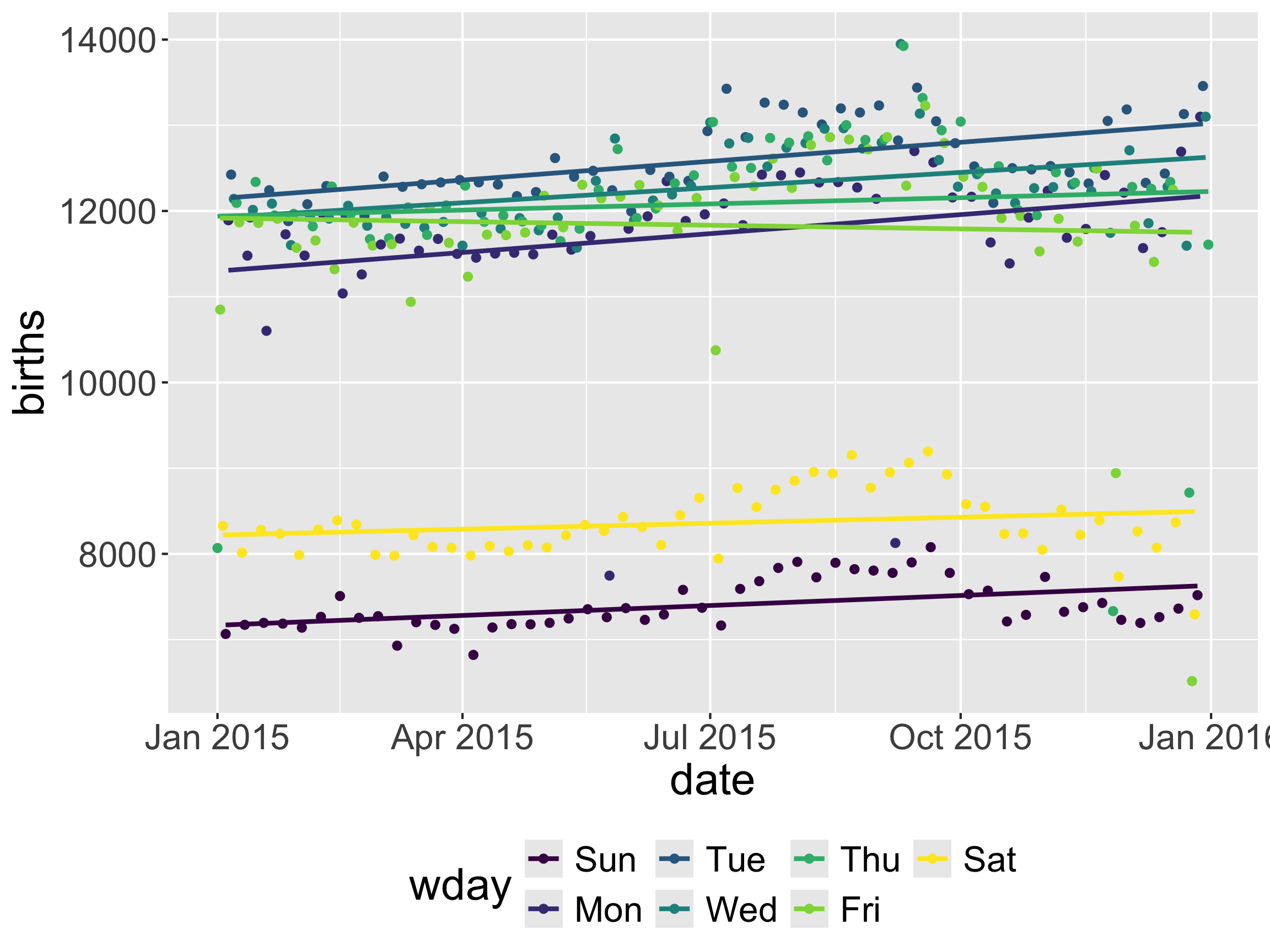
ggplot(data = Births2015, 
       mapping = aes(x = date, y = births,
                     color = wday)) + 
  geom_point() + 
  geom_smooth(method = "lm", se = FALSE) + 
  theme(legend.position = "bottom")

  • Does a multiple linear regression line(s) capture the trend?

Adding Curve(s)
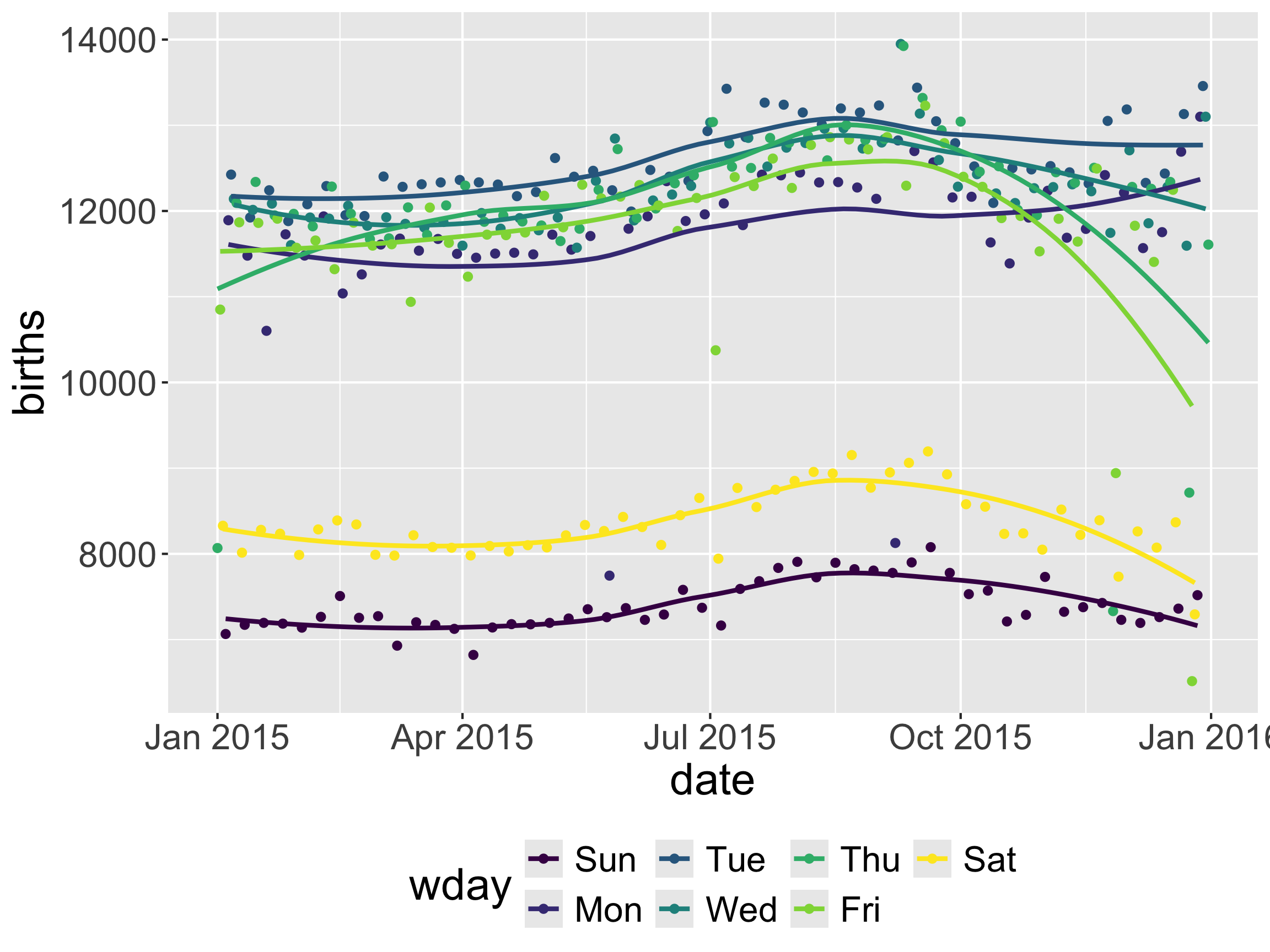
ggplot(data = Births2015, 
       mapping = aes(x = date, y = births,
                     color = wday)) + 
  geom_point() + 
  geom_smooth(se = FALSE) + 
  theme(legend.position = "bottom")

  • The default LOESS smoother usually does a reasonable job.

Adding Curve(s)
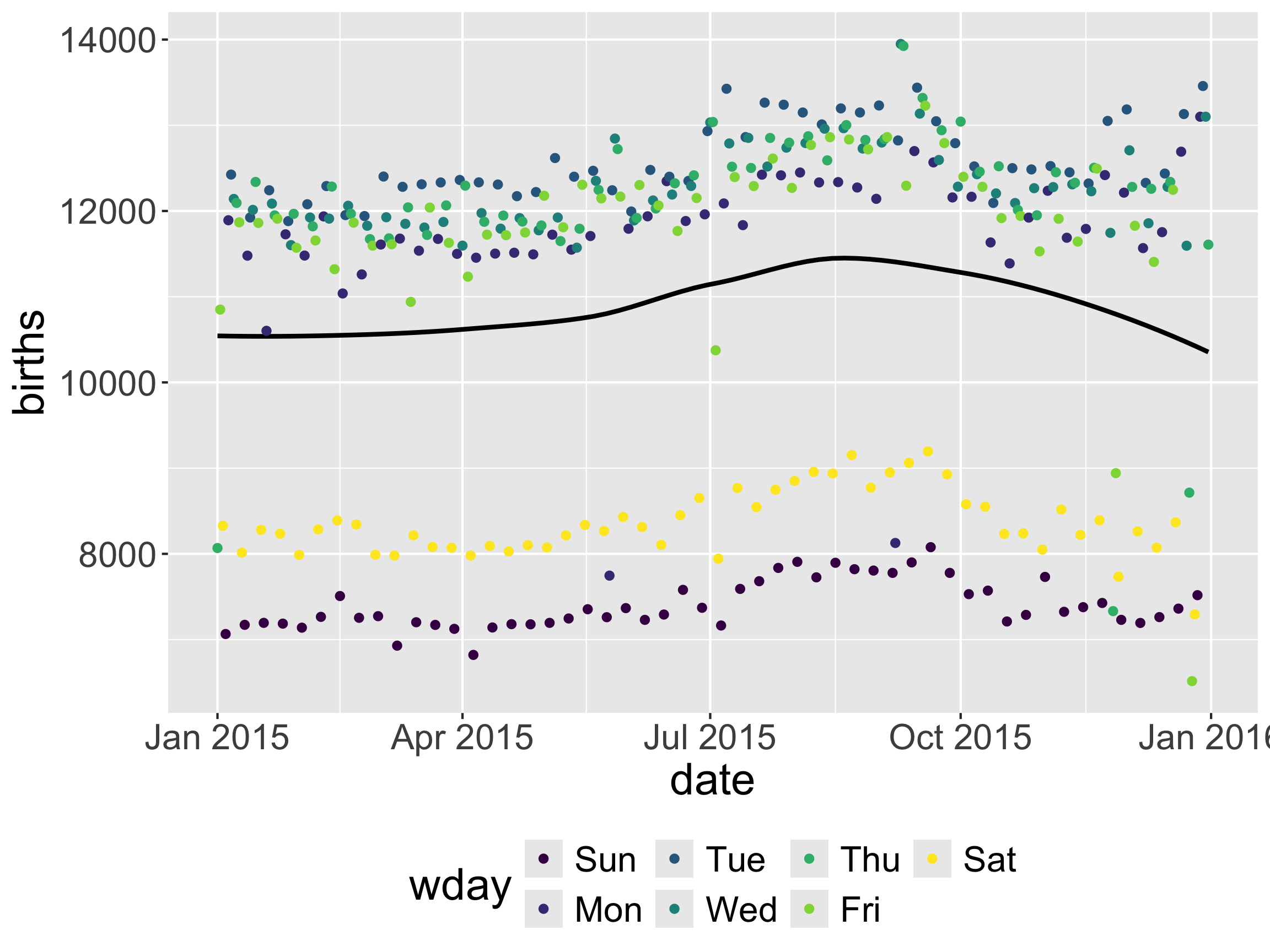
ggplot(data = Births2015, 
       mapping = aes(x = date, y = births,
                     color = wday)) + 
  geom_smooth(color = "black", se = FALSE) +
  geom_point() + 
  theme(legend.position = "bottom")

  • What happened?

  • Inheriting aesthetics discussion.

New Example: Movies and the Bechdel Test

  • Need a new dataset with more categorical variables
  • The Alison Bechdel Test: A movie passes the test if:
    • There are at least two named women in the picture
    • They have a conversation with each other at some point
    • That conversation isn’t about a male character
  • Movies from 1970 - 2013
movies <- readr::read_csv('https://raw.githubusercontent.com/rfordatascience/tidytuesday/master/data/2021/2021-03-09/movies.csv') %>%
  filter(rated %in% c("R", "PG-13", "PG", "G"))

New Example: Movies and the Bechdel Test

glimpse(movies)
Rows: 1,549
Columns: 34
$ year          <dbl> 2013, 2013, 2013, 2013, 2013, 2013, 2013, 2013, 2013, 20…
$ imdb          <chr> "tt2024544", "tt1272878", "tt0453562", "tt1335975", "tt1…
$ title         <chr> "12 Years a Slave", "2 Guns", "42", "47 Ronin", "A Good …
$ test          <chr> "notalk-disagree", "notalk", "men", "men", "notalk", "ok…
$ clean_test    <chr> "notalk", "notalk", "men", "men", "notalk", "ok", "ok", …
$ binary        <chr> "FAIL", "FAIL", "FAIL", "FAIL", "FAIL", "PASS", "PASS", …
$ budget        <dbl> 2.00e+07, 6.10e+07, 4.00e+07, 2.25e+08, 9.20e+07, 1.20e+…
$ domgross      <chr> "53107035", "75612460", "95020213", "38362475", "6734919…
$ intgross      <chr> "158607035", "132493015", "95020213", "145803842", "3042…
$ code          <chr> "2013FAIL", "2013FAIL", "2013FAIL", "2013FAIL", "2013FAI…
$ budget_2013   <dbl> 2.00e+07, 6.10e+07, 4.00e+07, 2.25e+08, 9.20e+07, 1.20e+…
$ domgross_2013 <chr> "53107035", "75612460", "95020213", "38362475", "6734919…
$ intgross_2013 <chr> "158607035", "132493015", "95020213", "145803842", "3042…
$ period_code   <dbl> 1, 1, 1, 1, 1, 1, 1, 1, 1, 1, 1, 1, 1, 1, 1, 1, 1, 1, 1,…
$ decade_code   <dbl> 1, 1, 1, 1, 1, 1, 1, 1, 1, 1, 1, 1, 1, 1, 1, 1, 1, 1, 1,…
$ imdb_id       <chr> "2024544", "1272878", "0453562", "1335975", "1606378", "…
$ plot          <chr> "In the antebellum United States, Solomon Northup, a fre…
$ rated         <chr> "R", "R", "PG-13", "PG-13", "R", "R", "PG-13", "PG-13", …
$ response      <lgl> TRUE, TRUE, TRUE, TRUE, TRUE, TRUE, TRUE, TRUE, TRUE, TR…
$ language      <chr> "English", "English, Spanish", "English", "English, Japa…
$ country       <chr> "USA, UK", "USA", "USA", "USA", "USA", "UK", "USA", "USA…
$ writer        <chr> "John Ridley (screenplay), Solomon Northup (based on \"T…
$ metascore     <dbl> 97, 55, 62, 29, 28, 55, 48, 33, 90, 58, 52, 78, 83, 53, …
$ imdb_rating   <dbl> 8.3, 6.8, 7.6, 6.6, 5.4, 7.8, 5.7, 5.0, 7.5, 7.4, 6.2, 7…
$ director      <chr> "Steve McQueen", "Baltasar Kormákur", "Brian Helgeland",…
$ released      <chr> "08 Nov 2013", "02 Aug 2013", "12 Apr 2013", "25 Dec 201…
$ actors        <chr> "Chiwetel Ejiofor, Dwight Henry, Dickie Gravois, Bryan B…
$ genre         <chr> "Biography, Drama, History", "Action, Comedy, Crime", "B…
$ awards        <chr> "Won 3 Oscars. Another 131 wins & 137 nominations.", "1 …
$ runtime       <chr> "134 min", "109 min", "128 min", "118 min", "98 min", "1…
$ type          <chr> "movie", "movie", "movie", "movie", "movie", "movie", "m…
$ poster        <chr> "http://ia.media-imdb.com/images/M/MV5BMjExMTEzODkyN15BM…
$ imdb_votes    <dbl> 143446, 87301, 43608, 25735, 123837, 85871, 18973, 10826…
$ error         <lgl> NA, NA, NA, NA, NA, NA, NA, NA, NA, NA, NA, NA, NA, NA, …

What are useful geoms for describing amounts/frequencies?

Amounts: geom_bar

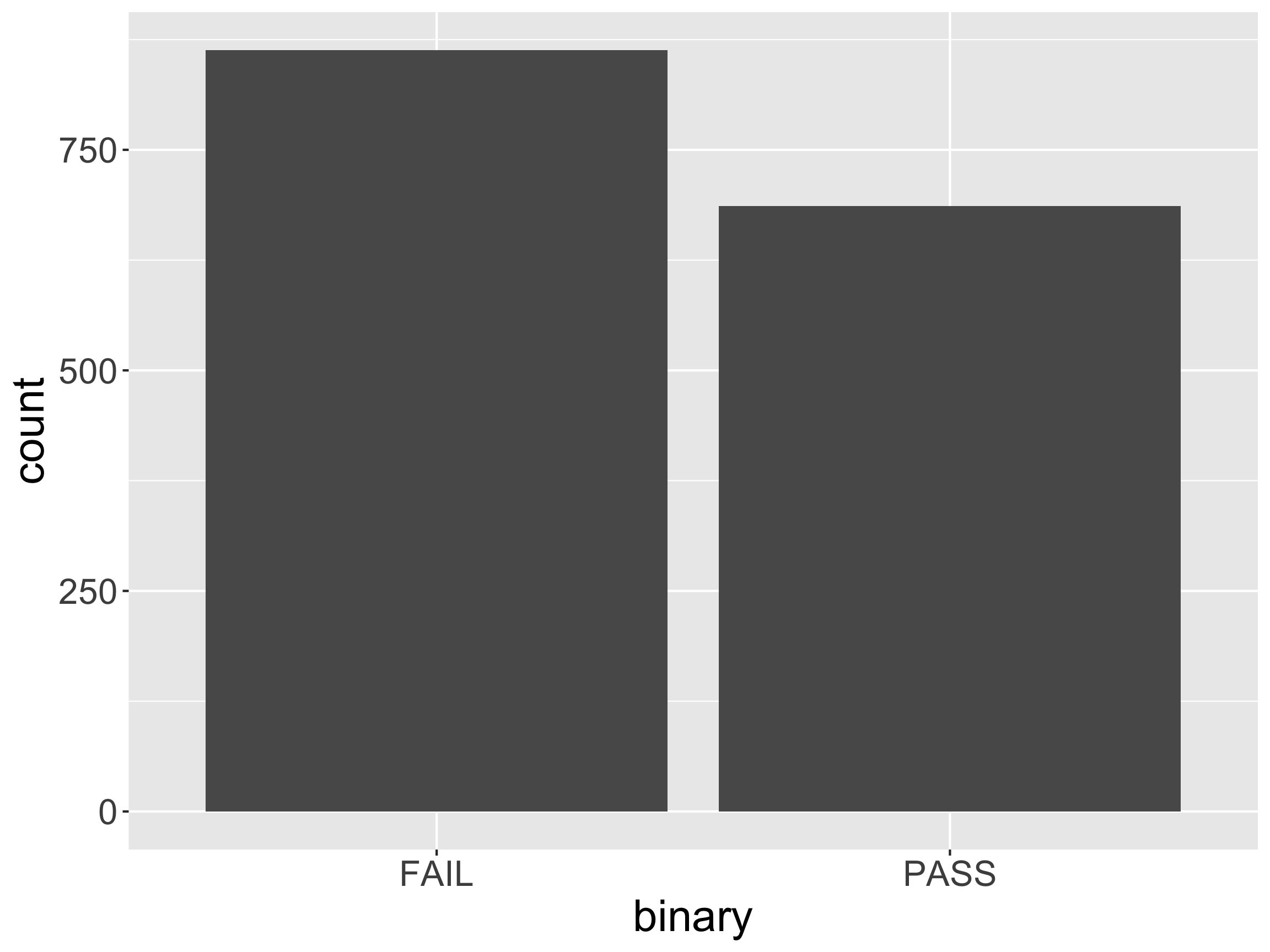
ggplot(data = movies,
       mapping = aes(x = binary)) + 
  geom_bar()

  • Verbalize the mapping of data to geom_bar().
    • How is this mapping different from geom_point()?

Another option: geom_col
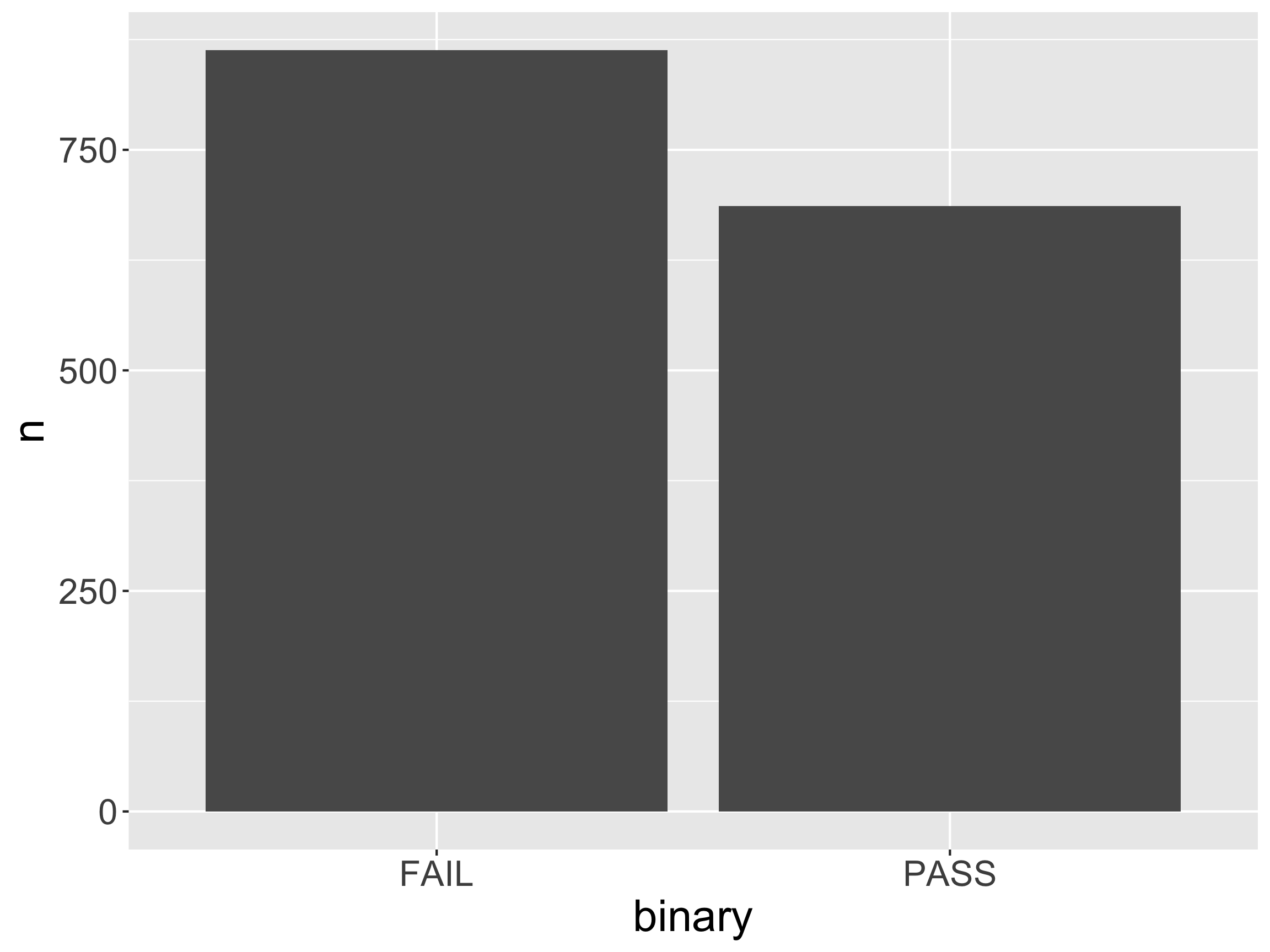
# First wrangle with dplyr
movies_ag <- count(movies, binary) 
movies_ag
# A tibble: 2 × 2
  binary     n
  <chr>  <int>
1 FAIL     863
2 PASS     686
ggplot(data = movies_ag, 
       mapping = aes(x = binary, y = n)) + 
  geom_col()

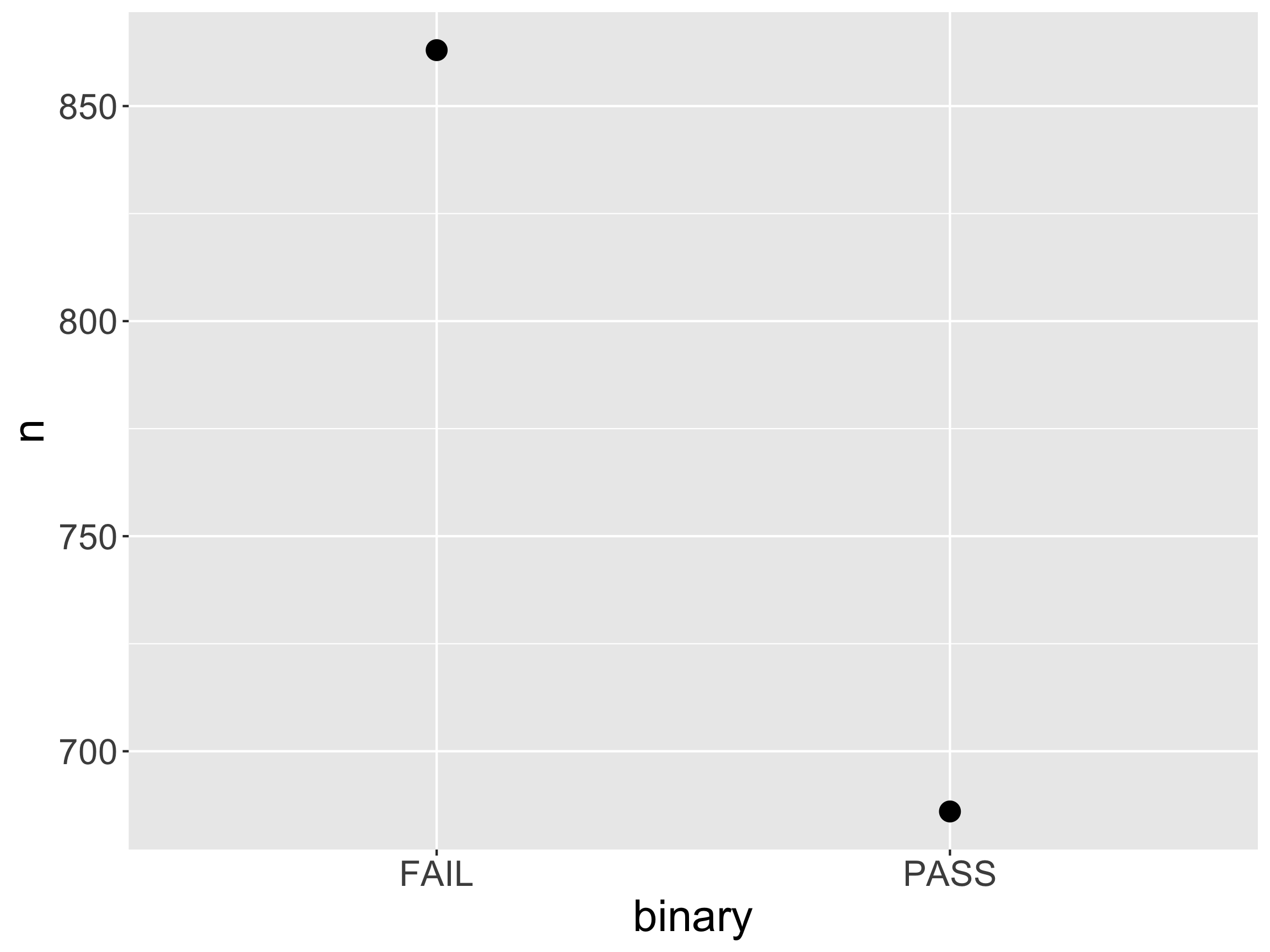
geom_point again

ggplot(data = movies_ag, 
       mapping = aes(x = binary, y = n)) + 
  geom_point(size = 4)

  • If you are worried about the data-ink ratio…

geom_point + geom_segment
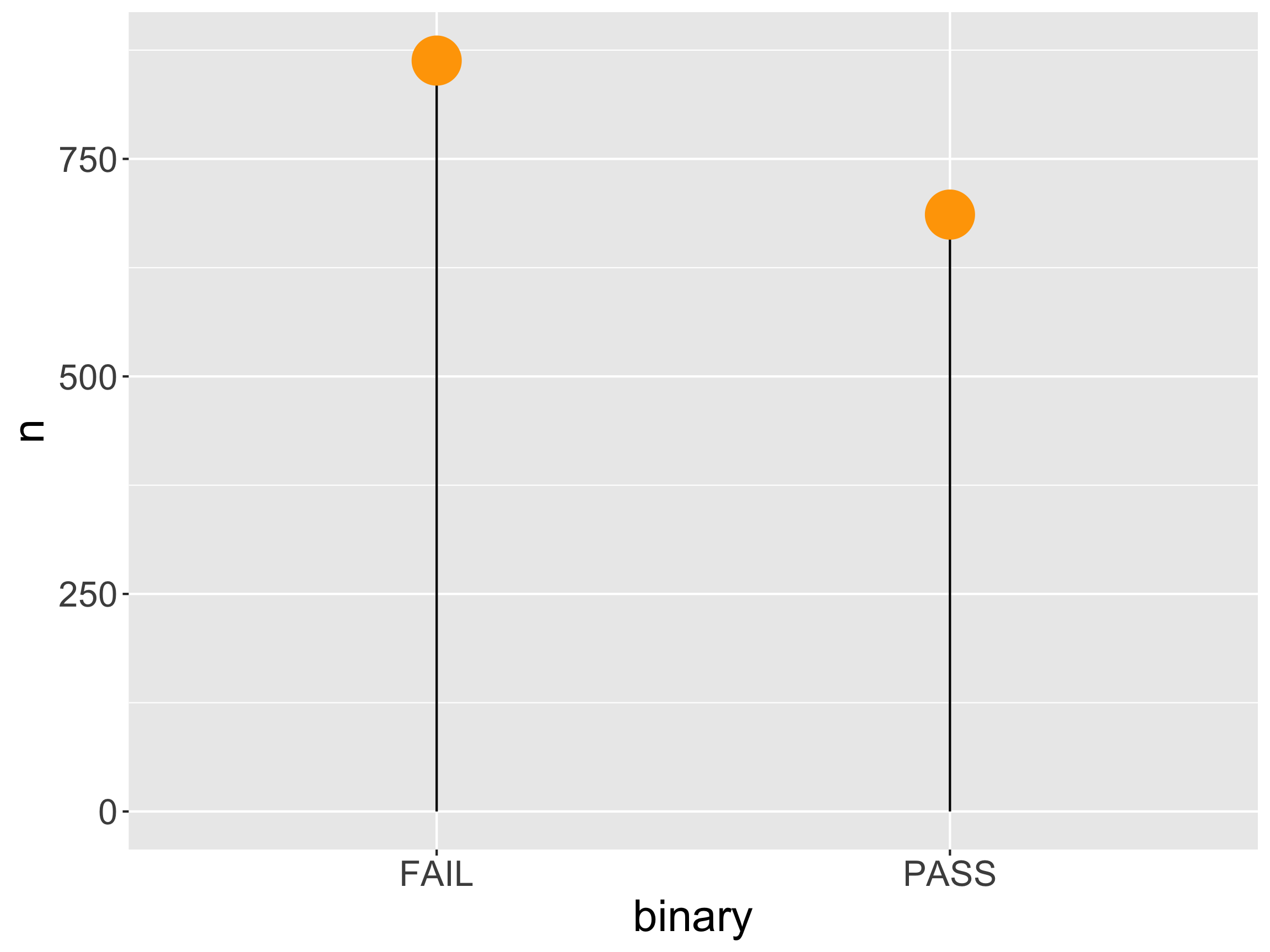
ggplot(data = movies_ag, 
       mapping = aes(x = binary, y = n)) + 
  geom_segment(mapping = aes(xend = binary), 
               yend = 0) + 
  geom_point(size = 10, color = "orange") +
  ylim(c(0, 875))

  • Lollipop chart: compromise?

Two categorical variables: geom_bar
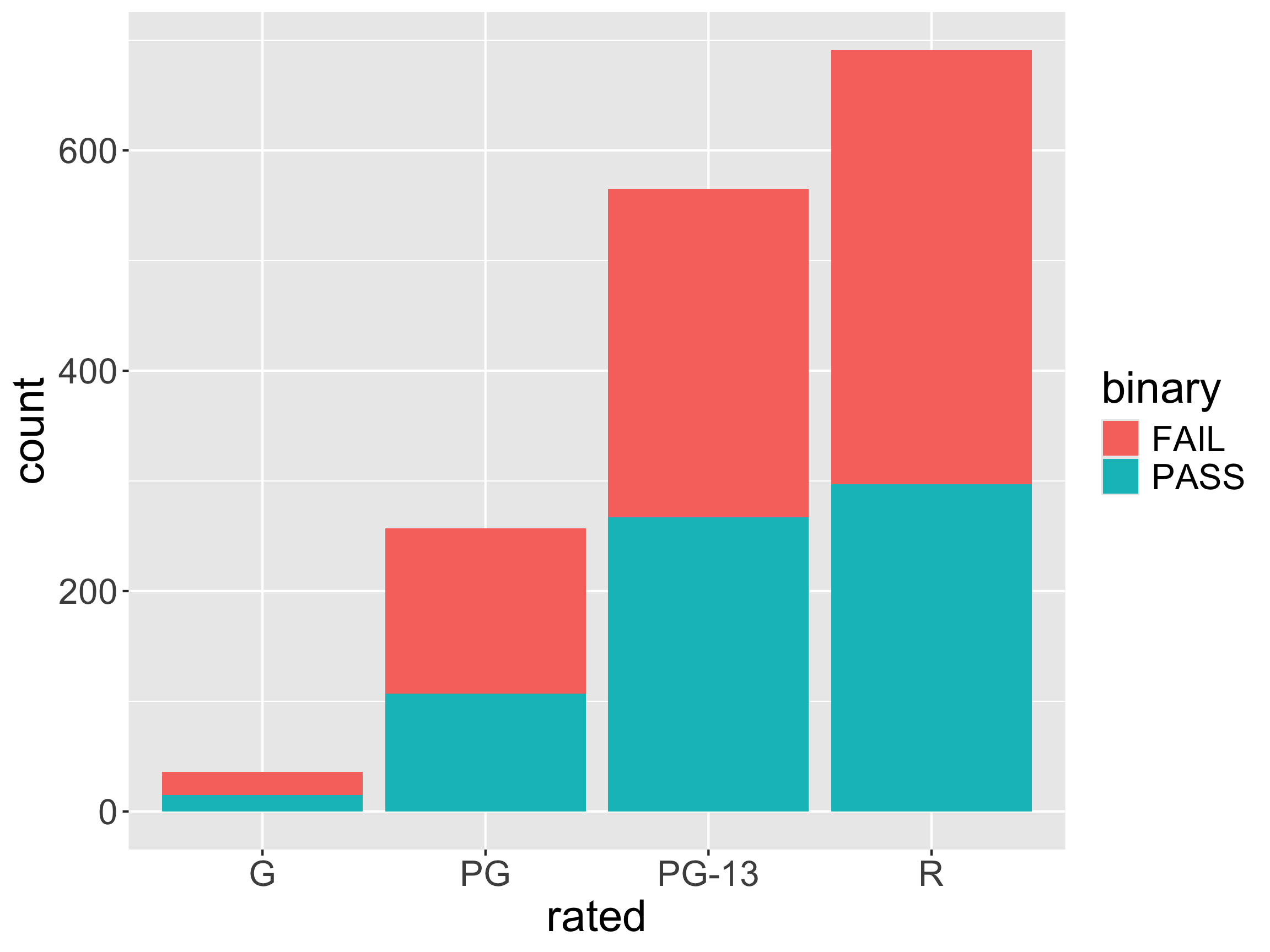
ggplot(data = movies,
       mapping = aes(x = rated,
                     fill = binary)) + 
  geom_bar()

  • Describe the mapping.

Two categorical variables: geom_bar
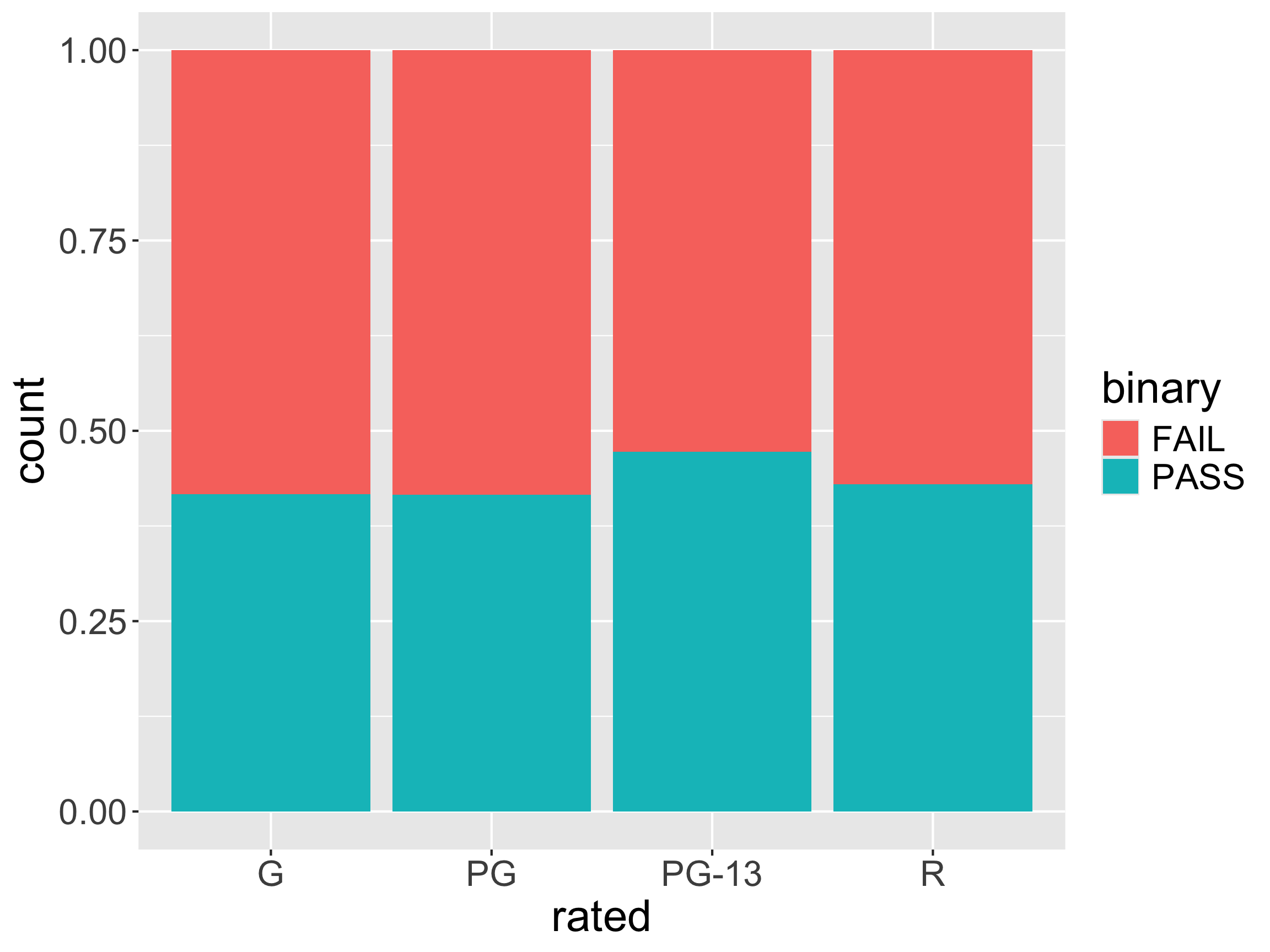
ggplot(data = movies,
       mapping = aes(x = rated,
                     fill = binary)) + 
  geom_bar(position = "fill")

  • Describe the mapping.

Two categorical variables: geom_bar
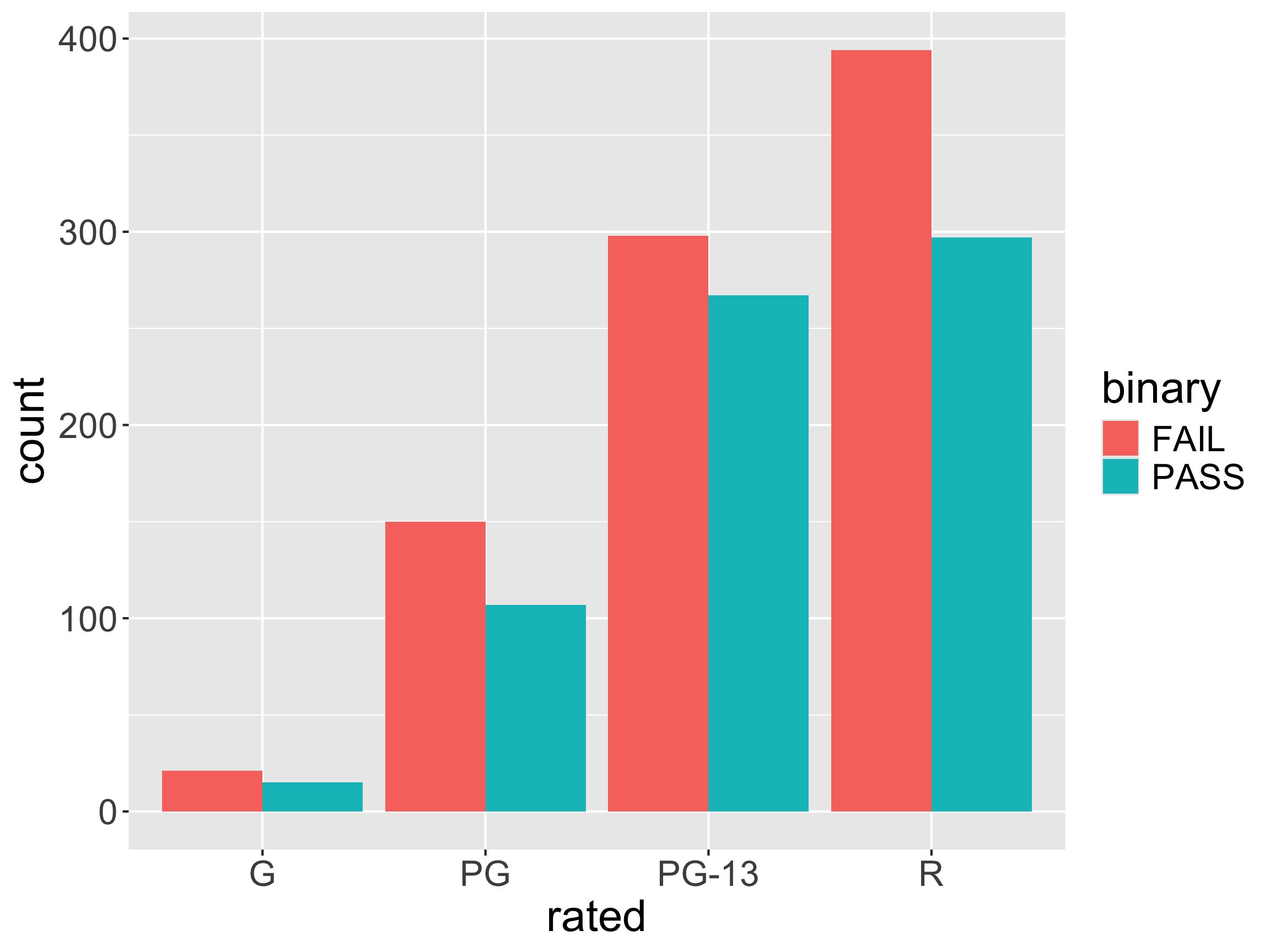
ggplot(data = movies,
       mapping = aes(x = rated,
                     fill = binary)) + 
  geom_bar(position = "dodge")

  • Describe the mapping.

Two categorical variables: geom_tile
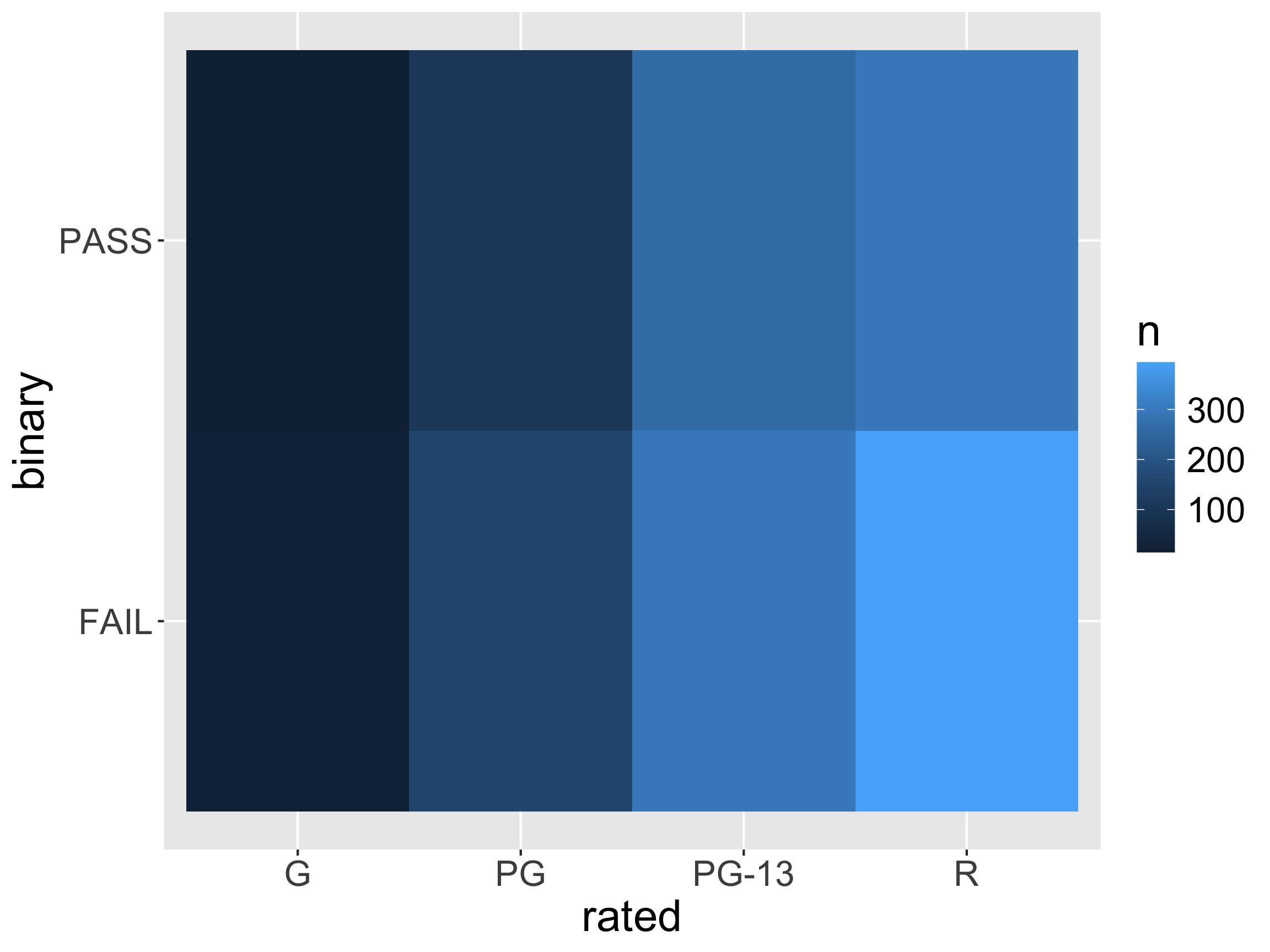
movies_ag <- count(movies, rated, binary)

ggplot(data = movies_ag,
       mapping = aes(x = rated,
                     y = binary,
                     fill = n)) + 
  geom_tile()

  • Describe the mapping.

Two categorical variables: geom_tile
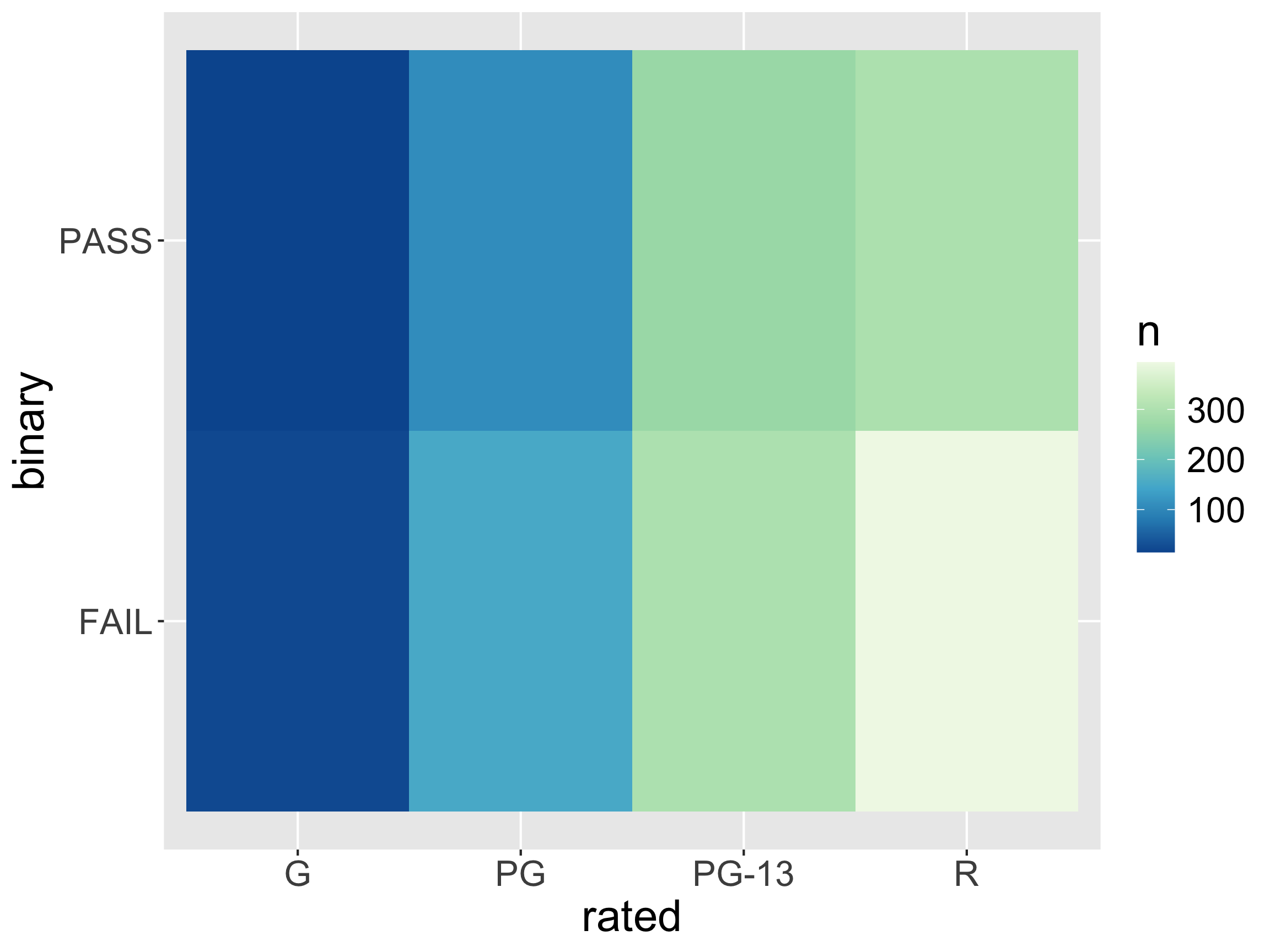
movies_ag <- count(movies, rated, binary)

ggplot(data = movies_ag,
       mapping = aes(x = rated,
                     y = binary,
                     fill = n)) + 
  geom_tile() +
  scale_fill_distiller(palette = 4)

  • Change the fill scale!

Can display more than frequencies!
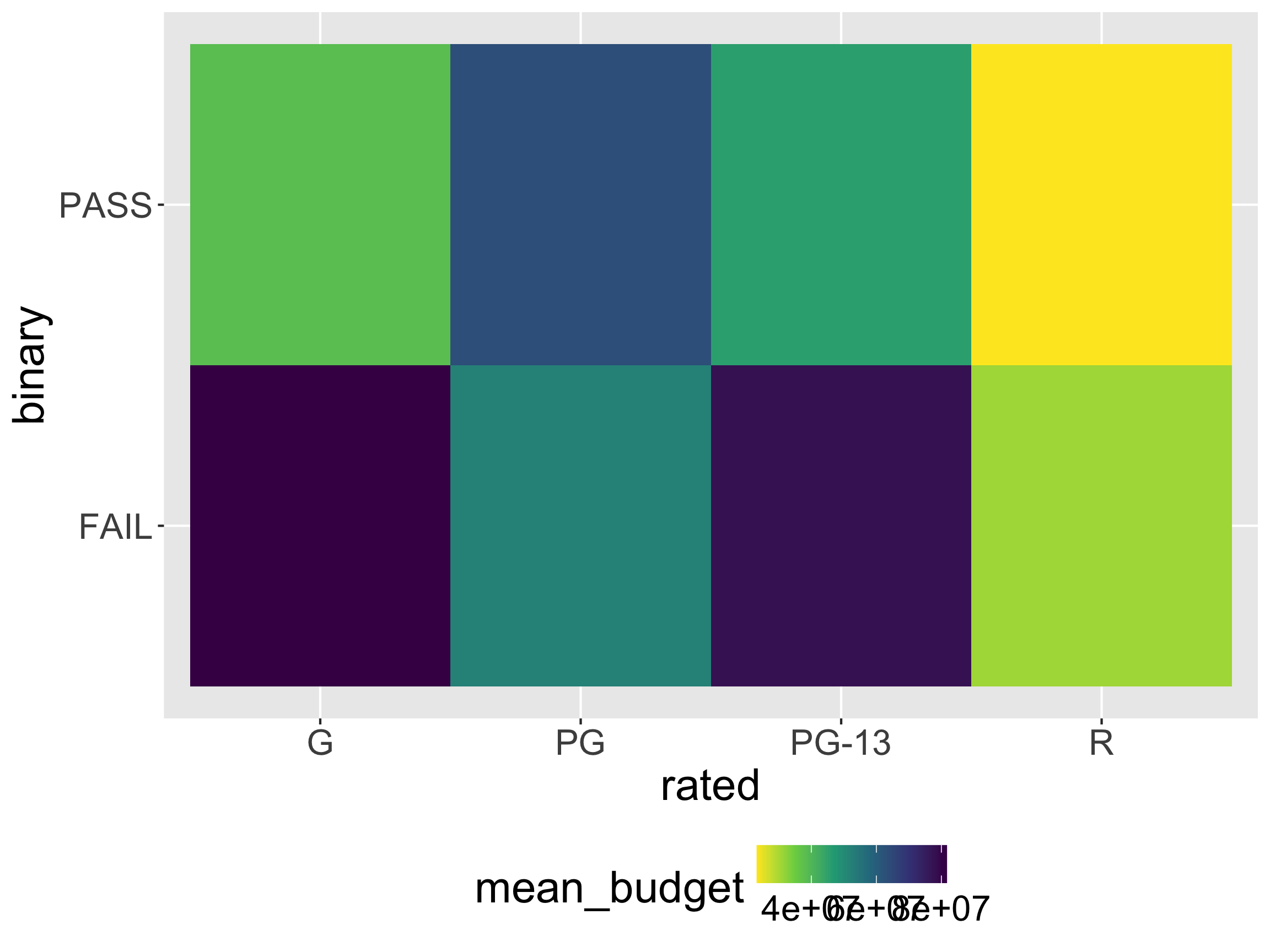
movies_ag <- group_by(movies,
                      rated, binary) %>%
  summarize(mean_budget = mean(budget))

ggplot(data = movies_ag,
       mapping = aes(x = rated,
                     y = binary,
                     fill = mean_budget)) + 
  geom_tile() +
  scale_fill_viridis_c(direction = -1) +
  theme(legend.position = "bottom")

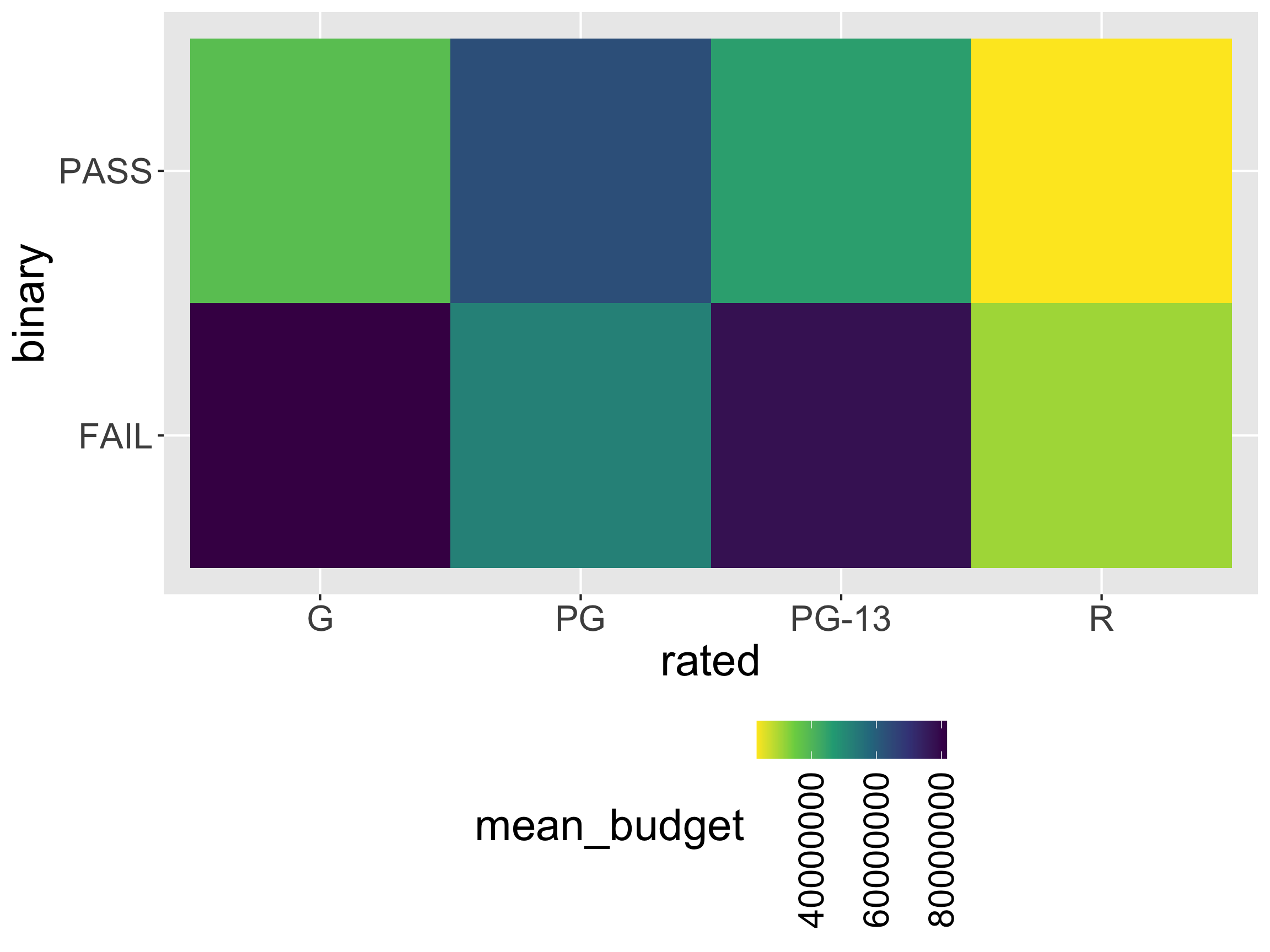
Can display more than frequencies!

options(scipen = 999) # turn off scientific notation

movies_ag <- group_by(movies,
                      rated, binary) %>%
  summarize(mean_budget = mean(budget))

ggplot(data = movies_ag,
       mapping = aes(x = rated,
                     y = binary,
                     fill = mean_budget)) + 
  geom_tile() +
  scale_fill_viridis_c(direction = -1,
                       guide = guide_colorbar(angle = 90)) +
  theme(legend.position = "bottom")
What are useful geoms (graphs) for visualizing distributions?

Distributions: geom_histogram

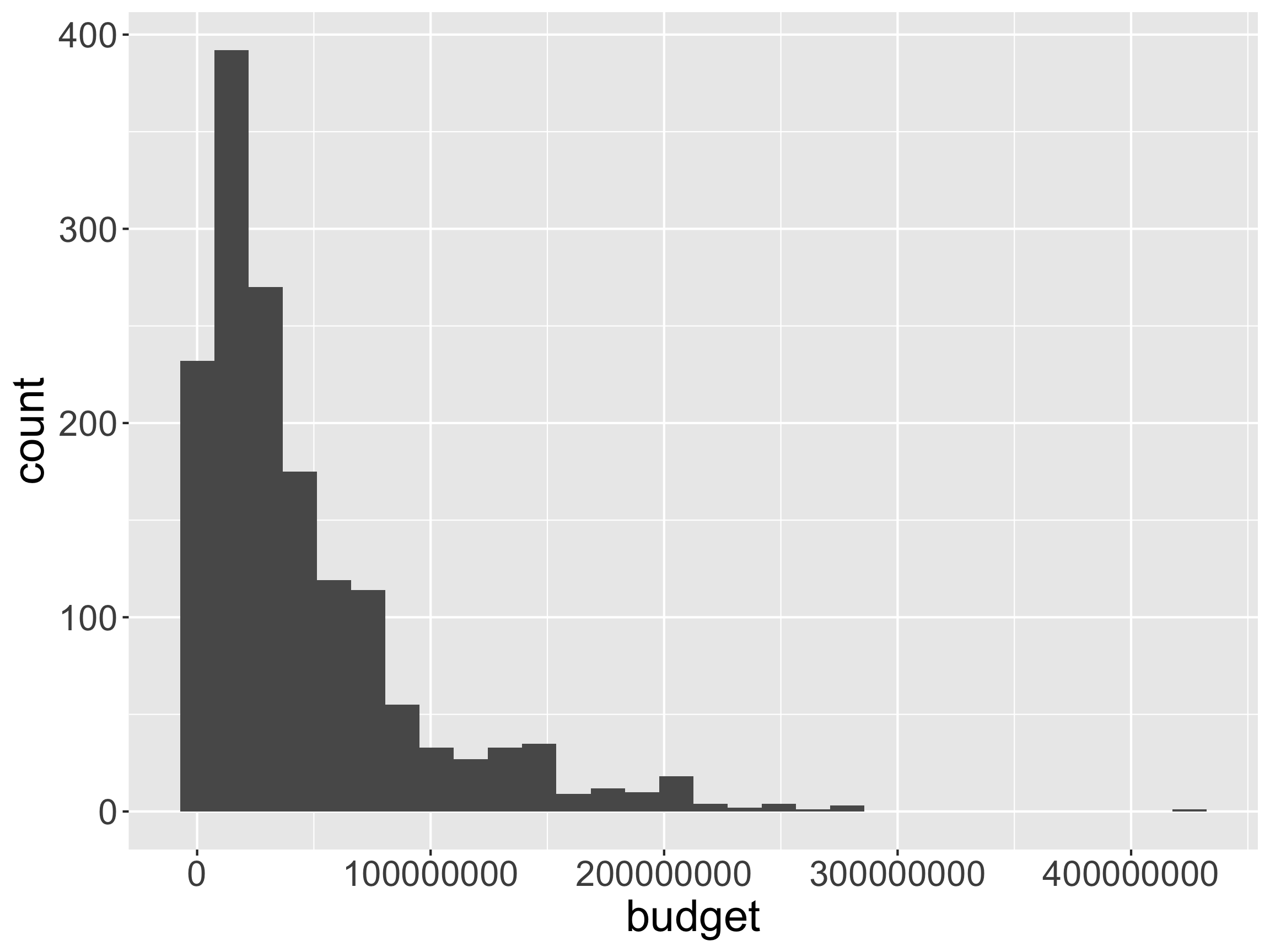
ggplot(movies, aes(x = budget)) +
  geom_histogram()

  • Describe the mapping.

Distributions: geom_histogram
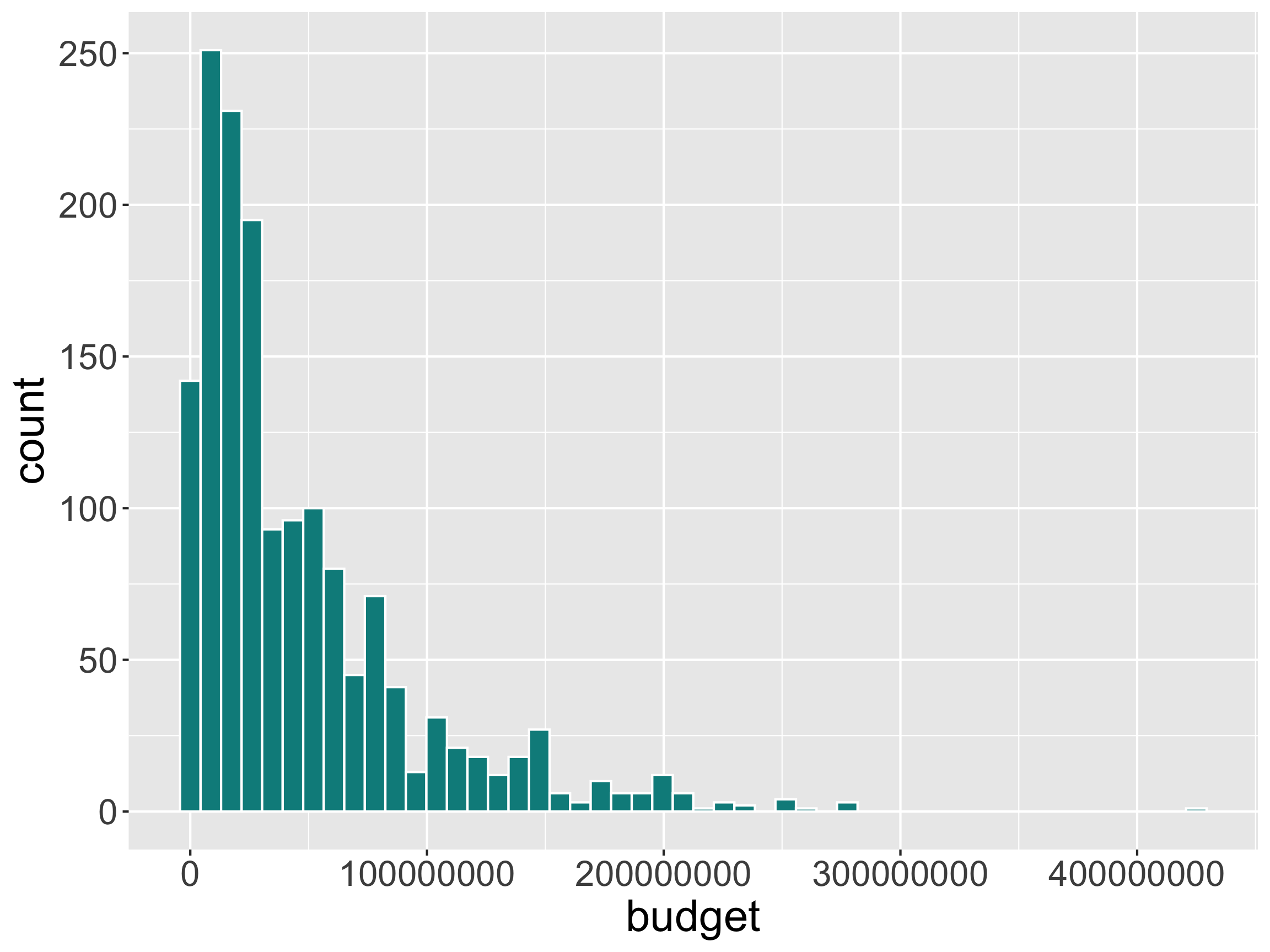
ggplot(movies, aes(x = budget)) +
  geom_histogram(bins = 50, 
                 color = "white",
                 fill = "darkcyan") 

  • Can modify the mapping via the binwidth or bins arguments

Distributions: geom_histogram
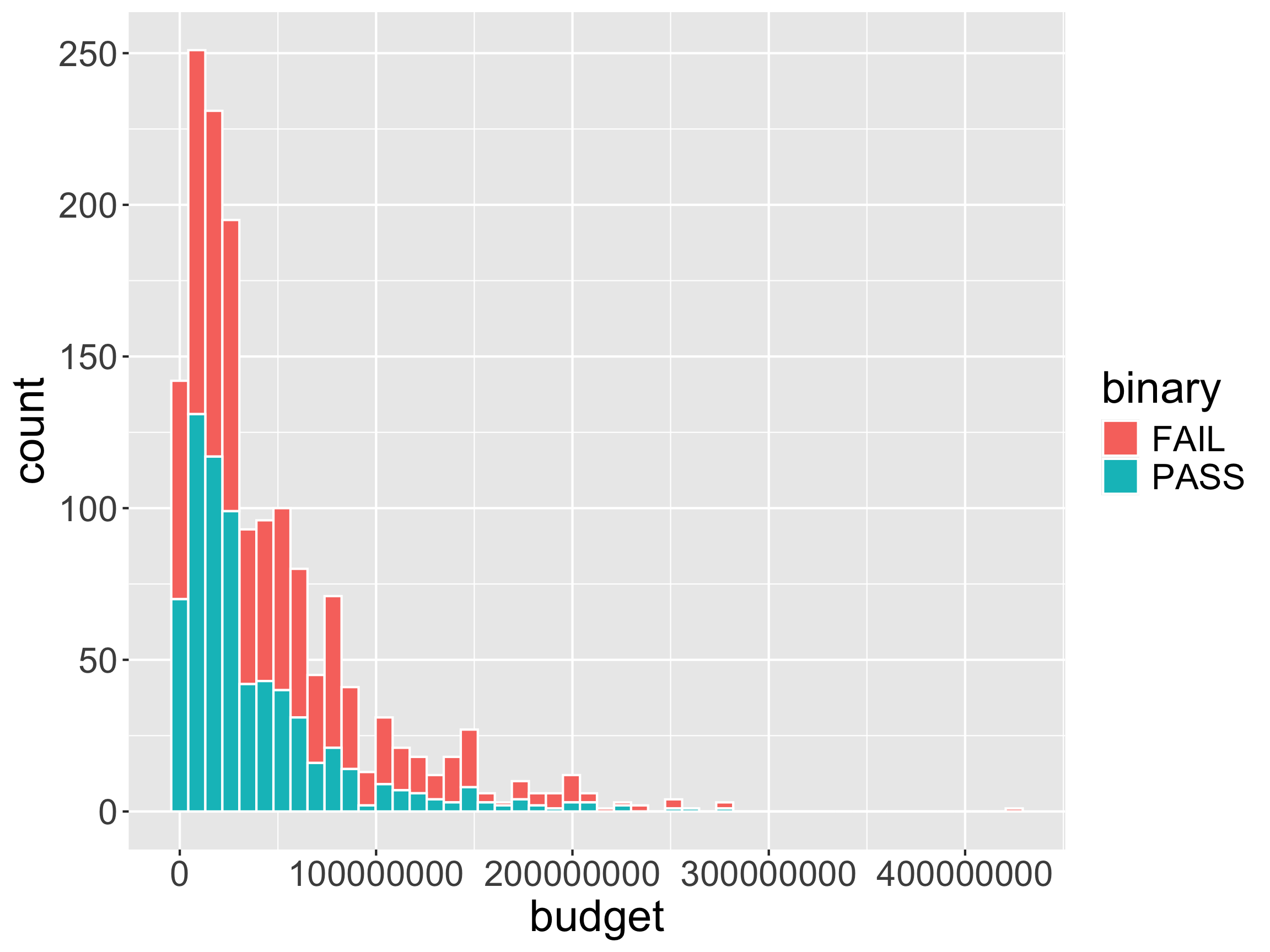
ggplot(movies, aes(x = budget, 
                   fill = binary)) +
  geom_histogram(bins = 50, 
                 color = "white")

  • What is problematic about this graph?

Distributions: geom_histogram
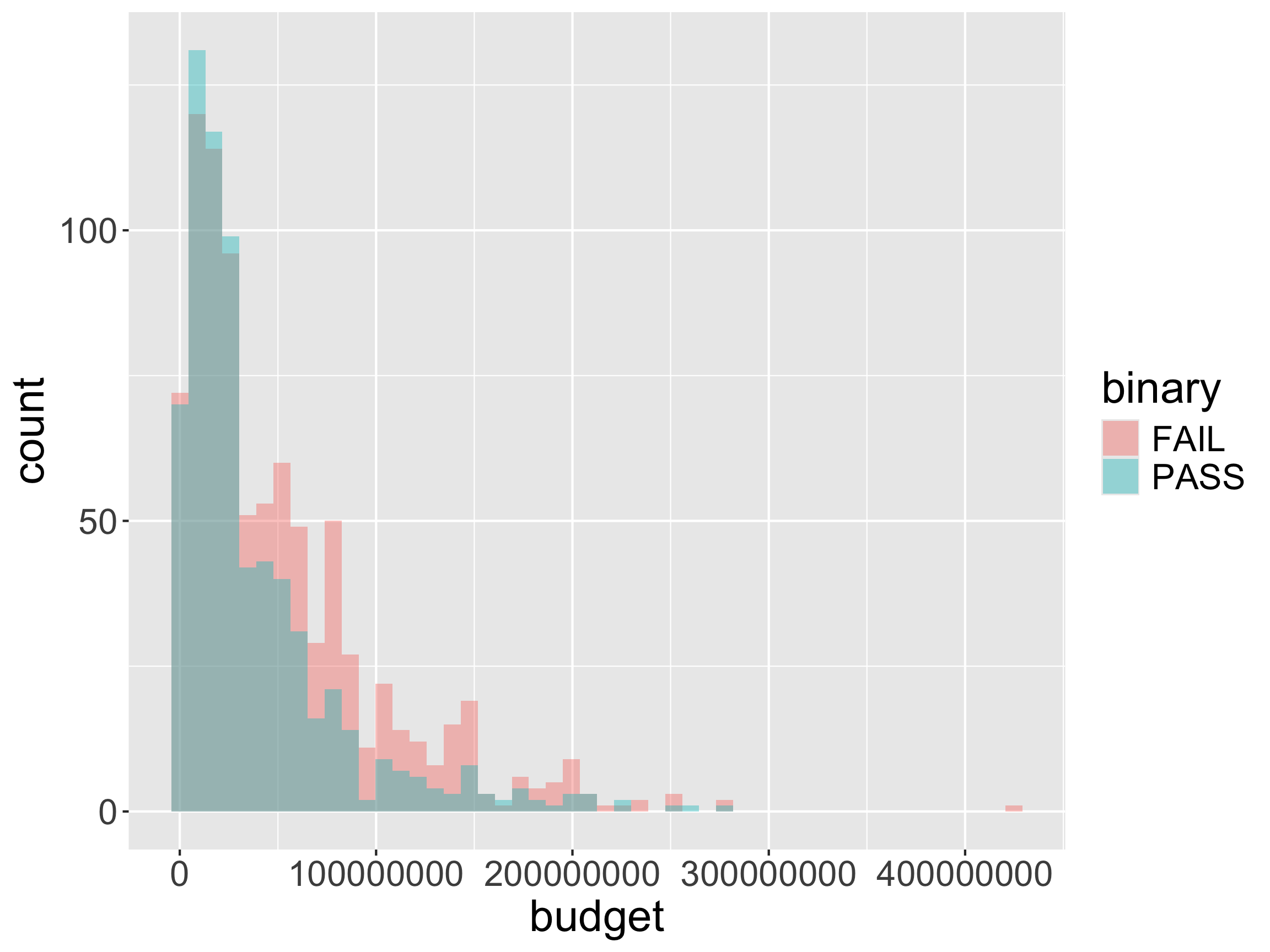
ggplot(movies, aes(x = budget, 
                   fill = binary)) +
  geom_histogram(bins = 50,
                 alpha = 0.4,
                 position = "identity")

  • Still problematic.

One option: Faceting
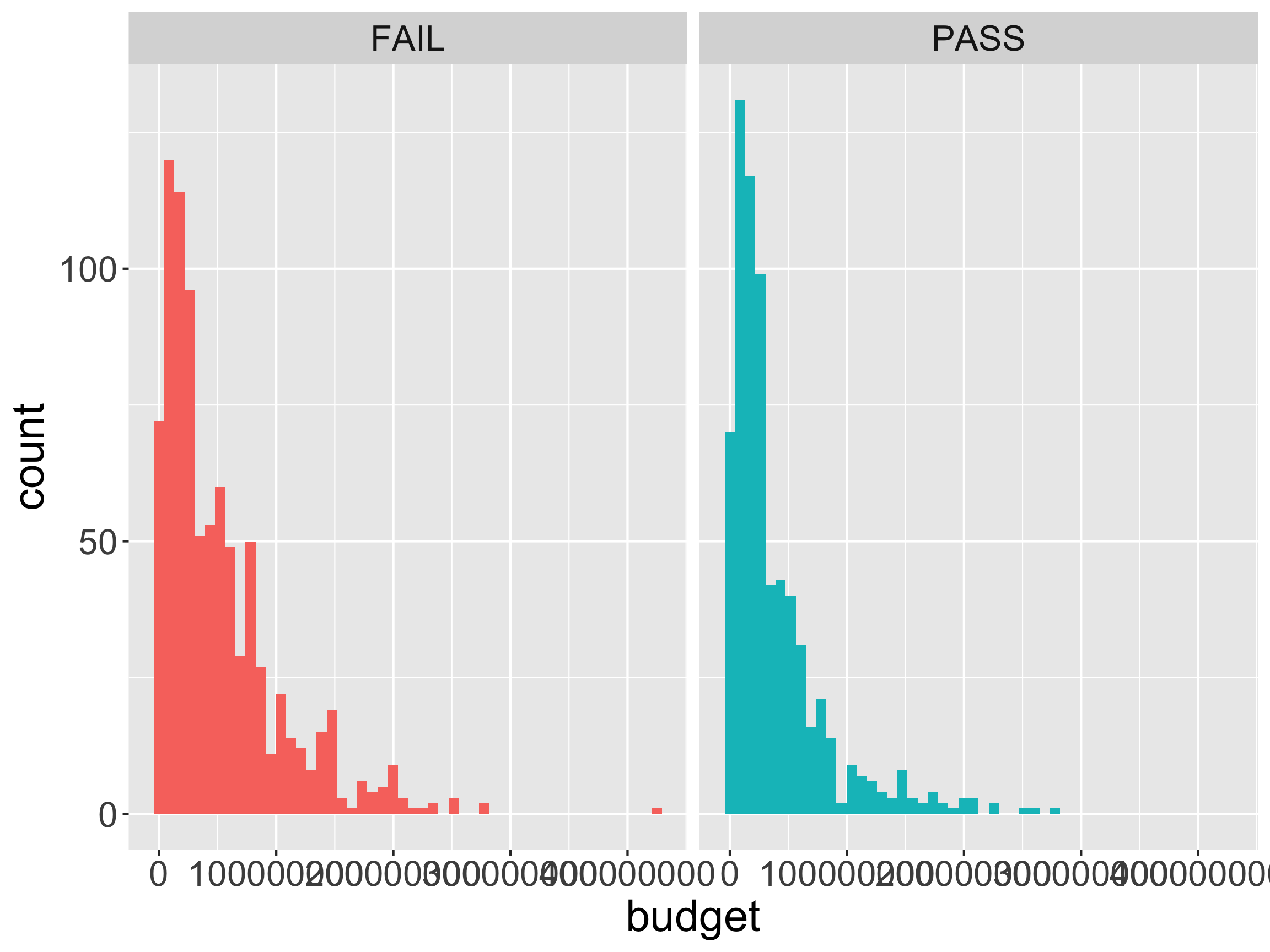
ggplot(movies, aes(x = budget, 
                   fill = binary)) +
  geom_histogram(bins = 50) +
  facet_wrap(~binary) +
  guides(fill = "none")

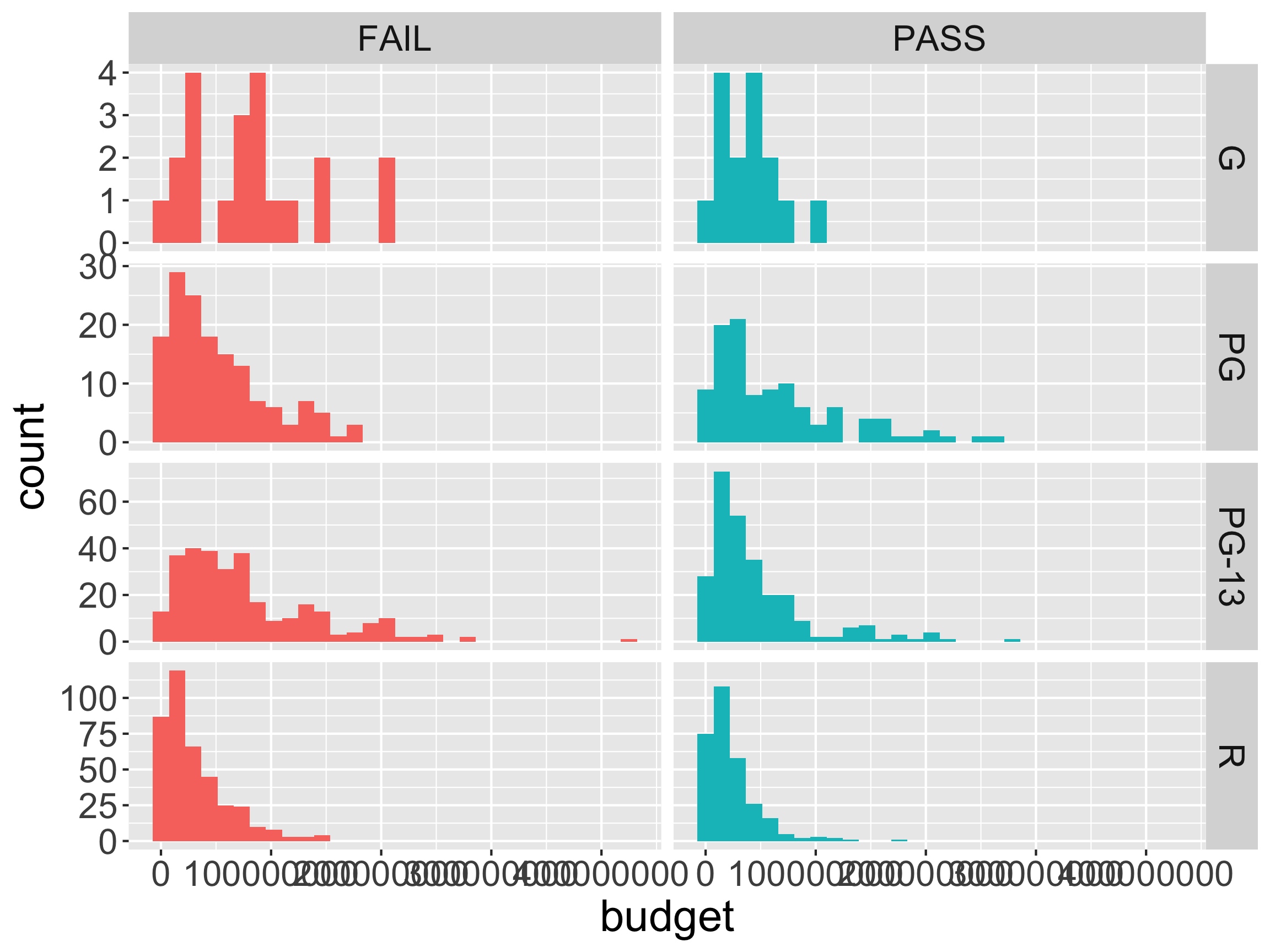
One option: Faceting

ggplot(movies, aes(x = budget, 
                   fill = binary)) +
  geom_histogram() +
  facet_grid(rated ~ binary, scales = "free_y") +
  guides(fill = "none")

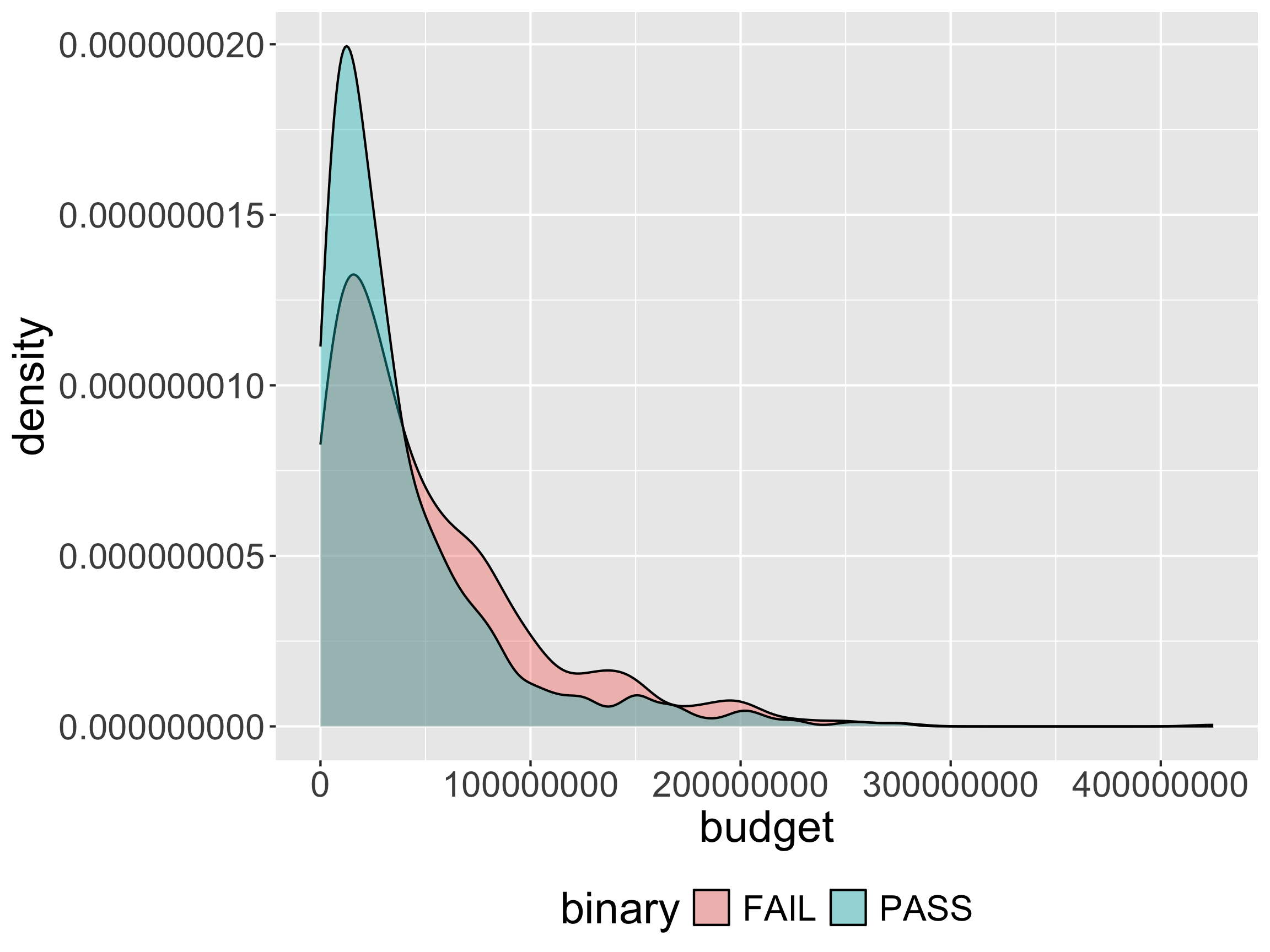
Another option: geom_density

ggplot(movies, aes(x = budget, 
                   fill = binary)) +
  geom_density(alpha = 0.4)  +
  theme(legend.position = "bottom")

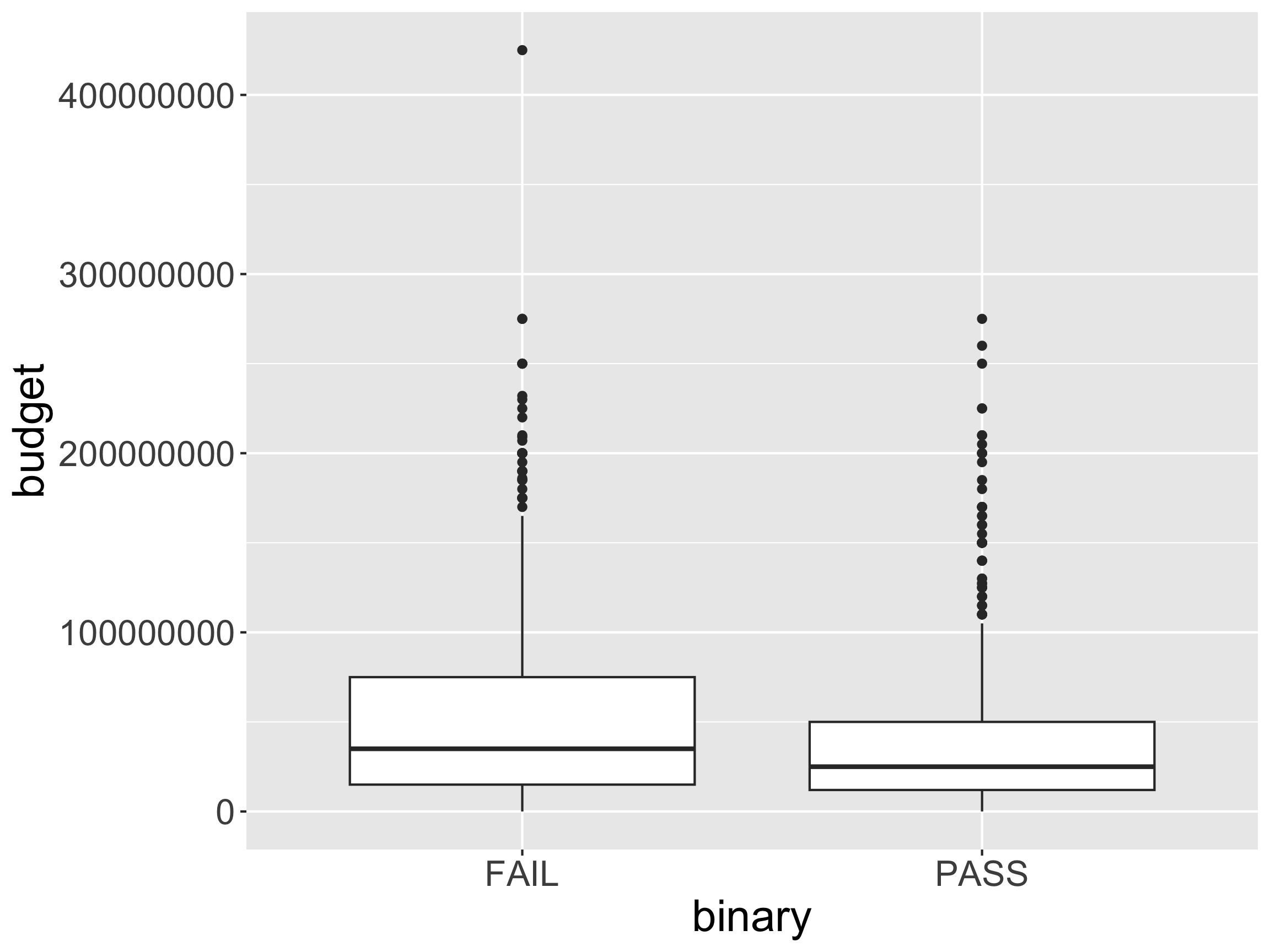
Distributions: geom_boxplot

ggplot(movies, aes(x = binary, 
                   y = budget)) +
  geom_boxplot()

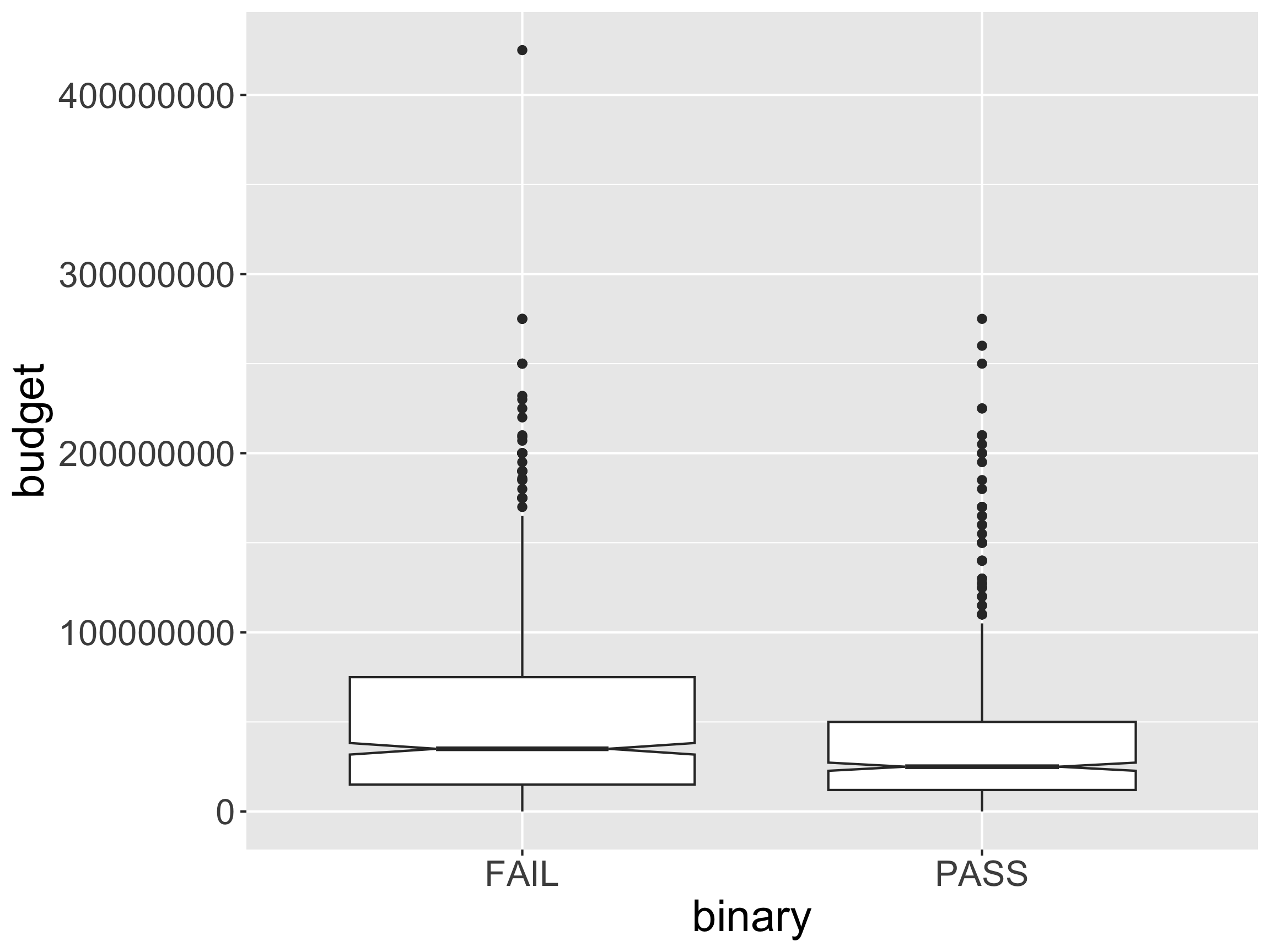
Distributions: geom_boxplot

ggplot(movies, aes(x = binary, 
                   y = budget)) +
  geom_boxplot(varwidth = TRUE,
               notch = TRUE)

  • What does varwidth do?
  • Why might we add notch = TRUE?

Distributions: geom_boxplot
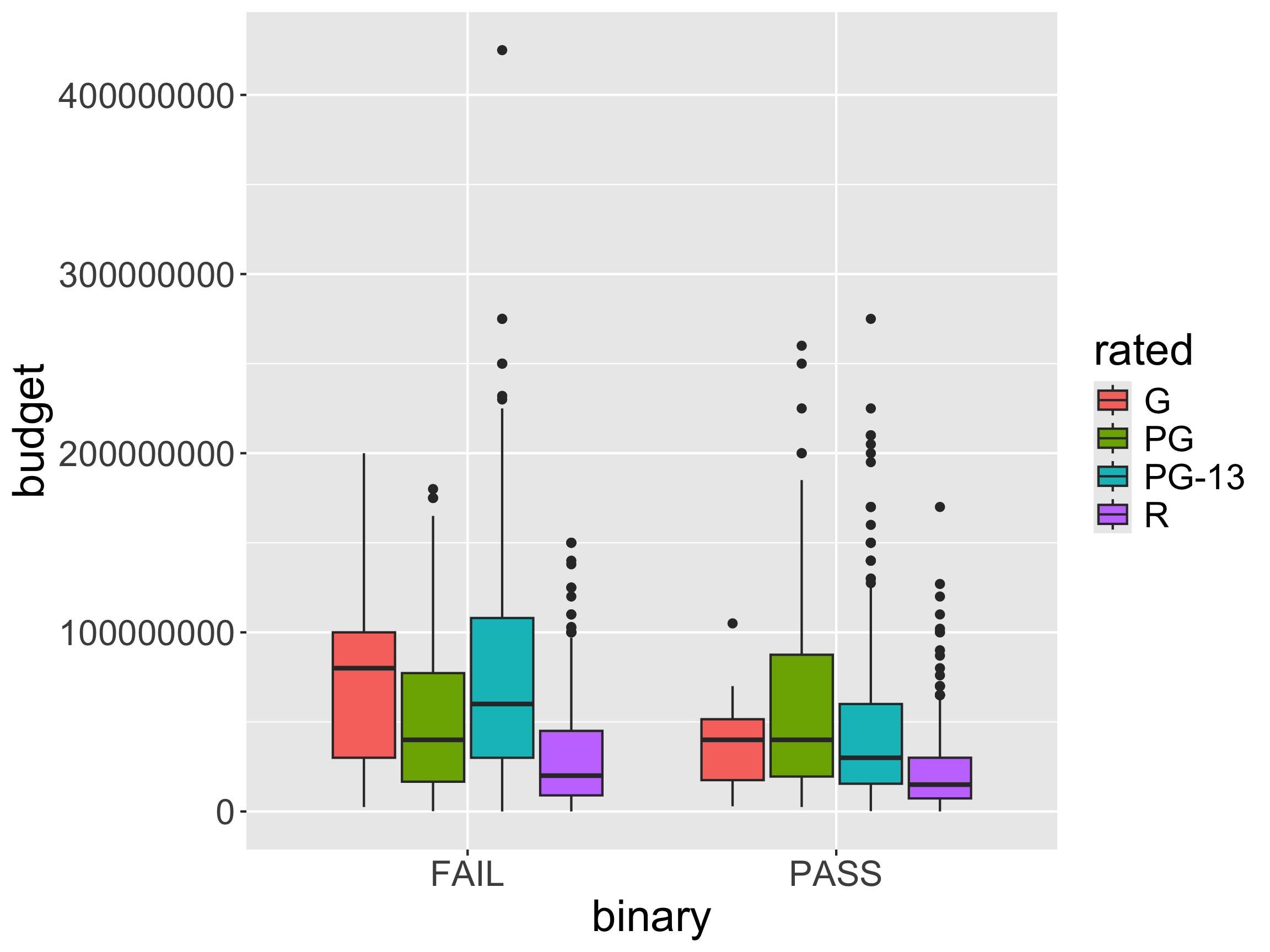
ggplot(movies, aes(x = binary, 
                   y = budget,
                   fill = rated)) +
  geom_boxplot()

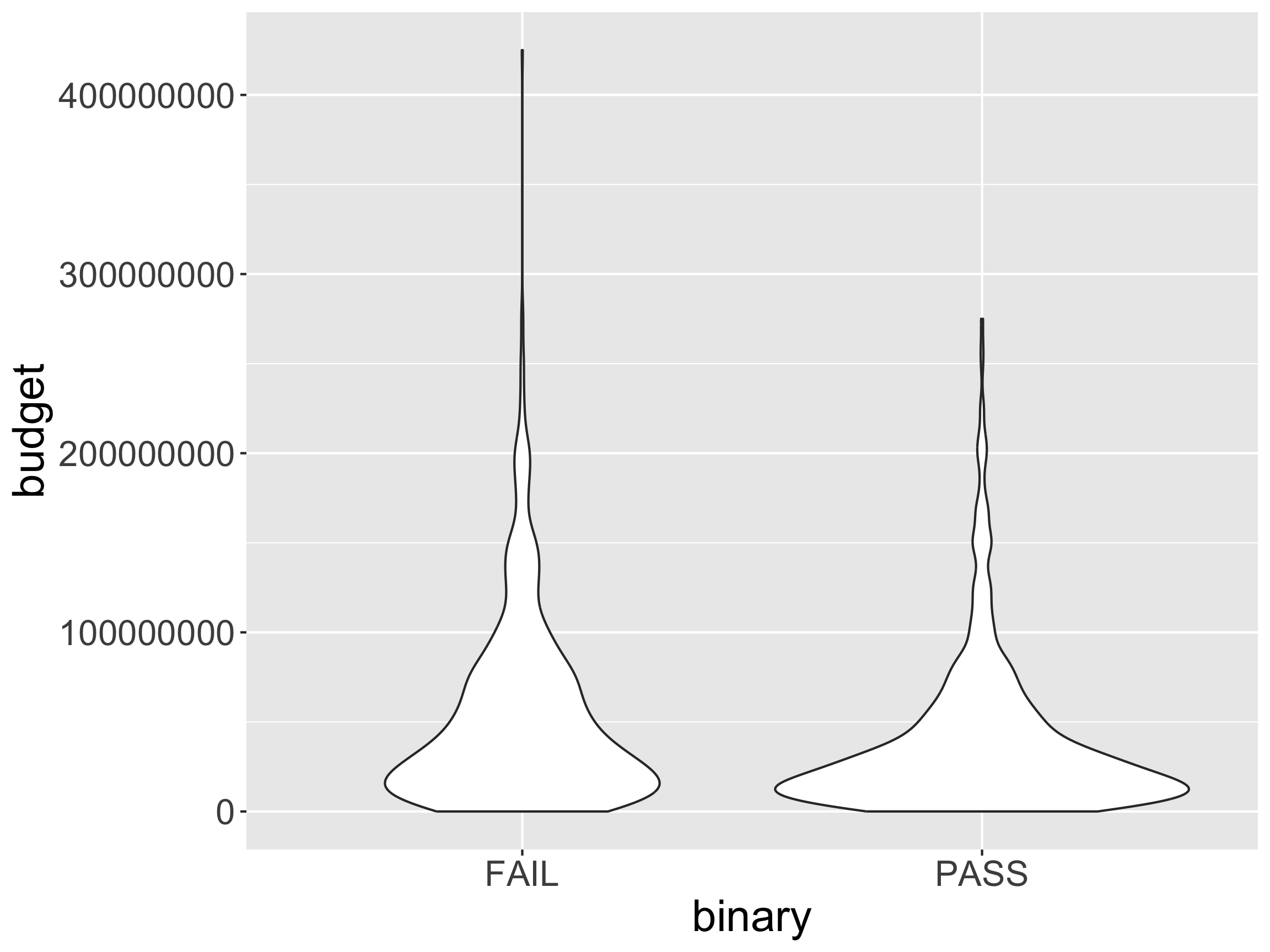
Distributions: geom_violin

ggplot(movies, aes(x = binary, 
                   y = budget)) +
  geom_violin()

  • Utility of the violin over the box?

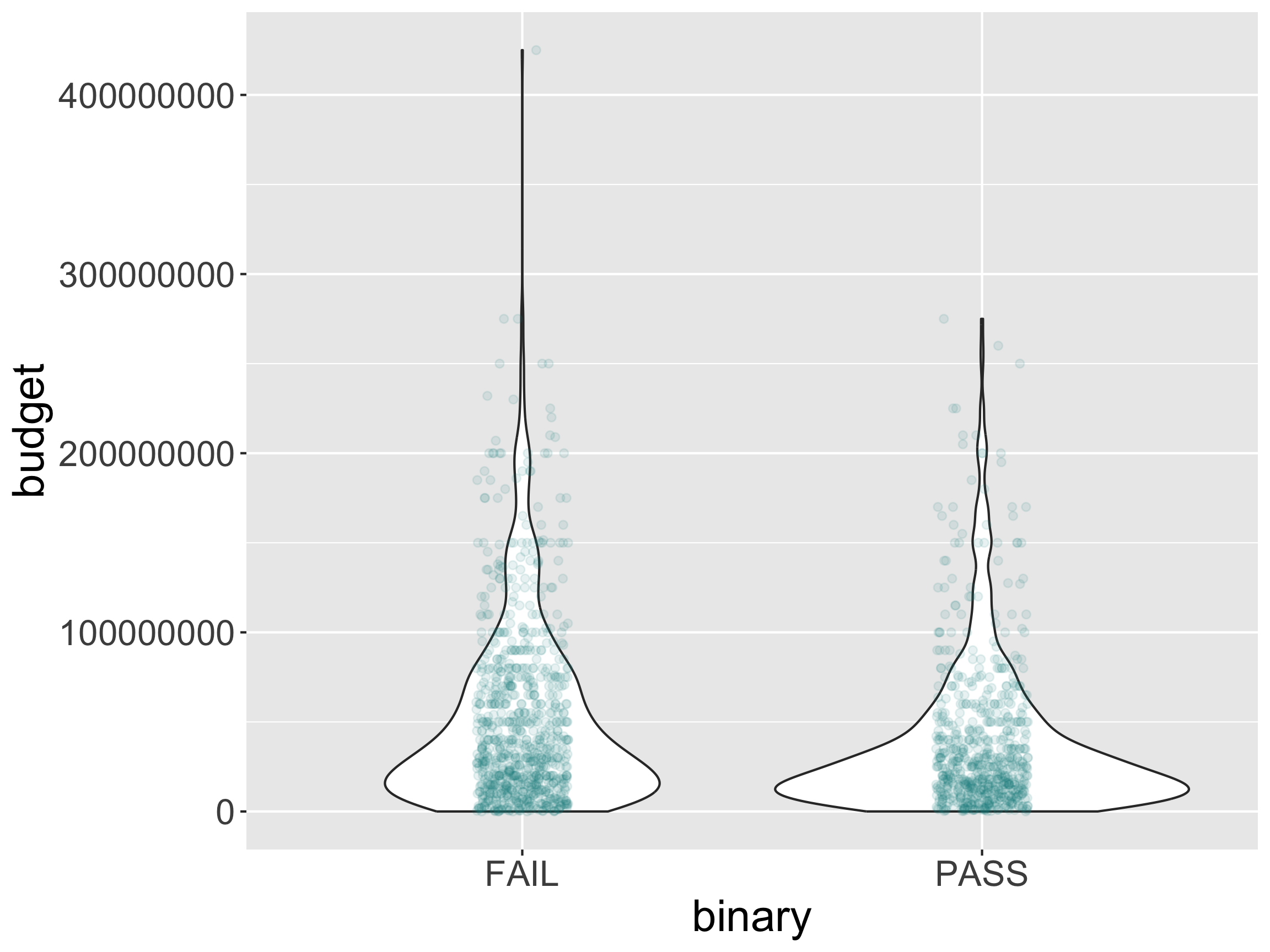
Distributions: geom_violin

ggplot(movies, aes(x = binary, 
                   y = budget)) +
  geom_violin() + 
  geom_jitter(alpha = .1,
              width = .1,
              color = "darkcyan")

Reminders

  • Office Hours Schedule
  • P-Set 1 released at 9am on Thursday.
    • Will discuss how to access the p-sets through GitHub on Wednesday.