Animation and Interactivity


Grayson White

Math 241
Week 3 | Spring 2026

Announcements

  • Office Hours Schedule
    • This week, my Friday office hours have been moved to Thursday.
  • Problem Set 1 due tomorrow at 9am.

Week 3 Goals

Mon Lecture

  • Think about reproducibility and learn how to ask coding questions well.

  • Motivate and work on data wrangling.

Wed Lecture

  • Recall some ideas about inheriting aesthetics.
  • Plot animation and interactivity.
  • Formalize some ideas about GitHub workflow and RStudio Projects / Positron folders.

First up: some further discussion of inheriting aesthetics

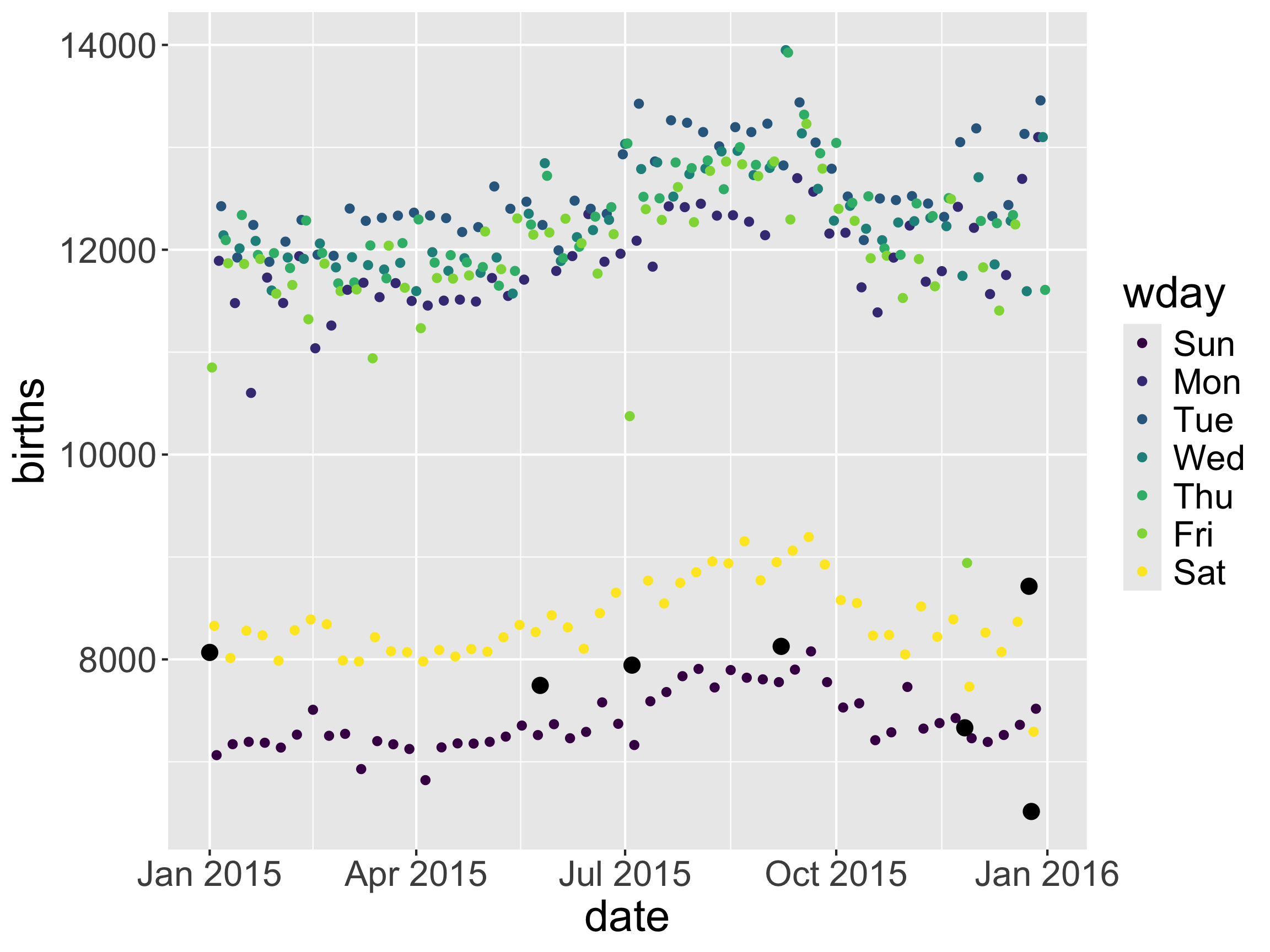
Inheriting aes from ggplot()

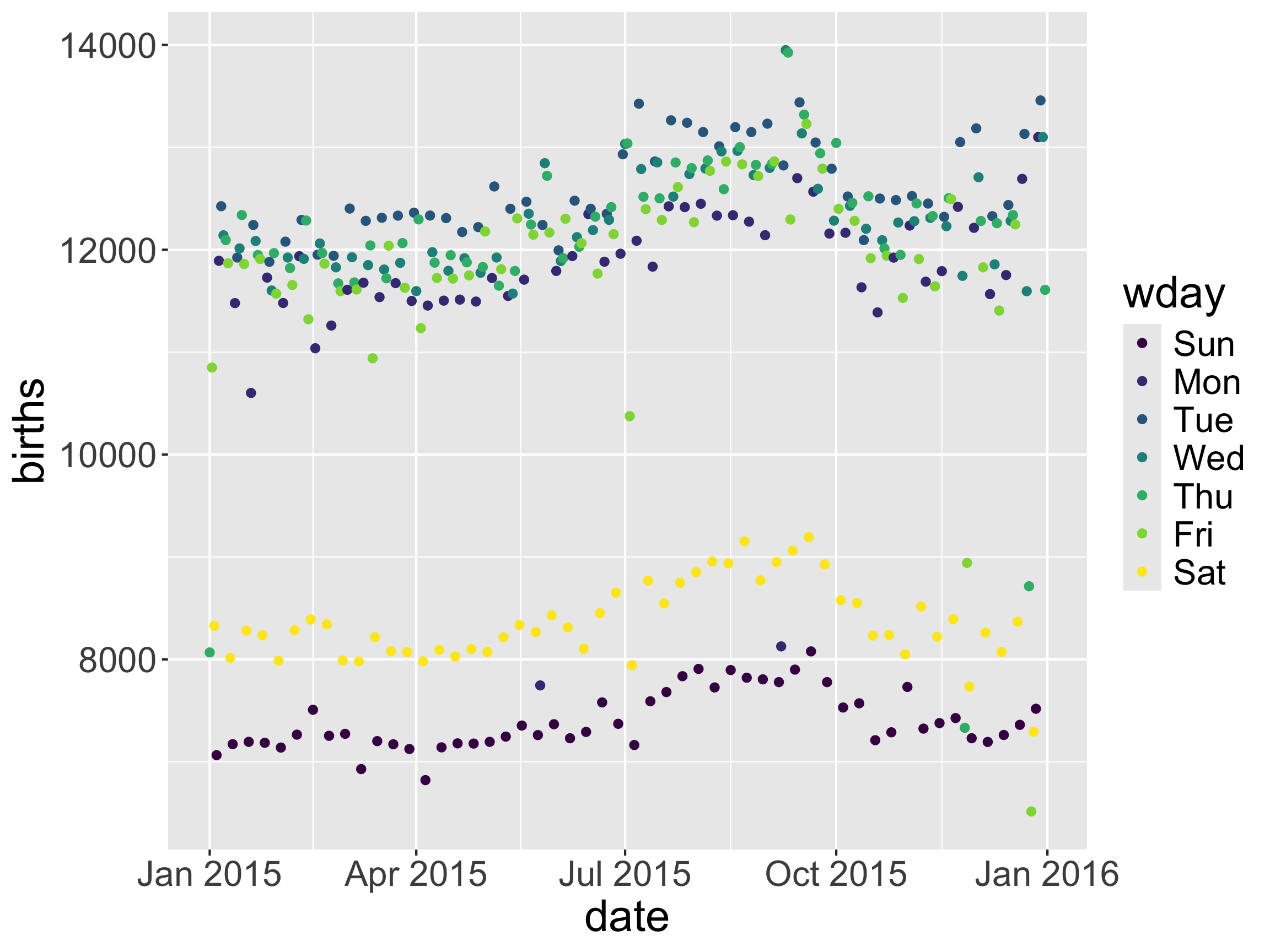
ggplot(data = Births2015, 
       mapping = aes(x = date, y = births,
                     color = wday)) + 
  geom_point() +
  geom_point(data = holidays, size = 3,
             color = "black")

  • What aesthetics did the second geom_point() inherit? What didn’t it inherit?
glimpse(Births2015)
Rows: 365
Columns: 8
$ date         <date> 2015-01-01, 2015-01-02, 2015-01-03, 2015-01-04, 2015-01-…
$ births       <dbl> 8068, 10850, 8328, 7065, 11892, 12425, 12141, 12094, 1186…
$ wday         <ord> Thu, Fri, Sat, Sun, Mon, Tue, Wed, Thu, Fri, Sat, Sun, Mo…
$ year         <dbl> 2015, 2015, 2015, 2015, 2015, 2015, 2015, 2015, 2015, 201…
$ month        <dbl> 1, 1, 1, 1, 1, 1, 1, 1, 1, 1, 1, 1, 1, 1, 1, 1, 1, 1, 1, …
$ day_of_year  <int> 1, 2, 3, 4, 5, 6, 7, 8, 9, 10, 11, 12, 13, 14, 15, 16, 17…
$ day_of_month <dbl> 1, 2, 3, 4, 5, 6, 7, 8, 9, 10, 11, 12, 13, 14, 15, 16, 17…
$ day_of_week  <dbl> 5, 6, 7, 1, 2, 3, 4, 5, 6, 7, 1, 2, 3, 4, 5, 6, 7, 1, 2, …
glimpse(holidays)
Rows: 7
Columns: 9
$ date         <date> 2015-01-01, 2015-05-25, 2015-07-04, 2015-12-25, 2015-11-…
$ occasion     <chr> "New Year", "Memorial Day", "Independence Day", "Christma…
$ births       <dbl> 8068, 7746, 7944, 6515, 7332, 8714, 8127
$ wday         <ord> Thu, Mon, Sat, Fri, Thu, Thu, Mon
$ year         <dbl> 2015, 2015, 2015, 2015, 2015, 2015, 2015
$ month        <dbl> 1, 5, 7, 12, 11, 12, 9
$ day_of_year  <int> 1, 145, 185, 359, 330, 358, 250
$ day_of_month <dbl> 1, 25, 4, 25, 26, 24, 7
$ day_of_week  <dbl> 5, 2, 7, 6, 5, 5, 2
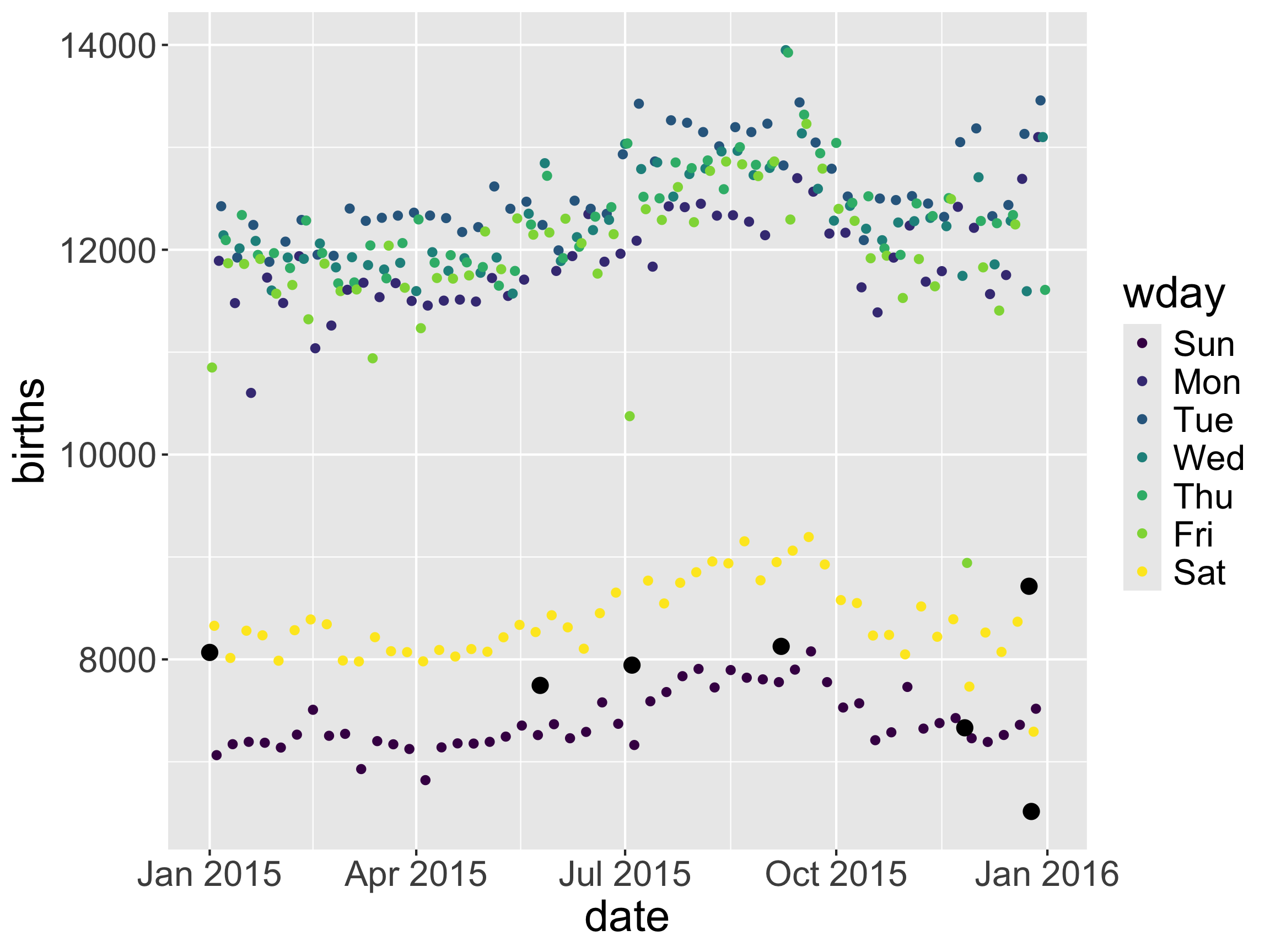
Inheriting aes from ggplot()

  • What aesthetics did the second geom_point() inherit? What didn’t it inherit?
holidays <- rename(holidays, Dates = date)

ggplot(data = Births2015, 
       mapping = aes(x = date, y = births,
                     color = wday)) + 
  geom_point() +
  geom_point(data = holidays, size = 3,
             color = "black")
Error in `geom_point()`:
! Problem while computing aesthetics.
ℹ Error occurred in the 2nd layer.
Caused by error:
! Aesthetics are not valid data columns.
✖ The following aesthetics are invalid:
• `x = date`
ℹ Did you mistype the name of a data column or forget to add `after_stat()`?

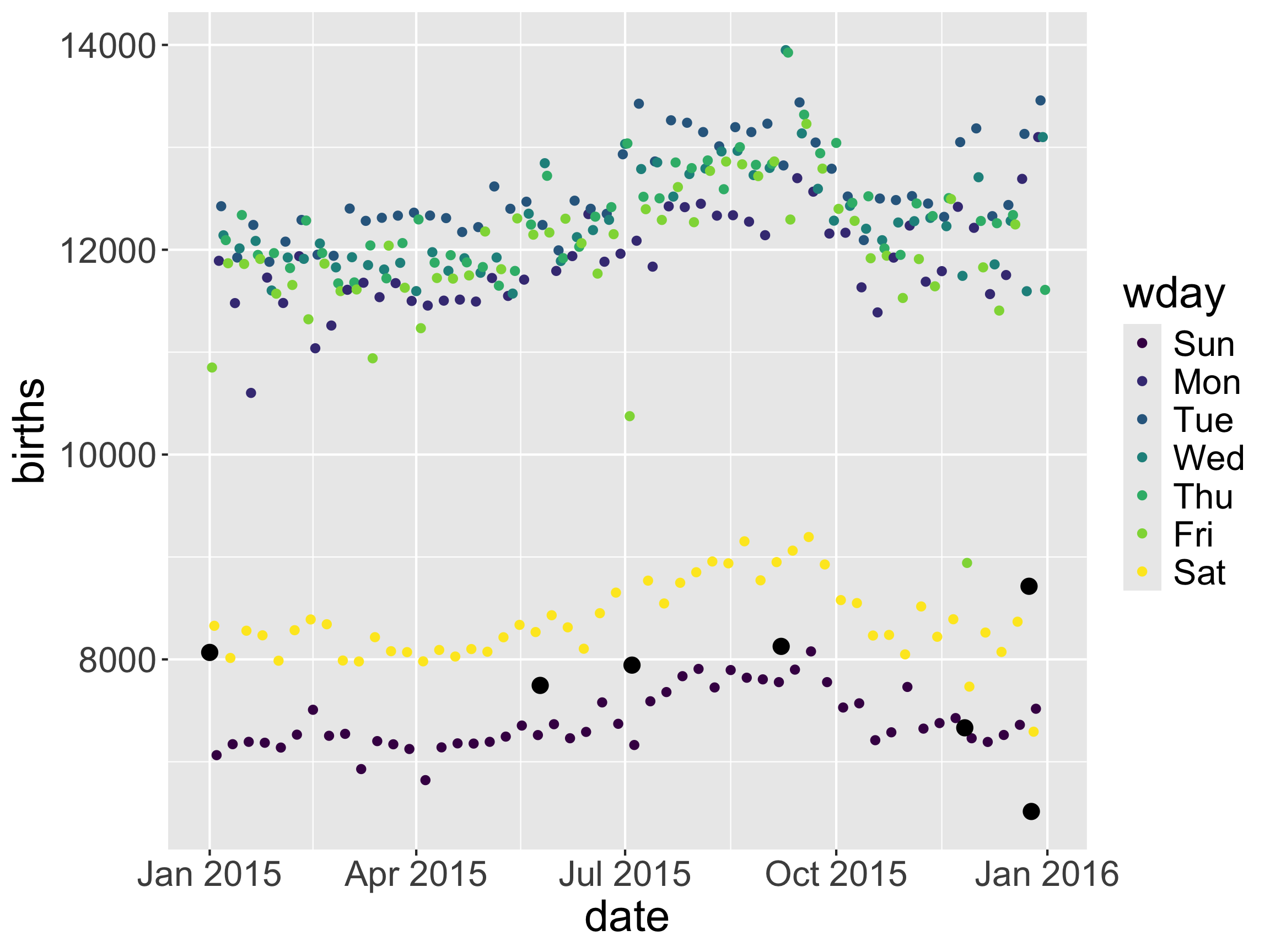
Inheriting aes from ggplot()

ggplot(data = Births2015, 
       mapping = aes(x = date, y = births,
                     color = wday)) + 
  geom_point() +
  geom_point(data = holidays, size = 3,
             color = "black", 
             mapping = aes(x = Dates))

  • What aesthetics did the second geom_point() inherit? What didn’t it inherit?

Inheriting aes from ggplot()

ggplot(data = Births2015, 
       mapping = aes(x = date, y = births,
                     color = wday)) + 
  geom_point() +
  geom_point(data = holidays, size = 3,
             color = "black", 
             mapping = aes(x = Dates),
             inherit.aes = FALSE)
Error in `geom_point()`:
! Problem while setting up geom.
ℹ Error occurred in the 2nd layer.
Caused by error in `compute_geom_1()`:
! `geom_point()` requires the following missing aesthetics: y.
  • What aesthetics did the second geom_point() inherit? What didn’t it inherit?

Inheriting aes from ggplot()

ggplot(data = Births2015, 
       mapping = aes(x = date, y = births,
                     color = wday)) + 
  geom_point() +
  geom_point(data = holidays, size = 3,
             color = "black", 
             mapping = aes(x = Dates,
                           y = births),
             inherit.aes = FALSE)

  • What aesthetics did the second geom_point() inherit? What didn’t it inherit?

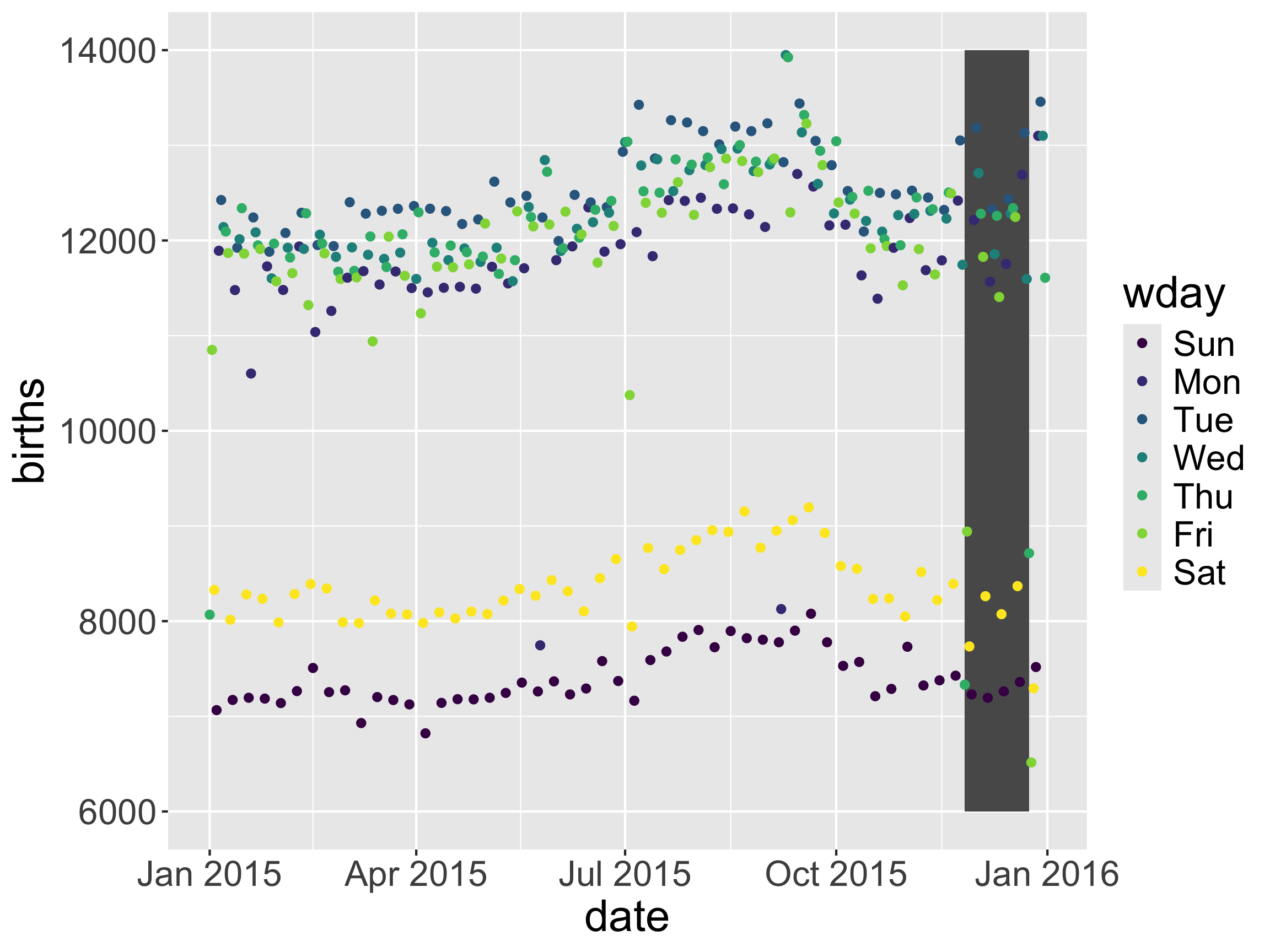
Inheriting aes from ggplot()

#Add a box around Thanksgiving to Christmas
holidays_season <- 
  data.frame(start = as_date("2015-11-26"), 
             end = as_date("2015-12-24"))

ggplot(data = Births2015, 
       mapping = aes(x = date, y = births,
                     color = wday)) +
  geom_rect(data = holidays_season,
            mapping = aes(xmin = start,
                          xmax = end,
                          ymin = 6000,
                          ymax = 14000)) + 
  geom_point()
Error in `geom_rect()`:
! Problem while computing aesthetics.
ℹ Error occurred in the 1st layer.
Caused by error:
! object 'births' not found
  • Problem: non-matching aes arguments

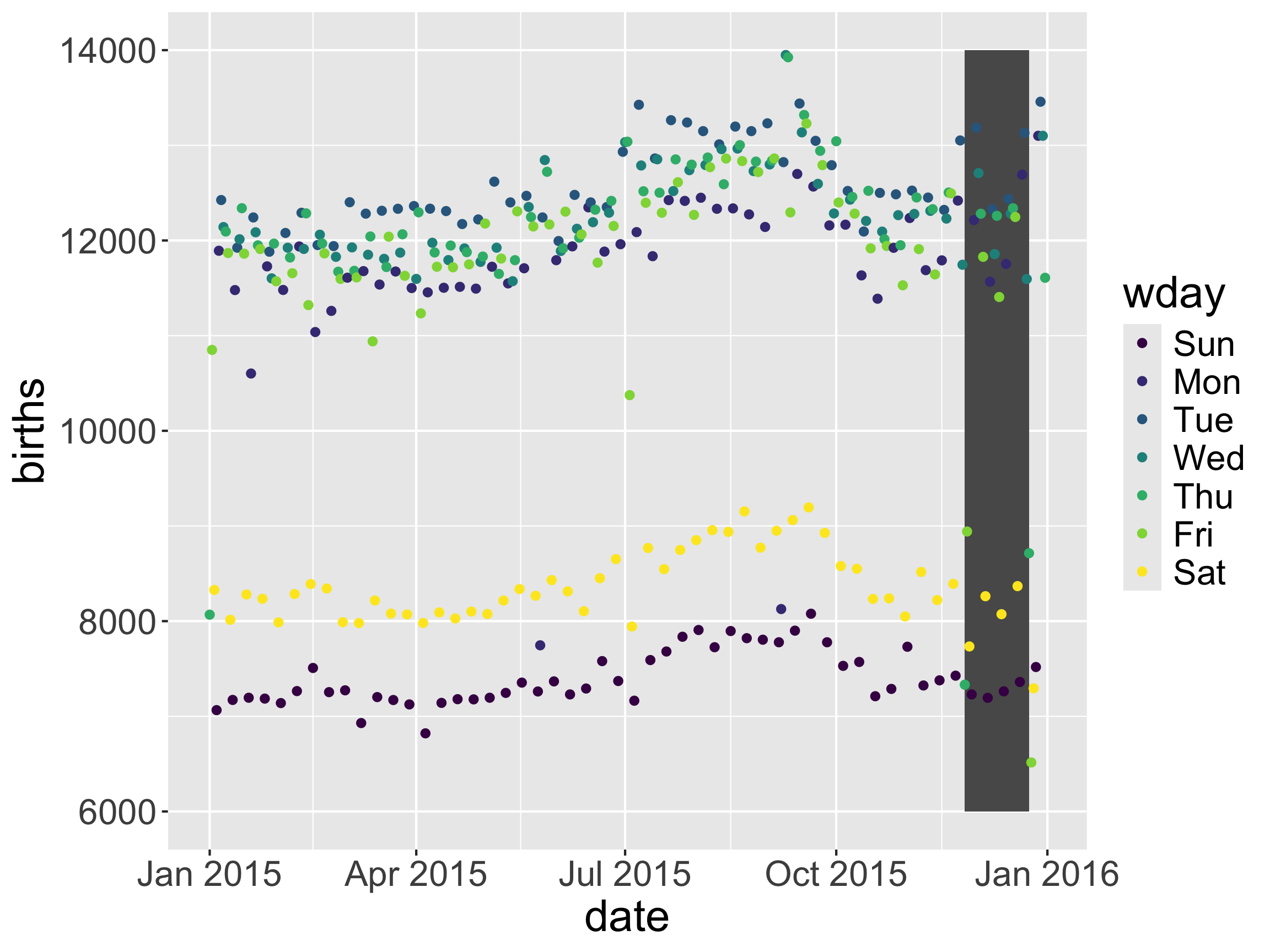
Inheriting aes from ggplot()

ggplot(data = Births2015, 
       mapping = aes(x = date, y = births,
                     color = wday)) +
  geom_rect(data = holidays_season,
            mapping = aes(xmin = start,
                          xmax = end,
                          ymin = 6000,
                          ymax = 14000),
             inherit.aes = FALSE) + 
  geom_point()

  • Problem: non-matching aes arguments

  • One solution: set inherit.aes = FALSE

Safe Play: Put the mappings in the individual geoms

ggplot(data = Births2015) +
  geom_rect(data = holidays_season,
            mapping = aes(xmin = start,
                          xmax = end,
                          ymin = 6000,
                          ymax = 14000),
             inherit.aes = FALSE) + 
  geom_point(mapping = aes(x = date,
                           y = births,
                           color = wday))

  • Problem: non-matching aes arguments

  • Safer solution.

Now: plot animation and interactivity

Plot animation and interactivity

Plot animation

We’ll use gganimate to make animated data viz

Plot interactivity

We’ll use plotly to make interactive data viz

First up: animation

gganimate basics

  • Core functions:
    • transition_*(): Defining the variables that control the change and how they control the change
    • enter/exit*(): Determining how data enters and exits
    • view_*(): Changing axes
    • shadow_*(): Giving the animation memory
    • animate(): Tuning the gif speed and size

Recall the babynames dataset

library(babynames)
head(babynames)
# A tibble: 6 × 5
   year sex   name          n   prop
  <dbl> <chr> <chr>     <int>  <dbl>
1  1880 F     Mary       7065 0.0724
2  1880 F     Anna       2604 0.0267
3  1880 F     Emma       2003 0.0205
4  1880 F     Elizabeth  1939 0.0199
5  1880 F     Minnie     1746 0.0179
6  1880 F     Margaret   1578 0.0162

And our data wrangling

babynames_math241 <- babynames %>%
  filter(name %in% c("Grayson", "Michael",
                     "Megan", "Lenny")) %>%
  group_by(year, name) %>%
  summarize(n = sum(n)) %>%
  ungroup() %>%
  arrange(desc(year))

babynames_math241
# A tibble: 431 × 3
    year name        n
   <dbl> <chr>   <int>
 1  2017 Grayson  8767
 2  2017 Lenny     118
 3  2017 Megan     624
 4  2017 Michael 12612
 5  2016 Grayson  8817
 6  2016 Lenny     134
 7  2016 Megan     744
 8  2016 Michael 14091
 9  2015 Grayson  8071
10  2015 Lenny     177
# ℹ 421 more rows

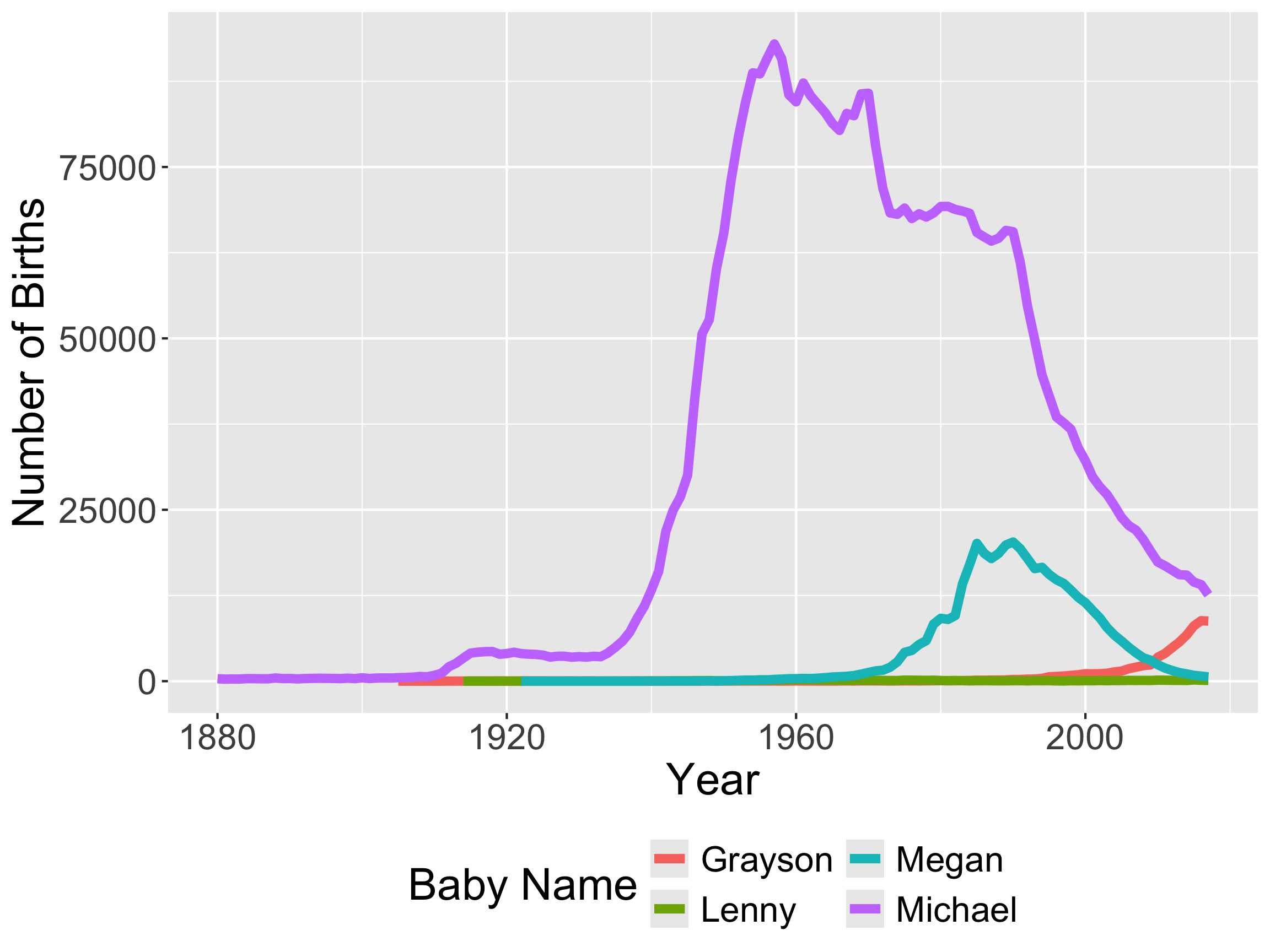
Now let’s make a plot

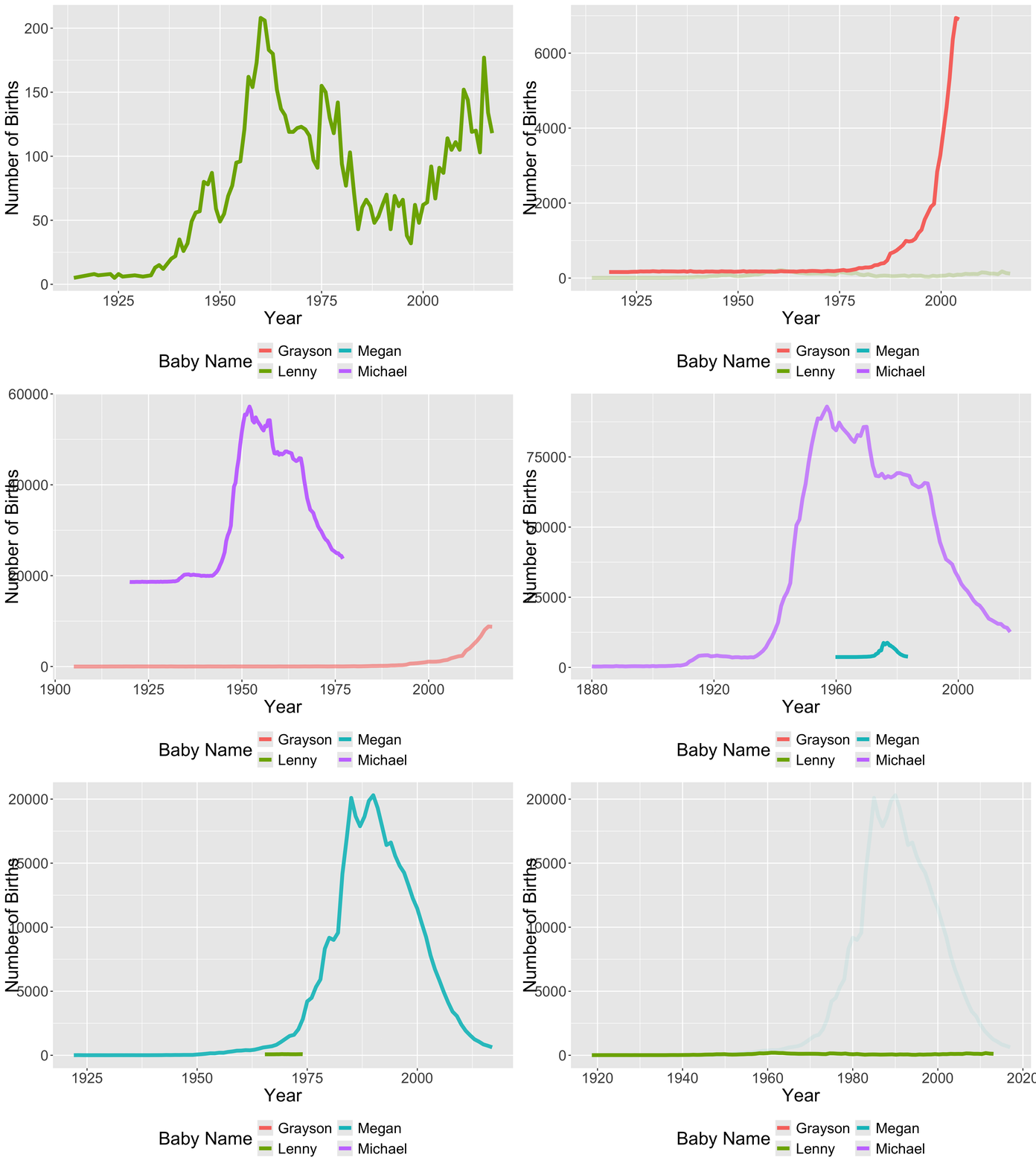
ggplot(data = babynames_math241, 
       mapping = aes(x = year, y = n)) +
  geom_line(aes(color = name), size = 2) + 
  theme(legend.position = "bottom", 
        text = element_text(size = 20)) +
  guides(color = guide_legend(nrow = 2)) +
  labs(y = "Number of Births",
       x = "Year", 
       color = "Baby Name")

Back to animation

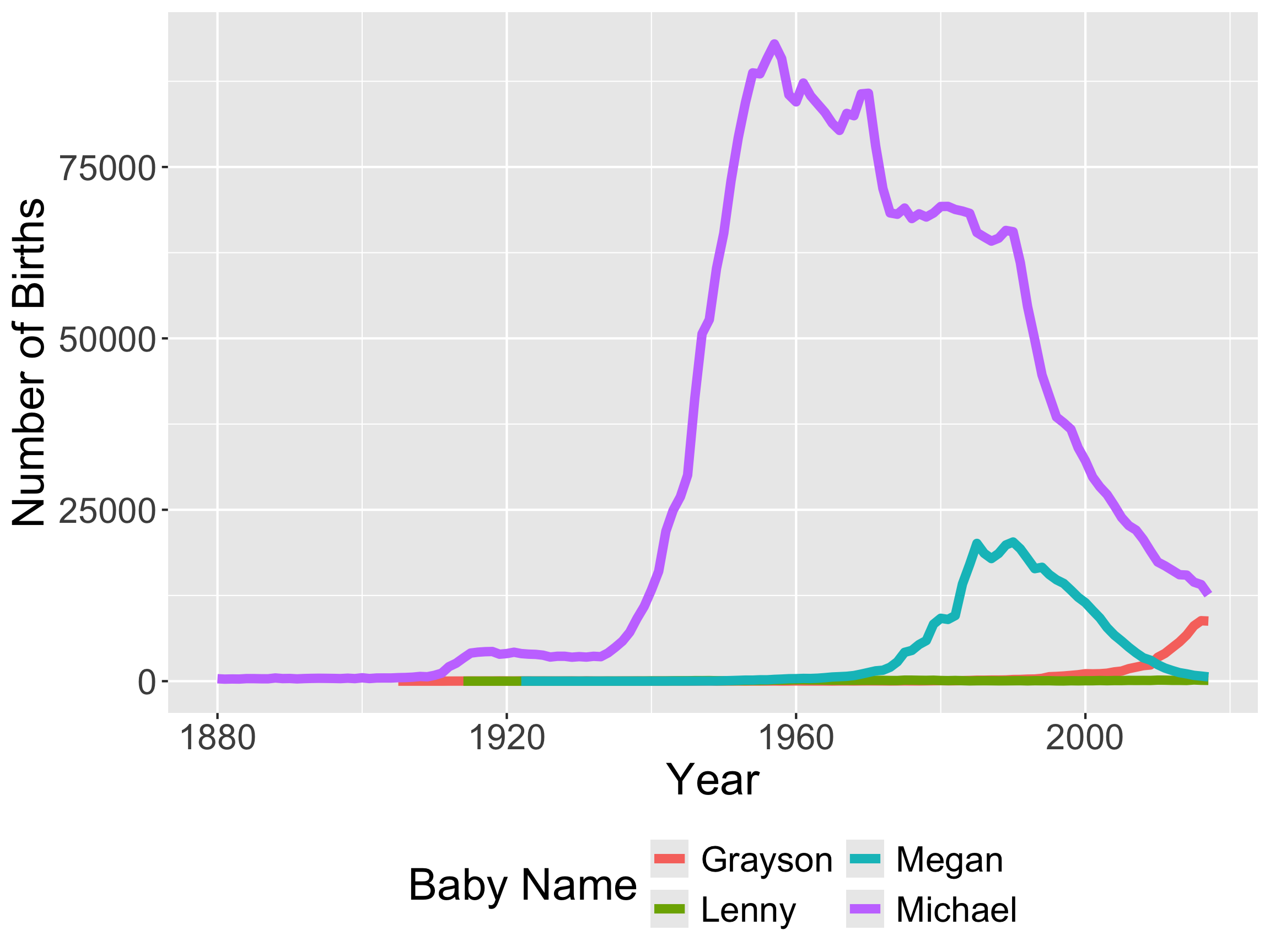
We’d like to animate this plot

p

Back to animation

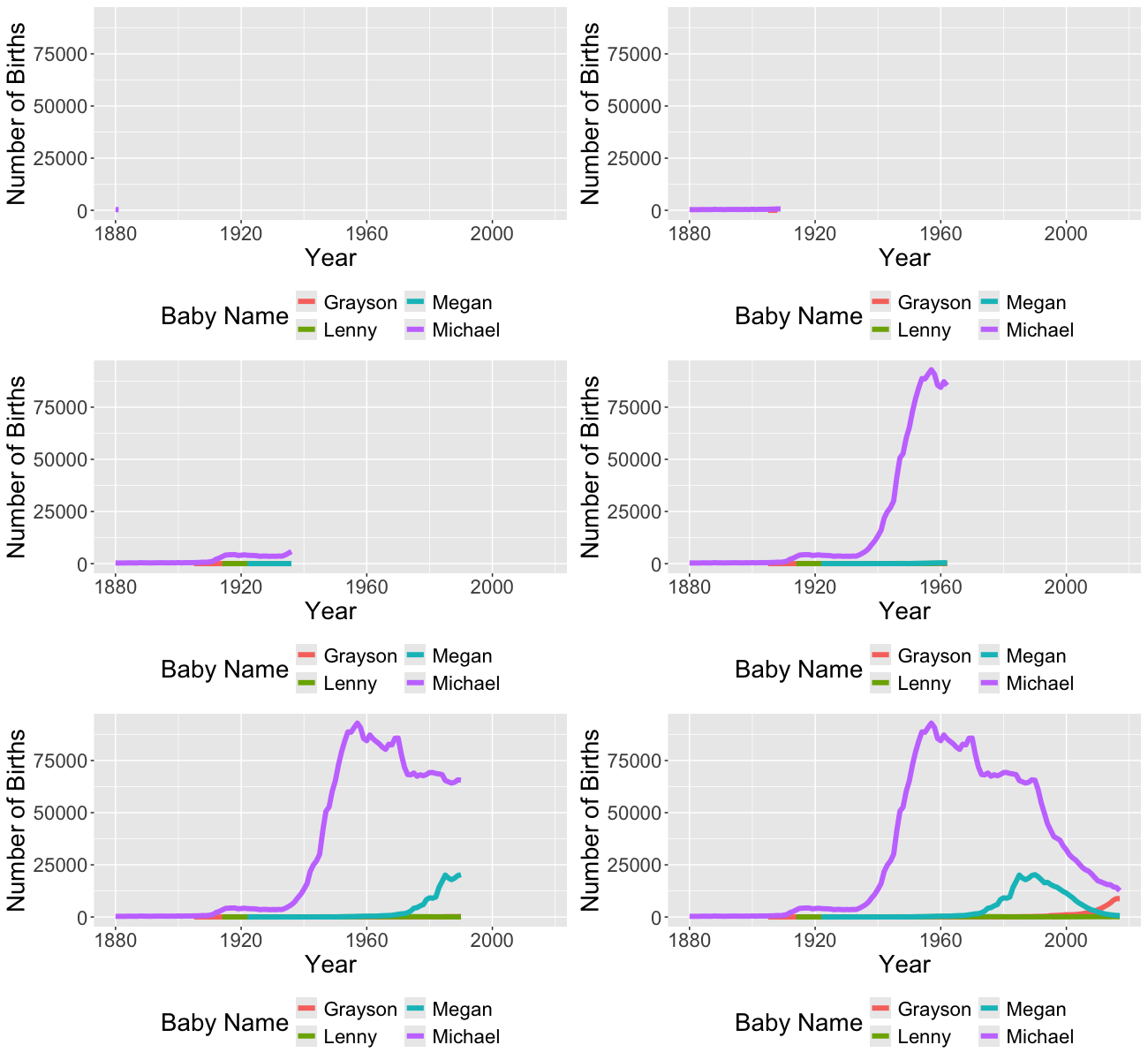
transition_reveal(): reveal the graph along a variable in the plot

library(gganimate)
p_animate <- p +
  transition_reveal(along = year)
animate(p_animate, 
        fps = 5, 
        end_pause = 40, 
        height = 4, width = 6.5,
        units = "in", 
        res = 100)

  • Add the transition_reveal() function just like another ggplot layer.
    • Set the along parameter to the variable you’d like to reveal over.

Other transition_***() functions

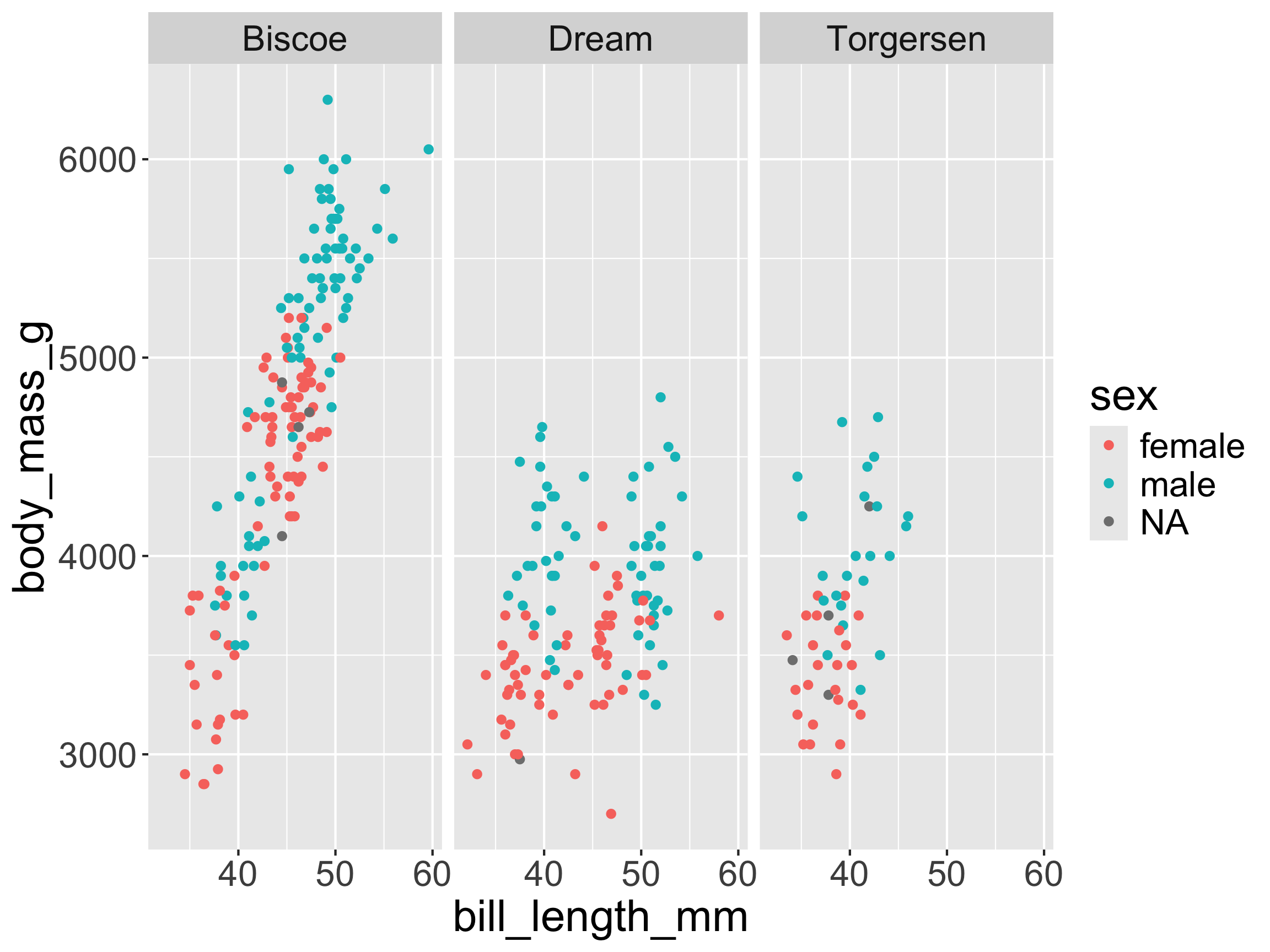
Static graph by island

library(palmerpenguins)
ggplot(penguins,
       aes(x = bill_length_mm, 
           y = body_mass_g, 
           color = sex)) + 
  geom_point() + 
  facet_wrap(~island)

Other transition_***() functions

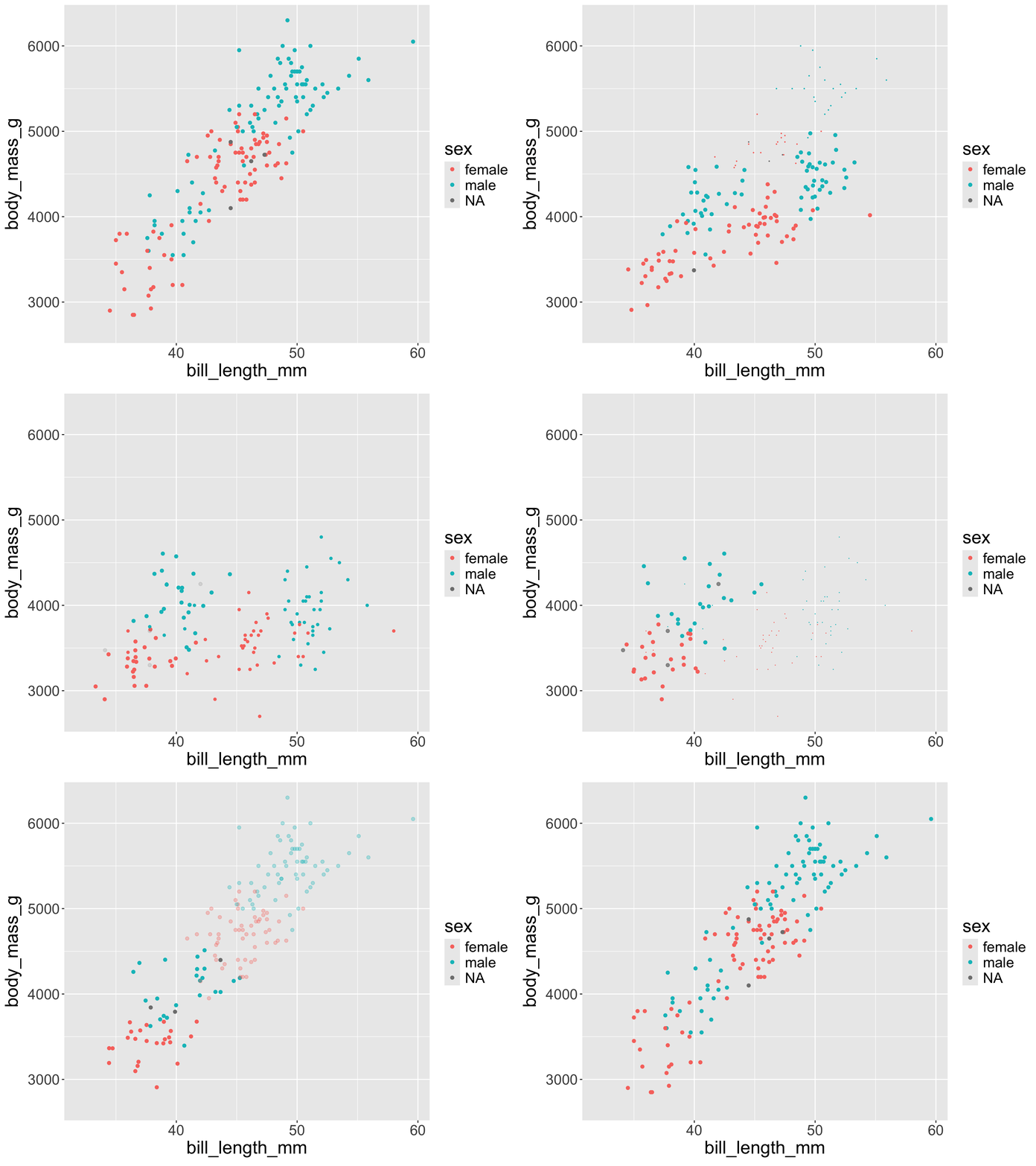
transition_states(): display graph for each category of a variable

p2_anim <- ggplot(penguins, 
                  aes(x = bill_length_mm,
                      y = body_mass_g,
                      color = sex)) + 
  geom_point() + 
  transition_states(
    states = island, wrap = TRUE
  ) + 
  enter_fade() +
  exit_shrink()

animate(p2_anim) 

Other transition_***() functions

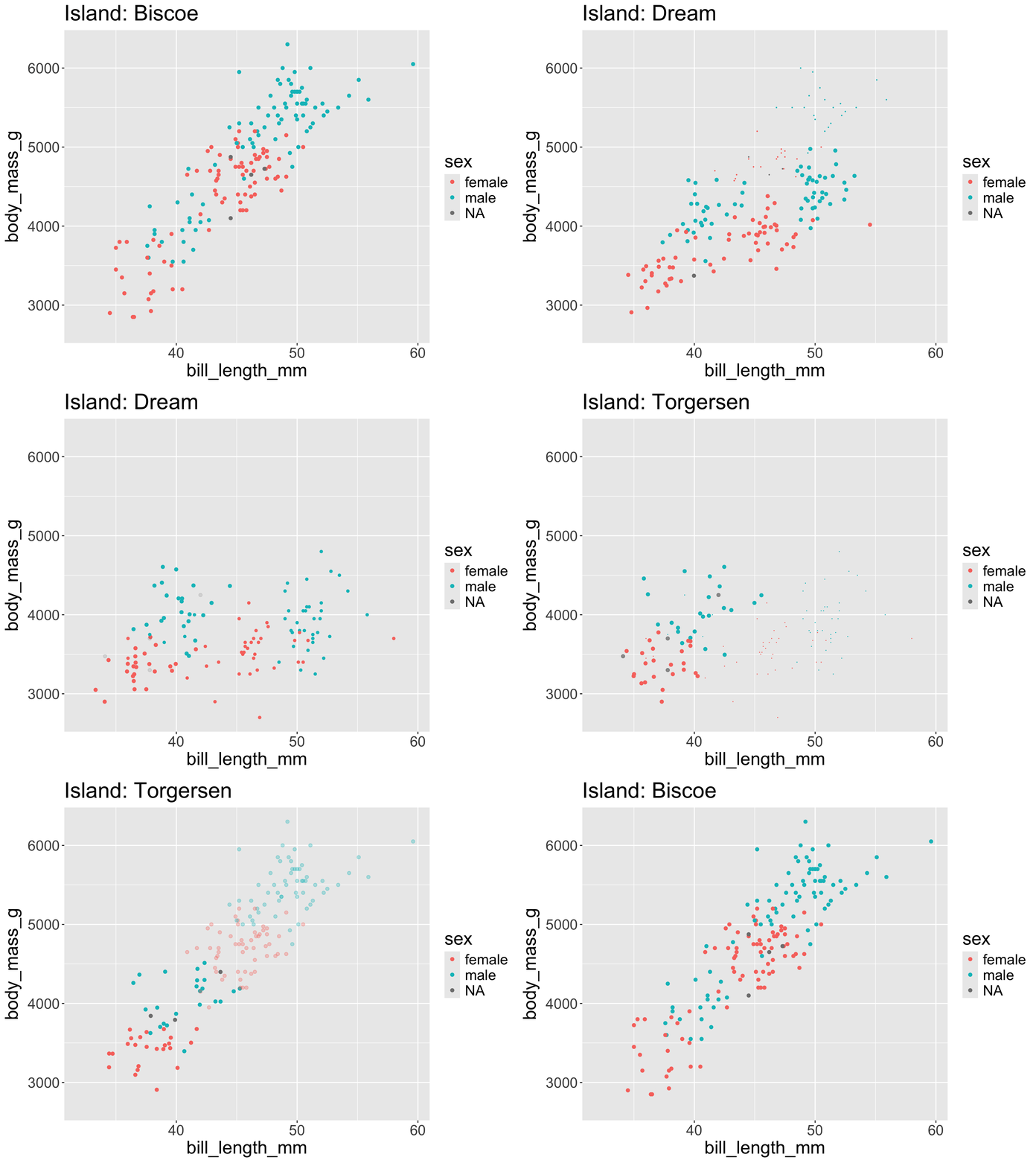
transition_states(): display graph for each category of a variable

p2_anim <- ggplot(penguins, aes(x = bill_length_mm, y = body_mass_g, color = sex)) + 
  geom_point() + 
  labs(title = "Island: {closest_state}") + 
  transition_states(
    states = island, wrap = TRUE
  ) +
  enter_fade() +
  exit_shrink()

animate(p2_anim) 

Other transition_***() functions

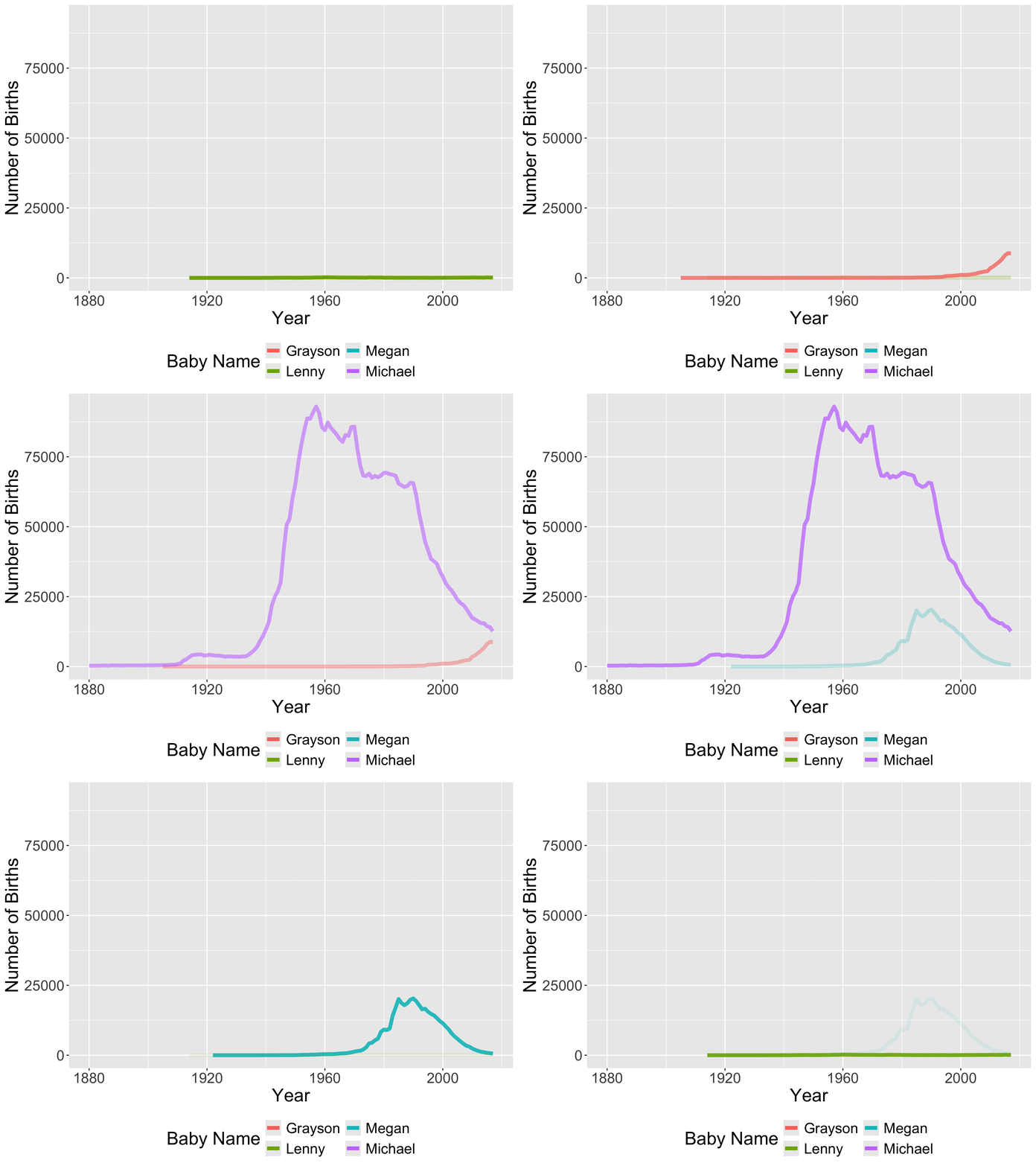
transition_filter(): display graph for multiple filtering conditions

stats_profs_anim <- p + 
  transition_filter(
    Lenny = name == "Lenny",
    Grayson = name == "Grayson",
    Michael = name == "Michael",
    Megan = name == "Megan",
  ) +
  enter_fade() +
  exit_fade()

animate(stats_profs_anim) 

Other transition_***() functions

view_follow(): let’s us adjust the axis as we view

stats_profs_anim <- p + 
  transition_filter(
    Lenny = name == "Lenny",
    Grayson = name == "Grayson",
    Michael = name == "Michael",
    Megan = name == "Megan",
  ) + 
  enter_grow() +
  exit_fade() + 
  view_follow()

animate(stats_profs_anim) 

How do I save an animation?

anim_save("my_plots/stats_profs_an.gif", animate(stats_profs_anim))

Why Add Animation to a Graph?

  • To engage the viewer
  • To accentuate the story
  • To add another variable to the plot

But don’t add animation just because you can. Drawbacks?

  • Require a higher level of attention
  • Can obscure the story

Animation: we’re just scratching the surface!

  • There are tons of different functions to fine-tune your animated pltos!
apropos("transition_")
[1] "transition_components" "transition_events"     "transition_filter"    
[4] "transition_layers"     "transition_manual"     "transition_null"      
[7] "transition_reveal"     "transition_states"     "transition_time"      
apropos("exit_")
[1] "exit_disappear" "exit_drift"     "exit_fade"      "exit_fly"      
[5] "exit_manual"    "exit_recolor"   "exit_recolour"  "exit_reset"    
[9] "exit_shrink"   
apropos("^view_")
[1] "view_follow"      "view_static"      "view_step"        "view_step_manual"
[5] "view_zoom"        "view_zoom_manual"

Now: interactivity

Simple Interactivity with ggplotly

We can use the plotly package to convert a static ggplot to an interactive plot.

library(mosaicData)
data(Births2015)

p <- ggplot(data = Births2015, 
       mapping = aes(x = date, y = births,
                     color = wday)) + 
  geom_point()
p

Simple Interactivity with ggplotly

We can use the plotly package to convert a static ggplot to an interactive plot.

library(plotly)
ggplotly(p) 


  • Conversion isn’t always perfect.
    • May need to spend more time tweaking theme() beforehand.
  • Can also create graphs with plot_ly()

Simple Interactivity with ggplotly

ggplotly(p, dynamicTicks = TRUE) %>%
  rangeslider() %>%
  layout(hovermode = "x")
  • Add a slider and make tick marks dynamic with zooming
  • Change the comparisons made when you hover

Simple Interactivity with ggplotly

p <- ggplot(data = holidays, 
       mapping = aes(text = occasion)) + 
  geom_point(data = Births2015,
             mapping = aes(x = date,
                           y = births,
                           color = wday),
             inherit.aes = FALSE) +
  geom_point(data = holidays, size = 3,
             color = "black", 
             mapping = aes(x = Dates,
                           y = births))
ggplotly(p, tooltip = "text")

How do I save / share my interactive plots?

  • Good question.

  • In HTML format (website, dashboard, .html file).

  • In Project 1, you’ll create a shiny dashboard / app, which is one of the best way to share interactive plots and maps!

  • We’ll explore interactivity more in Problem Set 2.

Workflow

Workflow review

  • I’d like to spend a little bit more time discussing workflow with git, RStudio, and Positron

  • And give you some slides to reference

RStudio Projects / Positron Folders

  • Where does your analysis live?
    • Working directory
      • Where R looks for files you ask it to load.
      • Where R puts files you ask it to save.

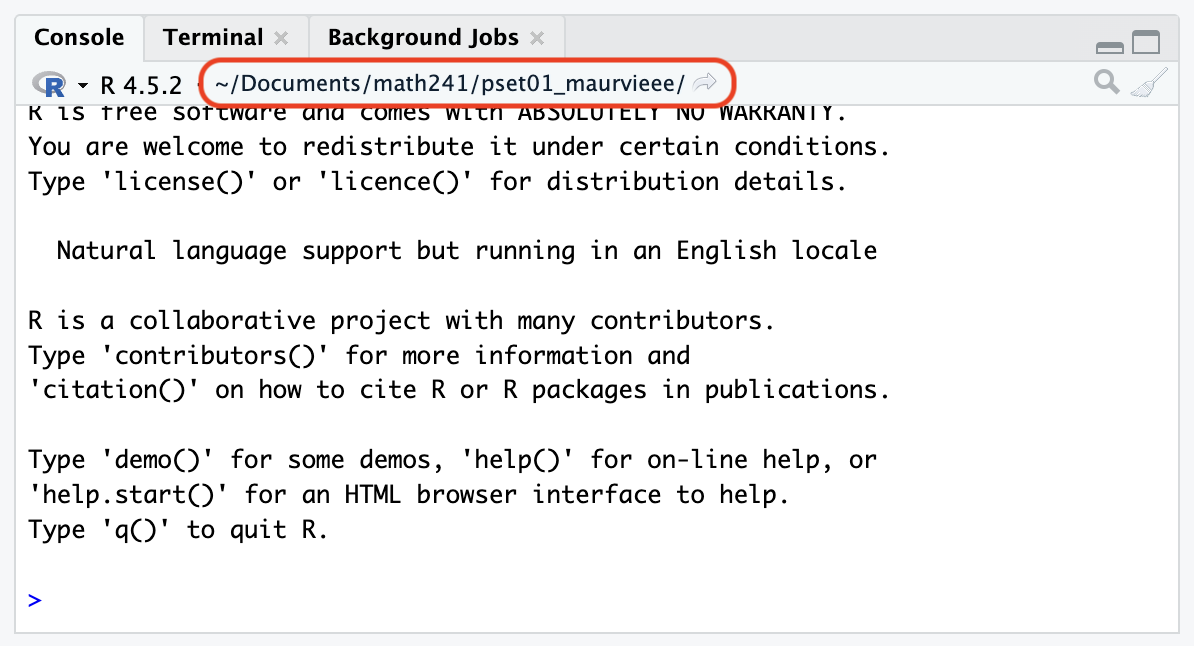
getwd()
[1] "/Users/grwhite/courses/math-241/Reed-Data-Science.github.io/slides"
  • For a given project, your analyses should live in the folder where you store the files associated with the project.

    • In other words, working directory = project folder.
  • Common default: Working directory = home directory

  • Can change the working directory with setwd() but instead we will use RStudio Projects or Positron Folders.

RStudio Projects and Positron Folders

RStudio Projects and Positron Folders: Feature that helps you organize your work.

  • Each problem set will get it’s own RStudio Project or Positron Folder

  • The working directory is the home directory of the project.

  • Question: My RStudio Project is Reed-Data-Science.github.io. Why does the file path end a folder furhter there when I run the following?
getwd()
[1] "/Users/grwhite/courses/math-241/Reed-Data-Science.github.io/slides"
  • R code executed in Quarto documents gets the working directory where that document lives, not the project directory
    • Confusing! But sometimes nice…

Projects and Workflow

  • Create an RStudio Project / Positron Folder for each analysis project.
    • We will have nine RStudio Projects / Positron Folders for this course:
      • An RStudio Project / Positron Folders for each of Labs 1 - 6
      • An RStudio Project / Positron Folders for project 1
      • An RStudio Project / Positron Folders for project 2
  • Each of these RStudio Projects / Positron Folders will be synced with git and GitHub

git and GitHub

  • git: Version control system
    • Think fancier type of Track Changes.
  • GitHub: Hosting service for git projects (which are called repositories)
    • Think fancier type of DropBox or Google Drive.
  • Useful resource when getting started: https://happygitwithr.com/

Git Real

  • Git is a decentralized version control system.
    • Each collaborator has a complete version of the repo.
    • Everyone can work offline and simultaneously.
    • GitHub holds the master copy.
  • git is not friendly and can be frustrating. + BUT, the version control and collaborative rewards are big!
  • GitHub.com is a great place to develop an online presence.
  • If you end up with a mess of errors, then don’t worry but come see one of the instructors for help.

Main Message:

Github Repo = RStudio Project or Positron Folder

  • A repo, short for repository, is the folder that contains all of the files for the project on GitHub.com.
  • Under the Reed-Data-Science GitHub Organization you currently have 1 repo:
    • pset01-username: Just you and the Math 241 teaching team (me, course assistant, graders) can access
    • Soon, you’ll have pset02-username
  • For each repo, you should create an RStudio Project or Positron folder (with version control).

Next Week

  • Big data wrangling week:
    • Monday: reshaping and joining data.
    • Wednesday: learn about different data types in R (beyond data.frames)


On the Horizon

  • Week 5: spatial data

  • Week 6: Interactive dashboards with shiny (and Project 1 assigned!)