
04:00

Data Wrangling and Types
Grayson White
Math 241
Week 4 | Spring 2026
Announcements
Welcome to the newly admitted students!
Office hours time change going forward.
Week 4 Goals
Mon Lecture
Different types of data in
R- atomic and generic vectors
- subsetting objects
Talk more about logical statements
More practice with
dplyrverbs and data wrangling
Wed Lecture
- Joining multiple data frames
- “Tidy” data
- Reshaping data frames
Looking Ahead to Project 1
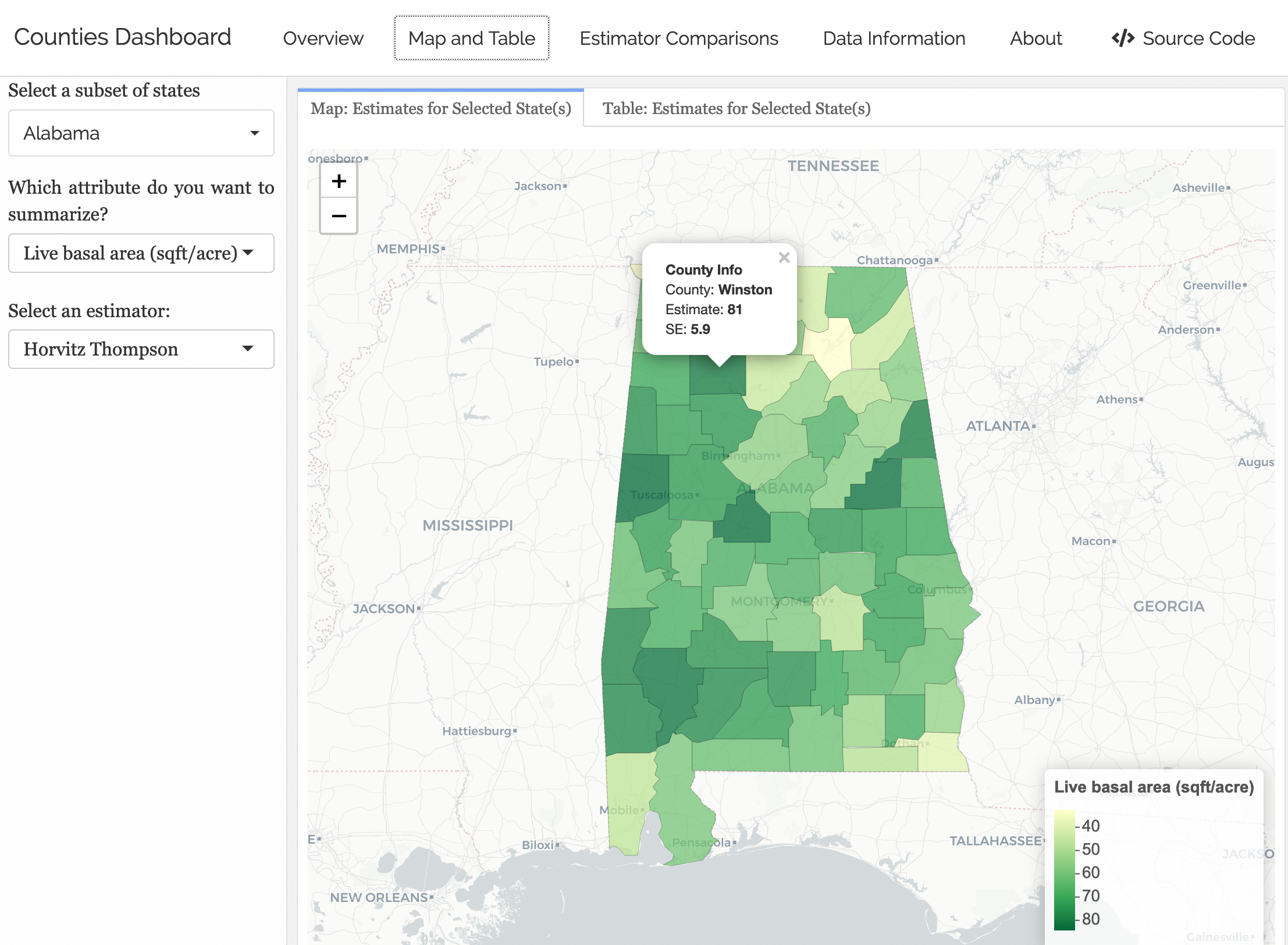
Goal: Create interactive dashboards with shinydashboard and flexdashboard.

What We Need First
Need a robust understanding of wrangling data frames.
Need to explore more data objects in
R.Need to learn how to interact with and wrangle these data objects.
dplyr review
Data: Census 2000 (from openintro)
# A tibble: 5 × 8
  census_year state_fips_code total_family_income   age sex    race_general
        <int> <fct>                         <int> <int> <fct>  <fct>
1        2000 Florida                       14550    44 Male   Two major races
2        2000 Florida                       22800    20 Female White
3        2000 Florida                           0    20 Male   Black
4        2000 Florida                       23000     6 Female White
5        2000 Florida                       48000    55 Male   White
# ℹ 2 more variables: marital_status <fct>, total_personal_income <int>
select()
Use select() to grab only the variables/columns we want
# A tibble: 500 × 4
   census_year   age sex    marital_status
         <int> <int> <fct>  <fct>
 1        2000    44 Male   Married/spouse present
 2        2000    20 Female Never married/single
 3        2000    20 Male   Never married/single
 4        2000     6 Female Never married/single
 5        2000    55 Male   Married/spouse present
 6        2000    43 Female Married/spouse present
 7        2000    60 Female Married/spouse present
 8        2000    47 Female Married/spouse present
 9        2000    54 Female Married/spouse present
10        2000    58 Female Widowed
# ℹ 490 more rows
select()
Or you can add minus signs to delete columns from the dataset.
# A tibble: 500 × 4
   state_fips_code total_family_income race_general    total_personal_income
   <fct>                         <int> <fct>                           <int>
 1 Florida                       14550 Two major races                     0
 2 Florida                       22800 White                           13000
 3 Florida                           0 Black                           20000
 4 Florida                       23000 White                              NA
 5 Florida                       48000 White                           36000
 6 Florida                       74000 White                           27000
 7 Florida                       23000 White                           11800
 8 Florida                       74000 White                           48000
 9 Florida                       60000 Black                           40000
10 Florida                       14600 White                           14600
# ℹ 490 more rows
mutate()
mutate() can add new columns that are functions of existing columns:
# A tibble: 500 × 5
   census_year state_fips_code total_family_income   age age_decade
         <int> <fct>                         <int> <int>      <dbl>
 1        2000 Florida                       14550    44          4
 2        2000 Florida                       22800    20          2
 3        2000 Florida                           0    20          2
 4        2000 Florida                       23000     6          0
 5        2000 Florida                       48000    55          5
 6        2000 Florida                       74000    43          4
 7        2000 Florida                       23000    60          6
 8        2000 Florida                       74000    47          4
 9        2000 Florida                       60000    54          5
10        2000 Florida                       14600    58          5
# ℹ 490 more rows- New operator:
%/%does integer division
filter()
filter() only keeps rows/observations that match certain criteria
# A tibble: 80 × 8
   census_year state_fips_code total_family_income   age sex    race_general
         <int> <fct>                         <int> <int> <fct>  <fct>
 1        2000 Florida                       22800    20 Female White
 2        2000 Florida                       23000     6 Female White
 3        2000 Florida                      103700     8 Female White
 4        2000 Florida                       70700    17 Female White
 5        2000 Florida                      118100    18 Female White
 6        2000 New York                      68020     2 Female Chinese
 7        2000 New York                      50400    21 Female White
 8        2000 New York                      65000     1 Female White
 9        2000 New York                      62900    17 Female Black
10        2000 New York                     168200     6 Female White
# ℹ 70 more rows
# ℹ 2 more variables: marital_status <fct>, total_personal_income <int>
arrange()
arrange() sorts the rows by a certain variable (or set of variables)
# A tibble: 500 × 8
   census_year state_fips_code total_family_income   age sex    race_general
         <int> <fct>                         <int> <int> <fct>  <fct>
 1        2000 Texas                          9200     0 Male   Black
 2        2000 Florida                       48000     1 Male   White
 3        2000 New York                      13000     1 Male   White
 4        2000 New York                      65000     1 Female White
 5        2000 Michigan                      57400     1 Female White
 6        2000 Pennsylvania                  27150     1 Male   White
 7        2000 Florida                       50090     2 Male   White
 8        2000 Florida                        6000     2 Male   White
 9        2000 New York                      68020     2 Female Chinese
10        2000 New York                      17000     2 Male   Two major races
# ℹ 490 more rows
# ℹ 2 more variables: marital_status <fct>, total_personal_income <int>
arrange()
Can do descending order too with the desc() function!
# A tibble: 500 × 8
   census_year state_fips_code total_family_income   age sex    race_general
         <int> <fct>                         <int> <int> <fct>  <fct>
 1        2000 Louisiana                      8100    93 Female White
 2        2000 Illinois                         NA    87 Female White
 3        2000 West Virginia                     0    87 Male   White
 4        2000 Delaware                      46200    85 Female White
 5        2000 Indiana                        8000    85 Male   Black
 6        2000 New York                      15570    83 Male   White
 7        2000 New York                       8800    82 Female White
 8        2000 Massachusetts                 34300    82 Female White
 9        2000 New York                      55000    81 Male   White
10        2000 Minnesota                         0    81 Female White
# ℹ 490 more rows
# ℹ 2 more variables: marital_status <fct>, total_personal_income <int>
arrange()
Can arrange by multiple variables too:
# A tibble: 500 × 8
   census_year state_fips_code total_family_income   age sex    race_general
         <int> <fct>                         <int> <int> <fct>  <fct>
 1        2000 Texas                          9200     0 Male   Black
 2        2000 New York                      65000     1 Female White
 3        2000 Michigan                      57400     1 Female White
 4        2000 Florida                       48000     1 Male   White
 5        2000 New York                      13000     1 Male   White
 6        2000 Pennsylvania                  27150     1 Male   White
 7        2000 New York                      68020     2 Female Chinese
 8        2000 Maryland                      95500     2 Female White
 9        2000 Oregon                         9300     2 Female White
10        2000 Michigan                      20340     2 Female White
# ℹ 490 more rows
# ℹ 2 more variables: marital_status <fct>, total_personal_income <int>
summarize()
summarize() computes summary statistics and collapses data into row(s) that show those summary statistics
# A tibble: 1 × 3
  mean_income sd_income  size
        <dbl>     <dbl> <int>
1 57411. 70732. 500- Can compute multiple measures
group_by() + summarize()
Add group_by() to summarize() to calculate summary statistics by specified grouping variable(s)
# A tibble: 14 × 4
   state_fips_code mean_income sd_income  size
   <fct>                 <dbl>     <dbl> <int>
 1 Washington           20079.    12980.    11
 2 Louisiana            34899.    42097.    12
 3 Ohio                 40748.    26796.    23
 4 Indiana              46738.    32291.    17
 5 Florida              46848.    31787.    39
 6 Pennsylvania         51685     44823.    26
 7 Illinois             55972.    42426.    21
 8 New York             57064.    44793.    43
 9 Texas                58240.    72468.    37
10 Michigan             59160     27403.    14
11 Massachusetts        59506.    38984.    12
12 Georgia              60488.    52199.    18
13 California           73142.    69338.    62
14 New Jersey           77498     80288.    15
Tip: count()
count() is a short-cut for group_by() + summarize(n())
group_by() + mutate()
Adding group_by() allows functions (e.g., sum()) to operate on variables by specified grouping variable(s)
Let’s start with this summary dataset:
# A tibble: 12 × 3
   marital_status         sex        n
   <fct>                  <fct>  <int>
 1 Divorced               Female    21
 2 Divorced               Male      17
 3 Married/spouse absent  Female     5
 4 Married/spouse absent  Male       9
 5 Married/spouse present Female    92
 6 Married/spouse present Male     100
 7 Never married/single   Female    93
 8 Never married/single   Male     129
 9 Separated              Female     1
10 Separated              Male       2
11 Widowed                Female    20
12 Widowed                Male      11
group_by() + mutate()
# A tibble: 12 × 4
   marital_status         sex        n     p
   <fct>                  <fct>  <int> <dbl>
 1 Divorced               Female    21 0.042
 2 Divorced               Male      17 0.034
 3 Married/spouse absent  Female     5 0.01
 4 Married/spouse absent  Male       9 0.018
 5 Married/spouse present Female    92 0.184
 6 Married/spouse present Male     100 0.2
 7 Never married/single   Female    93 0.186
 8 Never married/single   Male     129 0.258
 9 Separated              Female     1 0.002
10 Separated              Male       2 0.004
11 Widowed                Female    20 0.04
12 Widowed                Male      11 0.022
Q: What is the denominator for the proportions in the new p variable?
group_by() + mutate()
# A tibble: 12 × 4
# Groups:   marital_status [6]
   marital_status         sex        n     p
   <fct>                  <fct>  <int> <dbl>
 1 Divorced               Female    21 0.553
 2 Divorced               Male      17 0.447
 3 Married/spouse absent  Female     5 0.357
 4 Married/spouse absent  Male       9 0.643
 5 Married/spouse present Female    92 0.479
 6 Married/spouse present Male     100 0.521
 7 Never married/single   Female    93 0.419
 8 Never married/single   Male     129 0.581
 9 Separated              Female     1 0.333
10 Separated              Male       2 0.667
11 Widowed                Female    20 0.645
12 Widowed                Male      11 0.355
Q: Now what is the denominator for the proportions in the new p variable?
Now: type of data objects
Math 241 R Data Objects So Far:
Data frames:
[1] "spec_tbl_df" "tbl_df" "tbl" "data.frame" (Atomic) Vectors:
- The last two are both examples of what are called atomic vectors.
R Objects: Vectors
- Vectors are the fundamental building blocks of data in
R.- Each column in a data frame is an atomic vector!
- Come in 2 flavors!
- Flavor 1: Atomic vectors
- Homogeneous collections of the same type.
- Confusingly, people usually just call these vectors.
- Flavor 2: Generic vectors
- Heterogeneous collections of any type of
Robjects. - Commonly called lists.
- Heterogeneous collections of any type of
Deep Dive into (atomic) vectors
Let’s explore the common types and how to interact with them.
This will allow us to use vectors to do useful things,
Understand logical statements and
dplyrmore robustly, anddebug our code more effectively!
Flavors of Atomic Vectors
Logical: TRUEs and FALSEs
Numeric: Integers, real numbers (double-precision floating point numbers)
Factors versus Characters
Character: Strings (contains 1 or more characters)
- If you want to read more about this rabbit hole, go here.
Concatenation
Atomic vectors are created and combined with c().
Checking Type
Checking Type
Type Coercion
R will often change the type of a vector with no warning.
Usually it makes the smart choice.
Operator Coercion
Functions and operators (like
+,-,*, etc.) will often try to convert a vector to an appropriate type.Once we are writing our own functions, we will consider building in tests to ensure the user provided the correct type.
Changing Type
- We can also explicitly change the type, for example:
Vectorized
R is built to work with vectors.
Many operations are vectorized: will happen component-wise when given a vector as input.
Vectorized: Caution
- We need to be careful with vectorization!
Recycling
- R recycles vectors if they are not the necessary length.
- Notice we got NO error but that wasn’t what we wanted.
Indexing a Vector
So what about generic vectors/lists?
Recall they are heterogeneous collections of any type of R objects.
Lists
Think of these as the most general way to store things.
groceries <- list()
groceries$new_seasons <- c("apples", "goat cheese", "pizza slice")
groceries$safeway <- c("black beans", "tortillas")
groceries$peoples_food_coop <- c("squash", "tea", "fresh greens")
groceries$budget <- data.frame(stores = c("new_seasons", "safeway", "peoples_food_coop"),
                               fund = c(100, 25, 200))
class(groceries)
[1] "list"Lists
Notice the nested structure
$groceries
$groceries$new_seasons
[1] "apples"      "goat cheese" "pizza slice"

$groceries$safeway
[1] "black beans" "tortillas"

$groceries$peoples_food_coop
[1] "squash"       "tea"          "fresh greens"

$groceries$budget
             stores fund
1       new_seasons  100
2           safeway   25
3 peoples_food_coop  200


$holidays
[1] "Valentine's" "President's"
Indexing lists
Distinguishing between [ ] and [[]]
[ ] versus [[ ]]
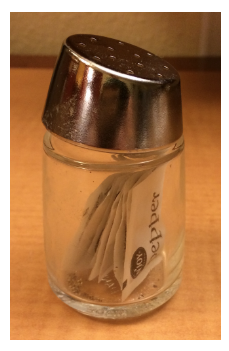
x is a list: the pepper shaker containing packets of pepper.
[ ] versus [[ ]]
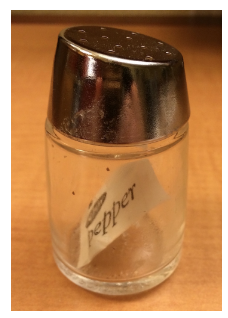
x[1] is a pepper shaker containing the first packet of pepper.
[ ] versus [[ ]]
x[2] is what?
[ ] versus [[ ]]
x[[1]] is what?
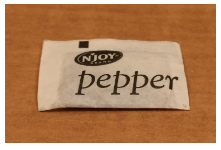
[ ] versus [[ ]]
x[[1]][[1]] is what?
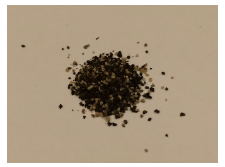
Data Frames
Let’s relate list()s to our favorite R object: data.frame()s!
data.frame()s arelist()s.- Each variable of a
data.frame()is an atomicvector(). - The
vector()s all have the same length but not necessary the same class.
Data Frames
Data Frames
Thoughts about R data objects
We can create and interact with (atomic) vectors and lists (generic vectors).
When writing and debugging code, it is a good idea to check the
class()of an object.R will sometimes change the type of an object without telling us (but based on our actions).
Vectorization makes
Rcode speedy but also can cause you to do something you didn’t mean to do.While we will primarily interact with
vector()s anddata.frame()s, we will sometimes needlist()s.
Next time
- Joining, reshaping, and tidying data!
Next Week
- Spatial data in
R