Totalram: 24.000 GiB
Freeram: 9.688 GiB
Local LLMs and ellmer Extensions
Grayson White
Math 241
Week 11 | Spring 2026
Monday Lecture:
ellmerWednesday Lecture:
R packagesLast time, we discussed the ethics of LLMs and showed some examples of using LLMs for data science.
We considered local vs cloud-based implementations of LLMs
ellmer and ellmer extensions!
Ollama is the primary host of open-weights models
You can download these models, and then connect them to ellmer with chat_ollama()
You can also access cloud-based models through ollama, but these get rate-limited.
git,curl -fsSL https://ollama.com/install.sh | sh
After installation, if you run
which ollama
in your terminal, you should see something like:
/usr/local/bin/ollama
Let’s navigate to ollama.com and install a model.
Install models by running the following in your terminal:
ollama pull {model_name}
e.g.,
ollama pull gemma4:e4b
ellmerellmerYour turn:
Complete the task from last time: parse names and ages (but now with a local LLM of your choice)
type_person <- type_object(
name = type_string(),
age = type_number()
)
prompts <- list(
"I go by Alex. 42 years on this planet and counting.",
"Pleased to meet you! I'm Jamal, age 27.",
"They call me Li Wei. Nineteen years young.",
"Fatima here. Just celebrated my 35th birthday last week.",
"The name's Robert - 51 years old and proud of it.",
"Kwame here - just hit the big 5-0 this year."
)
parallel_chat_structured(
chat,
prompts,
type = type_person
)# A tibble: 6 × 2
name age
<chr> <dbl>
1 Alex 42
2 <NA> NA
3 Li Wei 19
4 Fatima 35
5 Robert 51
6 Kwame 50
gemma4:e4b) really are sub-par…10:00
system.time({}) factor…On my M4 Pro Macbook Pro with 24GB RAM,
user system elapsed
0.068 0.020 52.077
Now, we can chat with cloud-based and local LLMs in R via ellmer
We can even structure the type of data we’d like to get back!
And create tools, which let the LLMs perform specific tasks related to our computer or R session.
To make this even more powerful: need to give the LLMs more context about our R environment.
ellmer Extensionsellmer ExtensionsA team at Posit has been working to make interesting R packages that allow you to interact with LLMs in R
Today, we’ll explore a couple of these R packages


btw: Provide context to LLMs
btw provides context about your R environment to LLMs through a variety of mediums:
ellmer or ellmer-like chats.btw: copy-paste contextProvide context for a data.frame:
Provide context for a data.frame, and documentation:
ellmer chats with btwBased on the documentation provided for the `pdxTrees_parks` dataset, the
variable **Crown_Width** measures:
* **The width of the tree canopy from North to South** (North to South
width).
While the documentation does not explicitly state the units (e.g., feet,
meters), this variable represents the physical horizontal dimension of the
tree.
Passing the direct context you’d like to reference can be really helpful for getting quick responses from local LLMs,
But if want btw to automatically find your context…
ellmer with btwchat <- chat_ollama(model = "gemma4:e4b")
chat$register_tools(
btw_tools("env")
# alternatively, call:
# btw_tools()
# to allow btw to use all of its built-in tools
)
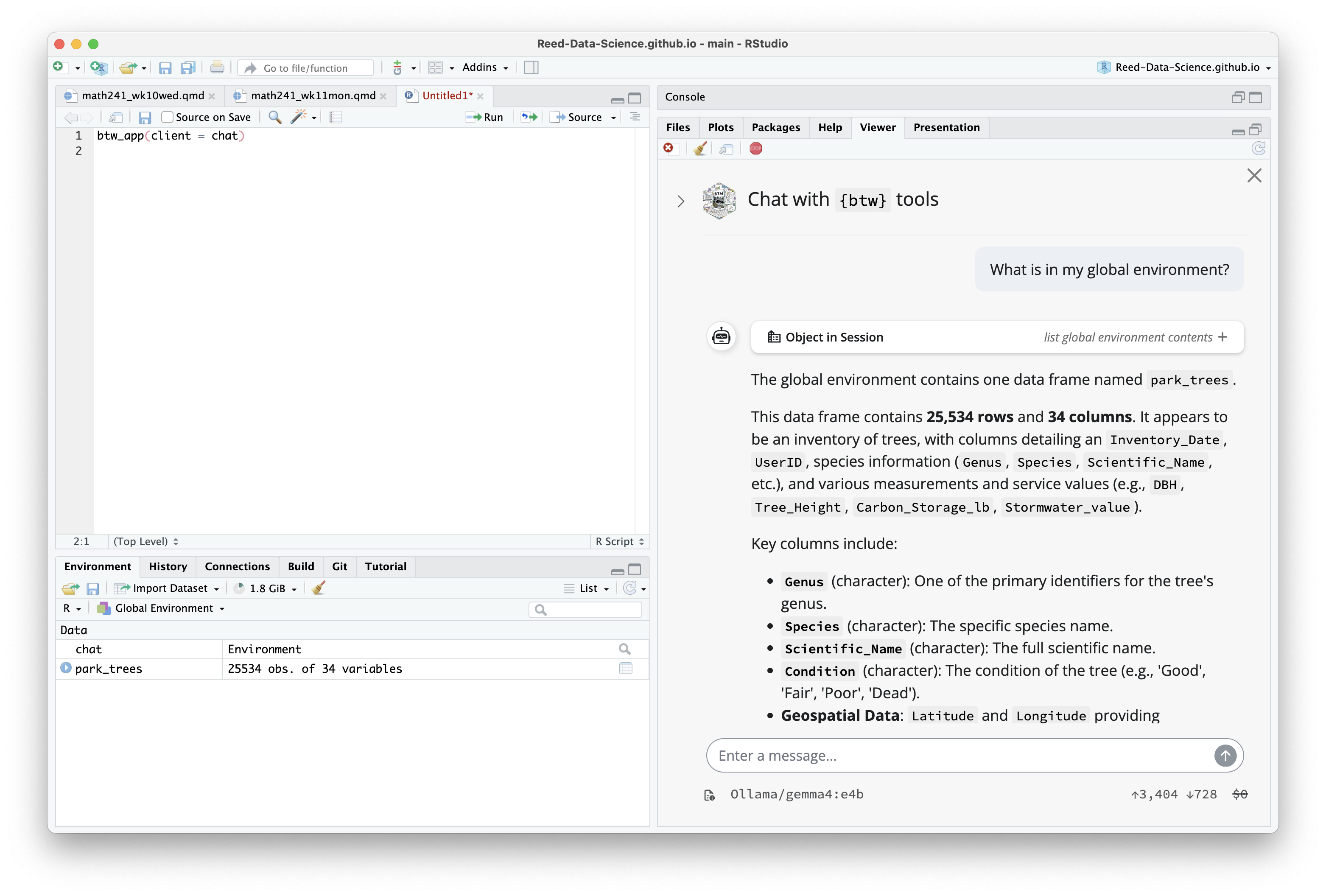
chat$chat("What is in my global environment?")
#> ◯ [tool call] btw_tool_env_describe_environment(`_intent` = "list global environment
#> contents")
#> ● #> ## Context
#> #>
#> #>
#> #> park_trees
#> #> ```json
#> #> …
#> The global environment contains one data frame named `park_trees`.
#>
#> This data frame contains **25,534 rows** and **34 columns**. It appears to be an inventory of
#> ...Providing a tool group (in this case: “env”) stops the local model from getting overwhelmed by too much context.
Let’s take a look at the documentation for btw_tools().

gander
R
gander is a higher-performance and lower-friction chat experience for data scientists in RStudio and Positron–sort of like completions with Copilot, but it knows how to talk to the objects in your R environment.
The package brings ellmer chats into your project sessions, automatically incorporating relevant context and streaming their responses directly into your documents.
ganderNext, pick a model to power gander:
(a): for your current R session,
or (b): as your default for all R session:
ganderFinally, set up a shortcut to gander:
(a): In RStudio, navigate to Tools > Modify Keyboard Shortcuts > Search "gander". The package authors suggest Ctrl+Alt+G (or Ctrl+Cmd+G on macOS), or
(b): In Positron, you’ll need to open the command palette, run “Open Keyboard Shortcuts (JSON)”, and paste the following into your keybindings.json:
{
"key": "Ctrl+Cmd+G",
"command": "workbench.action.executeCode.console",
"when": "editorTextFocus",
"args": {
"langId": "r",
"code": "gander::gander_addin()",
"focus": true
}
}
gander demoLocal models provide a more secure (and more ethical?) way to interact with LLMs in R
In their current state, local models are still slow, especially when given excessive of context.
Providing context to LLMs (local or cloud-based) through tools like btw and gander can make them much more useful in a data science workflow.
In Problem Set 6, you’ll get to reflect on LLM-usefulness for debugging, compared to the other debugging approaches we’ve learned so far.
In groups of 2 - 3, go through the activity for today.
30:00