Writing R Packages
Grayson White
Math 241
Week 11 | Spring 2026
Announcements
- Fill out this form ASAP to help me create the Project 2 groups.
- Groups and project instructions will be assigned on Monday.
Announcements

Week 11 Goals
Monday Lecture:
- Practice with local LLMs
Wednesday Lecture:
- Intro to writing
Rpackages
Sharing Code
How do you share code?
Sharing Code
Options:
Rscripts and Quarto documents- RStudio Projects
- GitHub Repository
- R Package
How to pick between the options?
When To Create an R Package
- If you have certain recurring operations that occur across multiple projects.
- Want to share data and documentation and not worry about file paths, file types, the documentation getting lost…
- BUT, you will still use an RStudio Project (with a corresponding GitHub repo) for the code and data that are specific to a given project.
R Packages
What is an R package?
“R packages are the fundamental unit of R-ness”. – Jenny Bryan
Contains (usually) functions, (possibly) datasets, documentation, and tests.
“base R”: a handful of base packages that are preloaded.
CRAN has > 23,000 more packages
install.packages("dplyr")library(dplyr)
And then there are all the packages on
GitHub:devtools::install_github("hadley/genzplyr")library(genzplyr)
R Data Packages
- Great way to share data!
- Example 1:
library(mosaicData)data(package = "mosaicData")?Births2015
- Example 2:
library(pdxTrees)get_pdxTrees_parks()get_pdxTrees_streets()
- Example 3:
library(gbfs)
R Packages
Why create an R package?
- Very portable.
- Includes documentation.
- Provides a useful structure for organizing your work:
Rfolder: Codetestsfolder: Testing functionsdatafolder: Storing data
- Lots of helper functions in other packages to automate parts of the process.
Creating an R Package
Key packages:
Let’s Build an R Package!
Our Package: pdxHoles
Goals:
- Share data on potholes reported across our great city!
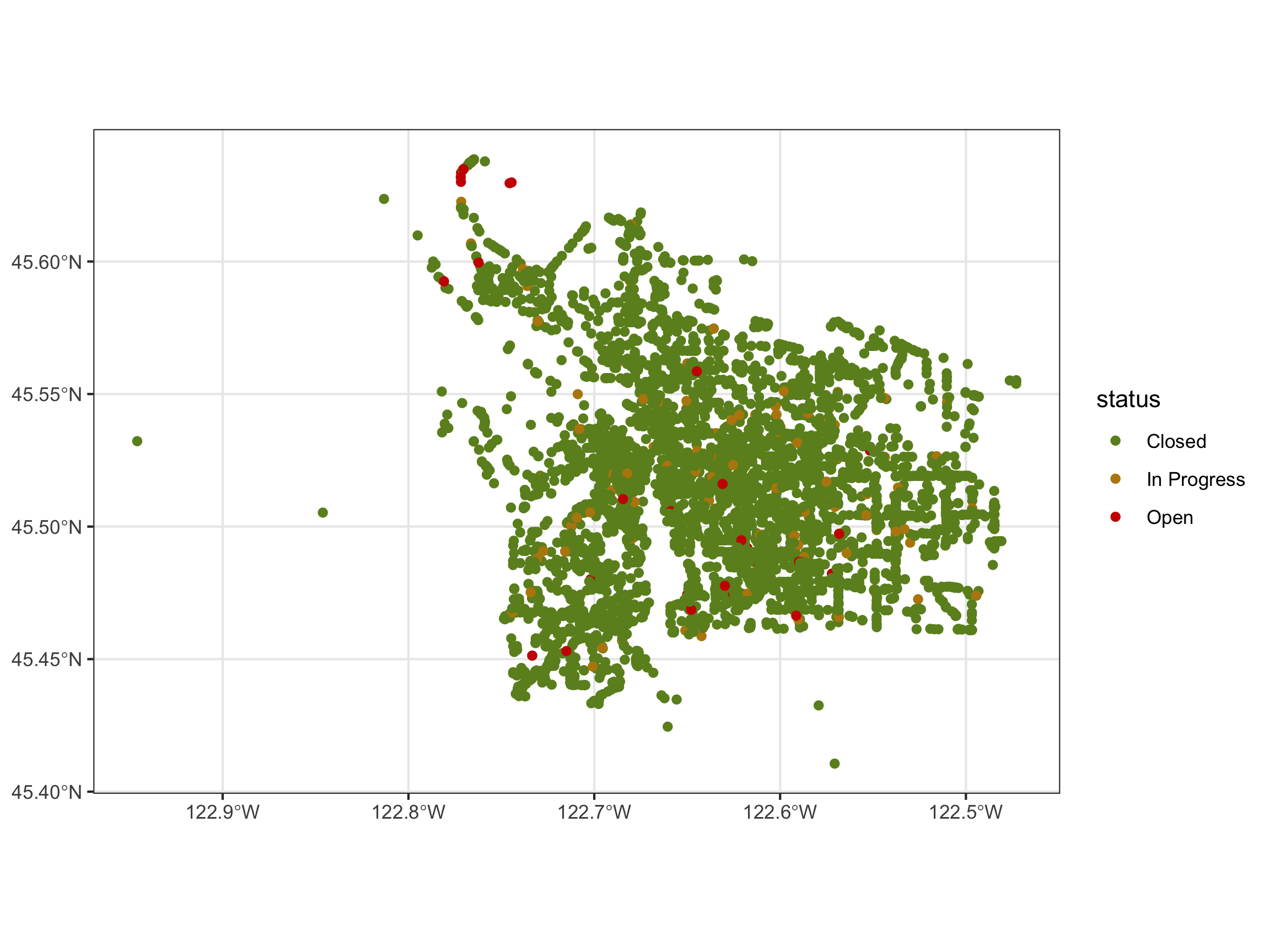
- Create a function that plots the potholes.
Our Package: pdxHoles. Useful MVP code:
library(tidyverse)
library(sf)
potholes <- st_read("data/potholes.geojson", quiet = TRUE) |>
  select(-OBJECTID, -ITEM_CATEGORY_NAME) |>
  rename(
    id = ITEM_ID,
    status = ITEM_STATUS,
    date_reported = ITEM_DATE_CREATED,
    neighborhood = LOCATION_NEIGHBORHOOD
  ) |>
  mutate(
    date_reported = as_datetime(date_reported / 1000, tz = "America/Los_Angeles"),
    neighborhood = str_to_title(neighborhood),
  )

plot_holes <- function(colors = c("olivedrab", "darkgoldenrod", "red3"),
                       alpha = 1) {
  ggplot(data = potholes,
                  mapping = aes(color = status)) +
    geom_sf(alpha = alpha) +
    scale_color_manual(values = colors) +
    theme_bw()
}
Our Package: pdxHoles. Useful MVP code:
Steps
Let’s go through the “Creating an R Package” hand-out.
I will demo the process with the PDX pothole data.
If following along, clone this repo: https://github.com/Reed-Data-Science/pkgDemo
Wrap-Up Thought:
Most common confusions when moving from R scripts/Quarto docs to writing R packages:
- Requires new ways of working with functions in other packages.
DESCRIPTIONfile to declare dependencies.- Use
package_name::function_name(). - Can’t use
library(package_name). - Want to avoid unnecessary dependencies.
Other questions?
Next week
- More writing
Rpackages!